iOS 9 comes with a new feature called Wi-Fi Assist (it appeared in iOS 9 beta 5) that will “automatically use cellular data when Wi-Fi connectivity is poor.” While this helps ensure you’re connected at all times, the problem is this setting is toggled ON by default.
For those with unlimited data plans, this may not be a problem. But for every iPhone user in Canada with precious data buckets, every ounce of data is worth preserving, considering the prices we pay (except those lucky folks in the Prairies).
Here’s how to disable Wi-Fi Assist in iOS 9:
1. On iPhone or your cellular iPad, go to Settings > Cellular > Wi-Fi Assist (scroll to the very bottom)
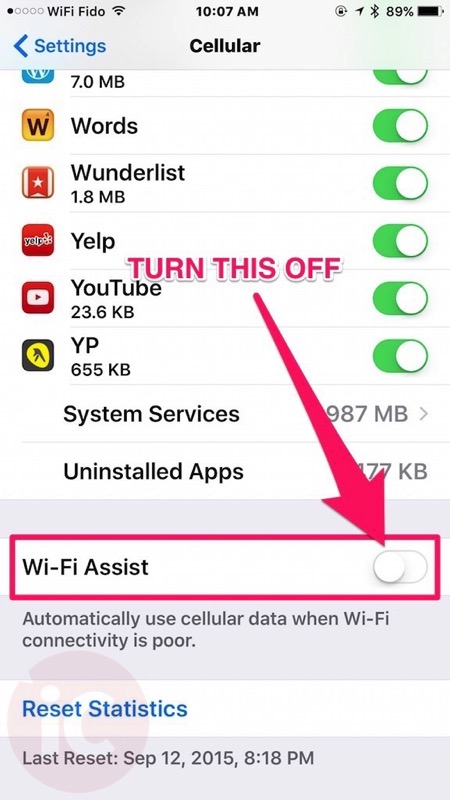
The issue is this setting lies at the very bottom of your massive list of apps, so you may not notice it at all—plus it’s turned on by default (I’m sure carriers love that it’s on by default)! Apple should consider having this off right from the get-go.
With some Rogers and Fido users experiencing mysterious data overages in iOS 8, turning this off may help them save data, especially if your Wi-Fi bonks and you happen to be watching streaming video. The same goes for any iPhone user that has a limited cellular data plan.
Let us know if you’re going to disable Wi-Fi Assist in iOS 9 or not! Feel free to share this tip with your friends and family–it could save their wallet a few bucks!



OMFG THE ONE SETTING IVE ALWAYS WANTED!
I had no clue that this was added in iOs9, might actually upgrade now.
Im always JUST outside of wifi range and it drives me nuts that the phone wont switch to carrier because it still thinks its connected to wifi somehow
i found this out the hard way
harrrrrrrd way
Well, apparently I’ve used ~50GB. My plan is 4GB. 🙁
You are probably looking at data used over the life of your phone if you never reset the counter.
No, I always reset it monthly
wow… i have to work pretty hard to use up my 6gb… do you use your phone for all your media streaming?
hmm ok… i just checked my usage and i’ve already used a gb in the last 6 days… this wifi assist thing might be a little over zealous. it must literally be ignoring my wifi when i do app updates at home.
I use it for about 3 hours / day browsing the internet, reddit, and Facebook
you guys must have crappy wifi lol to have wifi assist eat so much data.
Not going to disable it because I love this idea, though I agree it should be off by default. Would be nice if they had an alert that popped up if it downloads a certain amount of data over cellular when you think you’re on WiFi. I’ll definitely keep my eye on my data usage more closely the next few months.
Presumably having this setting enabled will still honour the ability to disable certain apps for cellular data use? i.e. If you have Cellular Data usage turned off for Facebook and your WiFi signal drops below the “poor” threshold, it will not suddenly decide that it’s ok to use Cell Data for Facebook. Can anybody confirm this?
If Facebook is disabled for cellular data, it should stay off permanently and this will not override that setting.
Use “My Data Manager” and it will notify you if you have exceeded your daily data limit. It takes your data limit and divides it by the number of days in that billing period. Also you can see exactly where you have used the data at each location you have been at.
I have iOS 9.2.1 and am $25 over my 5gb limit this month. I don’t have that wifi assist option to turn off. Is there another way to turn wifi assist off?