
Apple’s AirPort Utility App is Being Removed From the App Store
Apple warns that "functionality is not guaranteed" when using AirPort Utility on iOS 27 or later.
Are you always going over your puny Canadian data plan? Then what you need is DataMan Next for iOS, as the app has recently gone free, offering free features, with more advanced options available via in-app purchase in the new DataMan Store.
Here are the features you get for free:
– Real-time tracking of cellular and WiFi data usage.
– 3 extremely useful widgets: Data, Stopwatch, and Shortcuts.
– Smart usage forecast with colors.
– Apple Watch app with Complication support.
– Monthly or bill cycle usage history.
DataMan Next has an awesome Notification Centre widget (which we love) that tells you your data usage (and Wi-Fi usage) in real-time, plus it’s also colour coded so you can quickly glimpse and know whether you’re reaching your data limit, thanks to its Smart Forecast feature.
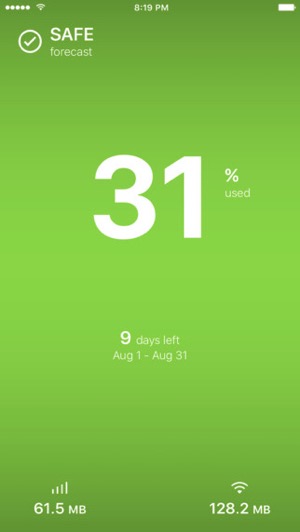
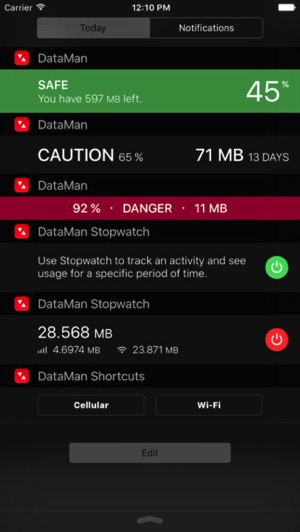
Your data is tracked in real-time by retrieving info from iOS, which means you no longer need to rely on your carrier to tell you your usage. The app’s simple and clean design makes it easy to use for any data plan, with an accompanying Apple Watch app to track data from your wrist too.
Additional features include:
– Track cellular (LTE/4G/3G) and Wi-Fi
– Monitor activities with Stopwatch widget
– Support monthly, 30-day, and various plans
– Auto reset on bill cycle date
– Four custom alert thresholds
– Compatible with all carriers
– View past usage by bill cycle
– Security – no VPN, no login
– Privacy – no monetizing your info
Click here to download DataMan Next for iOS in the App Store. Let us know what you think of it!
Want to see more of our stories on Google?

P.S. Want to keep this site truly independent? Support us by buying us a beer, treating us to a coffee, or shopping through Amazon here. Links in this post are affiliate links, so we earn a tiny commission at no charge to you. Thanks for supporting independent Canadian media!


Tried it for a couple of months…. “My Data Mgr” has a much better UI and offers more features
I love My Data Mgr. I only have one (major) gripe, which I’m curious to see if this other app addresses. My Data Mgr no longer tracks tethered data used. So I have to use another app on another device to track data I use on phone when using it as a personal hotspot,
DataMan has an “alternate tethering” option that compensates for some carrier setups not registering data usage while tethering.
Thanks for your great answer 🙂
I have this same problem – I sent them a message to see if there was a way to cover this. I also had Dataman before, but I like this UI better.
Yes, DataMan tracks tethered data usage. For Canadian carriers, you would need to turn on Alternate Tethering in Settings > Advanced.
I used DataMan (and loved it) for a while until my wife & I moved to a shared data plan, which the app doesn’t support. I have since moved to My Data Mgr, although I hate the UI.