
Spotify Offers Podcasters New Way to Make Money From Fans
Spotify is rolling out a new feature to help podcast creators build sustainable businesses and connect more deeply with their biggest listeners.
Following Apple’s official confirmation that Wi-Fi and Bluetooth are not fully disabled when toggled off in control center on iOS 11, non-profit digital rights group Electronic Frontier Foundation (EFF) has criticized Apple over this change in a new article, saying that the toggles are “misleading” and “bad for user security” (via MacRumors).
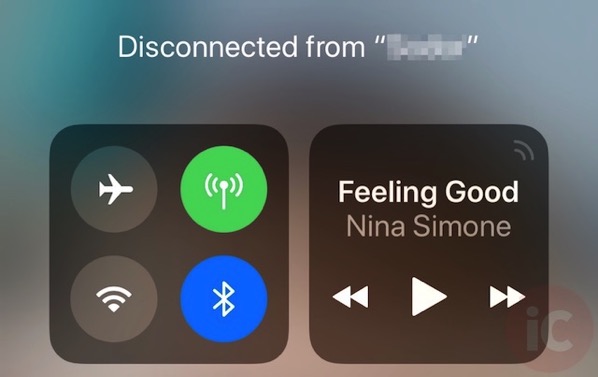
According to EFF, the “loophole in connectivity” can potentially leave users open to new attacks, and it linked to a white paper that unveils apparent zero day vulnerabilities and security flaws in modern Bluetooth stacks. The article also highlighted Apple should keep the Control Center toggles off until the user flips them back on, rather than overriding the user’s choice at 5:00 a.m. local time the next morning.
“When a phone is designed to behave in a way other than what the UI suggests, it results in both security and privacy problems. A user has no visual or textual clues to understand the device’s behavior, which can result in a loss of trust in operating system designers to faithfully communicate what’s going on. Since users rely on the operating system as the bedrock for most security and privacy decisions, no matter what app or connected device they may be using, this trust is fundamental”.
So far, Apple does not seem to be taking a reverse course, since the toggles still work the same way in iOS 11.1 beta.
Want to see more of our stories on Google?

P.S. Want to keep this site truly independent? Support us by buying us a beer, treating us to a coffee, or shopping through Amazon here. Links in this post are affiliate links, so we earn a tiny commission at no charge to you. Thanks for supporting independent Canadian media!


This is a good point. The UI should make it more obvious whether or not you’re fully turning off Wifi or Bluetooth.
It’s obvious to me. It says right above the buttons that I have disconnected from the current network or device. When WiFi and Bluetooth are completely off the icons have a line through them.
Apple should have just done a better job of explaining the change when iOS 11 was released.
There should be a third state in the Control Center UI, not just on and (fake) off.
Suggested UI is tap to cycle between Off, On, and Disconnected (the current “off” in iOS 11), plus a 3D touch action to select a specific state.
I think the reality is that I strongly doubt you’ll be able to see a person walking into a room and think… this guy looks nefarious, better turn off my Bluetooth… if you did, you could go into settings and turn it off.
It won’t turn back on if you turn them off in the settings.
I think Apple can appease a few people if they allow you to HOLD the wifi/Bluetooth control centre button to turn off the module completely.
Agreed. Whether it’s a long hold or a multi-selection or whatever the implementation, providing a clear difference between “turn off” and “disconnect and temporarily disable” would be the best way to go.
I’ve had to start turning my WiFi off in settings because I need to use my phone for work and it was connecting to different restaurant’s WiFi’s around the city. The problem is that I wasn’t really connected to their WiFi because many have “I accept” agreements so the WiFi icon in the top left showed connected but I wasn’t receiving data that I needed for work because it was blocking my cellular. It took me two days to fully change my habits because I didn’t realize why I kept connecting to fake WiFi when I needed to be on cellular.