The built-in “Low Power Mode” in iOS automatically adjusts some basic settings on your iPhone, such as turning off background app refresh and lowering the screen brightness, in order to extend the battery life as much as possible. However, the folks over at AppleInsider have shared a couple of handy tips that can help you maximize the battery life on your iPhone X even further.
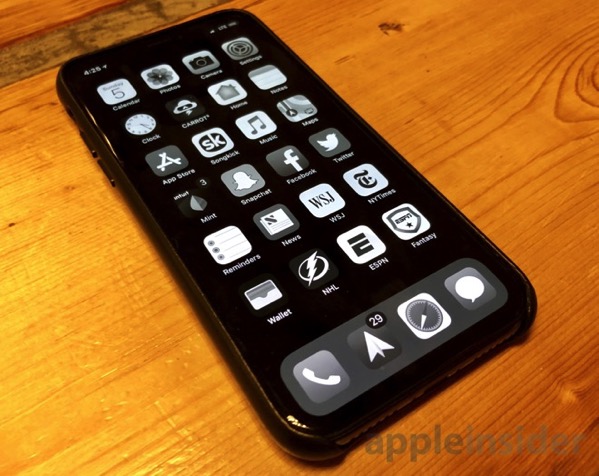
By using two optional iOS features, Smart Invert Colors and Grayscale, both of which are found inside the Settings app, you can reduce the OLED display’s power consumption, and extend the time needed between charges. Simply go to General > Accessibility > Display Accommodations to enable the two features on your iPhone X.
For smart invert colors, choose Invert Colors, then select Smart Invert. This is something of an unofficial “dark mode” for iOS, giving apps black backgrounds and white text. When an OLED display shows black pixels, far less power is consumed. This is because each individual pixel is lighted, negating the need for a uniform backlight, such as with a traditional LCD display.
To push things even further, go back to the Display Accommodations menu and select Color Filters. From there, you can flip the switch on and then select Grayscale. In this mode, colors are now displayed in shades of gray. In theory, darker pixels consume less power, offering users more battery savings.
If you want quick access to these optional features, simply navigate back to the Accessibility menu and scroll to the bottom for Accessibility Shortcut. Selecting both Color Filters and Smart Invert Colors will display both as options when the user triple clicks the side button.
By combining these two tips with the built-in Low Power Mode, and reducing brightness to its lowest setting, you should be able to get more battery life out of your OLED iPhone X.



Some tips? More like here is one tip, and it’s not even specific to the iPhone X. Big fan of the site, but this is clickbait. Thanks anyway.
Edited title thanks
Samsung OLED phones have a setting that black the screen when it is tipped down (like in your pocket or in a bag). The phone stays unlocked but uses less power
What’s up iPhone X fans… Here’s a great tip to save battery: Use your phone in black and white mode! It’s really practical, and you’ll get so much enjoyment out of your $1500 device if it has the same colour profile as a 1950’s television. Next up, we teach you how to use less water by forgoing bathing, just another *mild* sacrifice!
I hear if you don’t use it at all, the battery lasts almost two days! Wow, innovation!
A few less showers per weeks goes a long way in saving the planet!
Because who in their right mind would spend $1500 to show colors on an OLED display. Everyone knows black and white is the way to go.
Lol
Dear Gary,
We sure need to have a ?? / ?? mechanism for the articles on the site.
Not sure what all the hate is about… This is simply a method to conserve some battery if you’re running low… No one is telling you to keep this option enabled all the time? Thanks for the tip.
You’re watching it wrong