Last Friday, Twitter announced it was killing its Mac App, pulling it from the Mac App Store and also letting users know support would end in 30 days.
The Twitter app for Mac was free and useful because it had access to features unavailable to third party apps, such as Moments, polls and more—when it worked. The app would usually stop working in our case and had to be force closed and restarted daily.
Now that Twitter for Mac is disappearing, what are the best app alternatives? Two of the most popular ones to consider are Tweetbot ($13.99 CAD) and Twitterrific ($10.99 CAD; on sale).
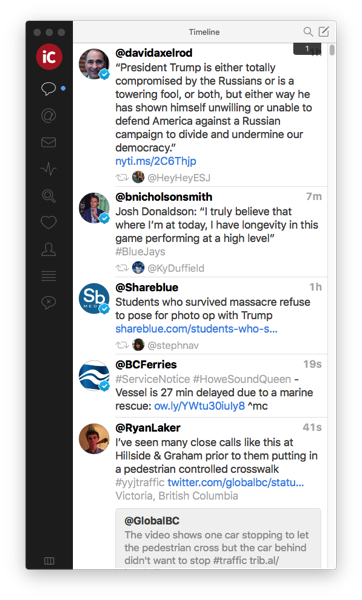
If you’re already familiar with Tweetbot for iOS, you’ll know the latter’s layout for Mac. Here’s how the timeline looks below:
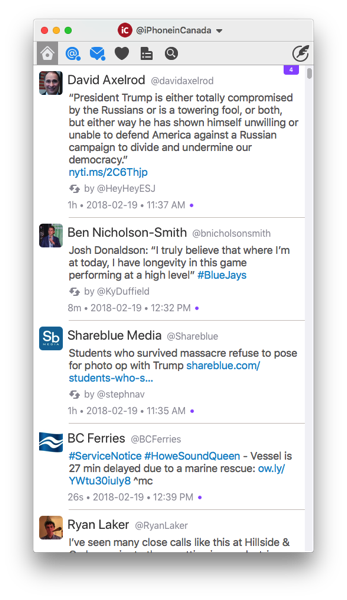
…and here is Twitterific’s timeline view:

What I like about Tweetbot for Mac is it’s easy to jump into threads by double-clicking a tweet anywhere. But on Twitterrific, you need to double click on the very side of tweets instead of anywhere within the tweet window.
Tweetbot lets you open new columns based on search terms and more, which can be useful, while the fit and finish of the app just feels better versus Twitterrific. I’ve used Tweetbot for iOS before so I may be skewed in my conclusions versus Twitterffic, but I feel the $4 premium is worth it to support a developer which churns out constant updates.
Tweetbot offers a slick interface and also muting features, plus adding accounts is much easier as it opens up your browser for authentication, meaning convenient access to 1Password for logging in, unlike Twitterrific, which was relaunched for macOS, back in 2017.
If you don’t want to pay for a Mac app for Twitter, you can also check out web-based alternatives such as Hootsuite and also TweetDeck (there’s also a Mac app, but it was last updated in July 2015!).
What Twitter app do you like to use on your Mac?



On iOS Twitterrific when you look at a discussion you can tweet each individual tweeter. This is very useful.
Which is easier to manage multiple accounts?
(And see which one you are in…from the screenshot that looks like Tweetbot.)
I’m voting for Tweetbot. Just tap your existing avatar and it brings up all your accounts. Twitterrific has a drop down menu.