
Here’s How You Can Make Soft-Breaks Using iOS Keyboard

While it’s common knowledge that you need a hardware keyboard to make soft-breaks for typing a multi-line sentence, it seems that you can make soft-breaks with the software keyboard on iOS as well.

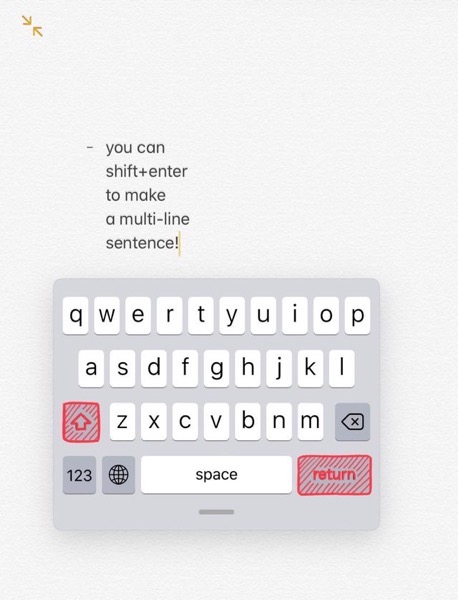
As shared by Reddit user, here’s how you can make soft-breaks using your iPhone or iPads default keyboard:

Fa9a952k4sv41

  • Simply press Shift + Enter keys simultaneously on your iOS keyboard to make a must-line sentence, without requiring a physical keyboard.
  • You can also hold one key and then press the other one to achieve the same result.

If you know of other similar keyboard combos we can do on iOS, don’t forget to share them with us in the comments section below.

Want to see more of our stories on Google?

Add iPhone in Canada as a Preferred Source on Google

P.S. Want to keep this site truly independent? Support us by buying us a beer, treating us to a coffee, or shopping through Amazon here. Links in this post are affiliate links, so we earn a tiny commission at no charge to you. Thanks for supporting independent Canadian media!

Subscribe
Notify of
guest
0 Comments
Oldest
Newest Most Voted
0
Would love your thoughts, please comment.x
()
x