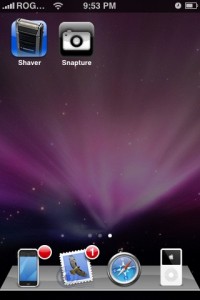
Do you love steroids? You might, but I know your iPhone camera has been waiting for this day. Off topic aside, we touched briefly on this application during our first ever iPhone in Canada Podcast. The 3rd party app is called Snapture, and it’s a program that takes your 2 megapixel iPhone camera to the extreme. Let’s check it out!
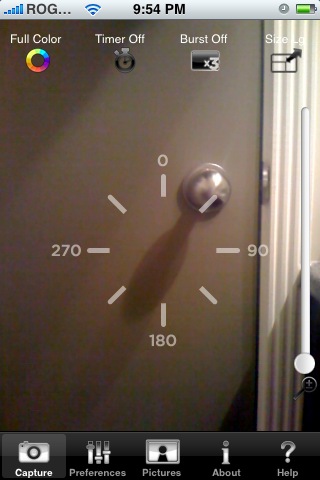
Snapture was recently released and it adds many features to your iPhone camera that Apple left out–it’s like your iPhone camera on steroids! Snapture will enable you to…
…take photos in full color or grayscale
…have a 3x digital zoom
…snap pictures by pressing anywhere on the screen, or the up/down volume buttons (love this feature!)
…take pictures with a 5 second self timer
…snap 3 pictures in burst mode
…choose between 3 image sizes
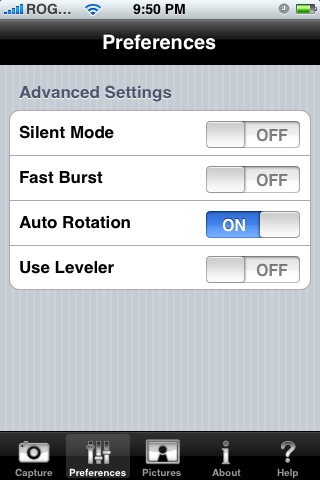
…enable a “silent mode” for those times when you’re stalking friends and family
…use a leveler to ensure pictures are straight
…and toggle auto rotation!
One of the best things about Snapture is that it’s free! It’s entirely funded by donations at the moment! This program is feature-rich and it’s super easy to use. I would recommend everyone to download it now via Installer!
I did have some issues with Snapture though. Pictures taken cannot be seen via my Camera Roll, but can be seen when I connect my iPhone to the computer via the Apple iPhone folder. Anyone else experiencing this?

If you enjoyed this post, please subscribe to my RSS feed, so you won’t miss any updates! You can also subscribe via email and have daily updates sent to your Inbox!





I can access the pictures through my camera roll but the picture(s) do not show up in the camera roll thumbmail square.
No issue on my oiPhone. Can send photo taken with Snapture and show up in thumbnail square in camera roll.
However, the setting for silent mode and leveler reset itself every time I start the program after exiting.
my pics don’t show up on camera roll either… is there a way to change this somewhere?
what firmware is everyone using? like, people with the camera roll problems, what’s yours, and those without, what’s yours? maybe it’s firmware specific.
Hey great, great blog.
One question. How do you put that amazing background?
I have it as an image and it shows up when I unlock my phone (to use it)… But then my background is black when I have the icons.
Let me know!
Hey Everyone,
Version 1.2 is coming out in a day or two to fix the issues that some people have been having with regards to images not showing up in camera roll properly. Keep refreshing your sources and it’ll show up.
Btw…one of the Snapture developers Samir is a proud Canadian. Born and raised in Toronto. Love this site.
Sweet. Thanks for the heads up. I’ll give it a try.
I found vdo software, but I haven’t had it work for more than 2 or 3 seconds (uh, what’s the point?) — Has anyone else found video software that works on the iPhone?
works perfectly with the latest update. Love it.
Where can I find this app??? I was trying to look in the app store for it…am I missing something?
Here are the issues:
1. Not obvious how to take pictures with it.
2. FROZE my camera. Nothing worked. I had to press the power off on the upper right along with the HOME button in the bottom middle together simultaneously to make the phone finally shut off. I thought the phone will over-heat it froze so hard.
3. When you try to remove it, (by holding your finger on any icon until they wiggle) this icon does NOT give you the little x to delete it.
The only way I could remove the darn thing is loading SSH on my phone, and used WinSCP on my pc, logged into my phone using: root@192.18.1.11 or whatever IP address you get from your router. I browsed to the directory: root / private / var / stash / Applicaiton. and removed the fricken: Snapture application.
4. After this you have to hold the power button (upper right of your phone) and shut it down. When you press power (upper right) and boot back up, this piece of crap software will be finally off your phone.
I DON’T RECOMMEND IT, until they fix some of these issues.
Pictures are not being saved in Cameral roll, or in any other Album… where are they going?
I can access the pictures through my camera roll but the picture(s) do not show up in the camera roll thumbmail square.
I can access the pictures through my camera roll but the picture(s) do not show up in the camera roll thumbmail square.
No issue on my oiPhone. Can send photo taken with Snapture and show up in thumbnail square in camera roll.
However, the setting for silent mode and leveler reset itself every time I start the program after exiting.
No issue on my oiPhone. Can send photo taken with Snapture and show up in thumbnail square in camera roll.
However, the setting for silent mode and leveler reset itself every time I start the program after exiting.
my pics don’t show up on camera roll either… is there a way to change this somewhere?
my pics don’t show up on camera roll either… is there a way to change this somewhere?
what firmware is everyone using? like, people with the camera roll problems, what’s yours, and those without, what’s yours? maybe it’s firmware specific.
what firmware is everyone using? like, people with the camera roll problems, what’s yours, and those without, what’s yours? maybe it’s firmware specific.
Hey great, great blog.
One question. How do you put that amazing background?
I have it as an image and it shows up when I unlock my phone (to use it)… But then my background is black when I have the icons.
Let me know!
Hey great, great blog.
One question. How do you put that amazing background?
I have it as an image and it shows up when I unlock my phone (to use it)… But then my background is black when I have the icons.
Let me know!
Hey great, great blog.
One question. How do you put that amazing background?
I have it as an image and it shows up when I unlock my phone (to use it)… But then my background is black when I have the icons.
Let me know!
Hey Everyone,
Version 1.2 is coming out in a day or two to fix the issues that some people have been having with regards to images not showing up in camera roll properly. Keep refreshing your sources and it’ll show up.
Btw…one of the Snapture developers Samir is a proud Canadian. Born and raised in Toronto. Love this site.
Hey Everyone,
Version 1.2 is coming out in a day or two to fix the issues that some people have been having with regards to images not showing up in camera roll properly. Keep refreshing your sources and it’ll show up.
Btw…one of the Snapture developers Samir is a proud Canadian. Born and raised in Toronto. Love this site.
Hey Everyone,
Version 1.2 is coming out in a day or two to fix the issues that some people have been having with regards to images not showing up in camera roll properly. Keep refreshing your sources and it’ll show up.
Btw…one of the Snapture developers Samir is a proud Canadian. Born and raised in Toronto. Love this site.
Sweet. Thanks for the heads up. I’ll give it a try.
I found vdo software, but I haven’t had it work for more than 2 or 3 seconds (uh, what’s the point?) — Has anyone else found video software that works on the iPhone?
Sweet. Thanks for the heads up. I’ll give it a try.
I found vdo software, but I haven’t had it work for more than 2 or 3 seconds (uh, what’s the point?) — Has anyone else found video software that works on the iPhone?
Sweet. Thanks for the heads up. I’ll give it a try.
I found vdo software, but I haven’t had it work for more than 2 or 3 seconds (uh, what’s the point?) — Has anyone else found video software that works on the iPhone?
works perfectly with the latest update. Love it.
works perfectly with the latest update. Love it.
works perfectly with the latest update. Love it.
Where can I find this app??? I was trying to look in the app store for it…am I missing something?
Where can I find this app??? I was trying to look in the app store for it…am I missing something?
Where can I find this app??? I was trying to look in the app store for it…am I missing something?
Here are the issues:
1. Not obvious how to take pictures with it.
2. FROZE my camera. Nothing worked. I had to press the power off on the upper right along with the HOME button in the bottom middle together simultaneously to make the phone finally shut off. I thought the phone will over-heat it froze so hard.
3. When you try to remove it, (by holding your finger on any icon until they wiggle) this icon does NOT give you the little x to delete it.
The only way I could remove the darn thing is loading SSH on my phone, and used WinSCP on my pc, logged into my phone using: root@192.18.1.11 or whatever IP address you get from your router. I browsed to the directory: root / private / var / stash / Applicaiton. and removed the fricken: Snapture application.
4. After this you have to hold the power button (upper right of your phone) and shut it down. When you press power (upper right) and boot back up, this piece of crap software will be finally off your phone.
I DON’T RECOMMEND IT, until they fix some of these issues.
Here are the issues:
1. Not obvious how to take pictures with it.
2. FROZE my camera. Nothing worked. I had to press the power off on the upper right along with the HOME button in the bottom middle together simultaneously to make the phone finally shut off. I thought the phone will over-heat it froze so hard.
3. When you try to remove it, (by holding your finger on any icon until they wiggle) this icon does NOT give you the little x to delete it.
The only way I could remove the darn thing is loading SSH on my phone, and used WinSCP on my pc, logged into my phone using: root@192.18.1.11 or whatever IP address you get from your router. I browsed to the directory: root / private / var / stash / Applicaiton. and removed the fricken: Snapture application.
4. After this you have to hold the power button (upper right of your phone) and shut it down. When you press power (upper right) and boot back up, this piece of crap software will be finally off your phone.
I DON’T RECOMMEND IT, until they fix some of these issues.
Here are the issues:
1. Not obvious how to take pictures with it.
2. FROZE my camera. Nothing worked. I had to press the power off on the upper right along with the HOME button in the bottom middle together simultaneously to make the phone finally shut off. I thought the phone will over-heat it froze so hard.
3. When you try to remove it, (by holding your finger on any icon until they wiggle) this icon does NOT give you the little x to delete it.
The only way I could remove the darn thing is loading SSH on my phone, and used WinSCP on my pc, logged into my phone using: root@192.18.1.11 or whatever IP address you get from your router. I browsed to the directory: root / private / var / stash / Applicaiton. and removed the fricken: Snapture application.
4. After this you have to hold the power button (upper right of your phone) and shut it down. When you press power (upper right) and boot back up, this piece of crap software will be finally off your phone.
I DON’T RECOMMEND IT, until they fix some of these issues.
Pictures are not being saved in Cameral roll, or in any other Album… where are they going?
Pictures are not being saved in Cameral roll, or in any other Album… where are they going?
Pictures are not being saved in Cameral roll, or in any other Album… where are they going?