
Apple Updates App Store Guidelines With Enforced Rules Against Low-Effort Apps
Within the App Store Guidelines support page, Apple urges developers not to "submit apps that are indistinguishable from what's already widely available."
As seen in majority of other Google apps, the card-style thumbnail layout has finally made its way to the Google Drive app for iOS. The app has just received a major revamp that not only gets that same card-style thumbnail layout that allows users to effortlessly browse and preview files, but also a number of minor upgrades to make the app even easier to use on iOS devices.
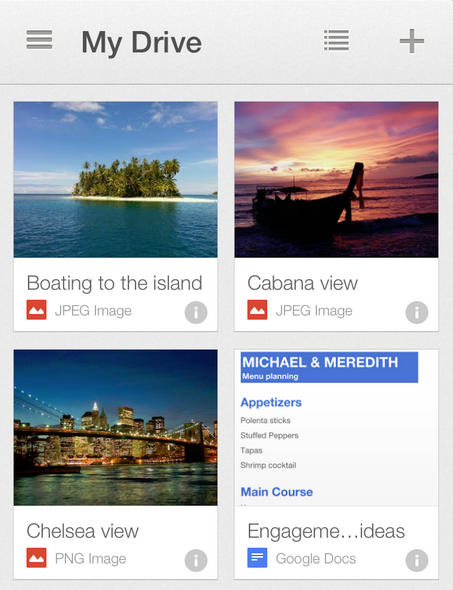
The new Google Drive app allows you to switch back and forth between the new card-style thumbnail view, a feature that was previously available in the Android app only, and the usual list view. Additionally, files and folders are grouped more intuitively instead of being mixed together, and you can view and edit files in landscape mode. It’s also now easier to copy the link for any Drive file. Just visit the details pane of the file you want and select ‘Get link’ to automatically copy the link to your clipboard, ready for sharing vie email etc.
From the Google Drive Blog:
“And last, we brought search to the forefront of the app so you can find the exact file you’re looking for, whether you’re on a small iPhone or a larger iPad. And remember, Drive search recognizes objects in your images and text in scanned documents. So the next time you’re looking for photos of that trip to the Statue of Liberty, just enter the phrase “Statue of Liberty” and your photos will appear – voilà!”
So what are you waiting for? Head over to the App Store now and grab the free update at the following link (which is still being updated around the world):
Download Google Drive For iPhone, iPod touch and iPad [Direct Link]
Update: the update has finally hit the App Store–go get it!
Want to see more of our stories on Google?

P.S. Want to keep this site truly independent? Support us by buying us a beer, treating us to a coffee, or shopping through Amazon here. Links in this post are affiliate links, so we earn a tiny commission at no charge to you. Thanks for supporting independent Canadian media!


I’m not seeing a new version. What’s the version number? Latest I see is 1.5.0.
I also don’t see it. In fact, all of the app updates that Useman has posted about today, aren’t available yet.
You mean Usman 🙂
As with most Google iOS app updates, it seems to be taking its time to release here in the Canadian App Store. Should come by this evening we hope.
give it time @gary and his cohorts are a bit too much on the ball for these apps to propagate over to the snowy side.
The iTunes Store, not the App Store.