
Apple’s AirPort Utility App is Being Removed From the App Store
Apple warns that "functionality is not guaranteed" when using AirPort Utility on iOS 27 or later.
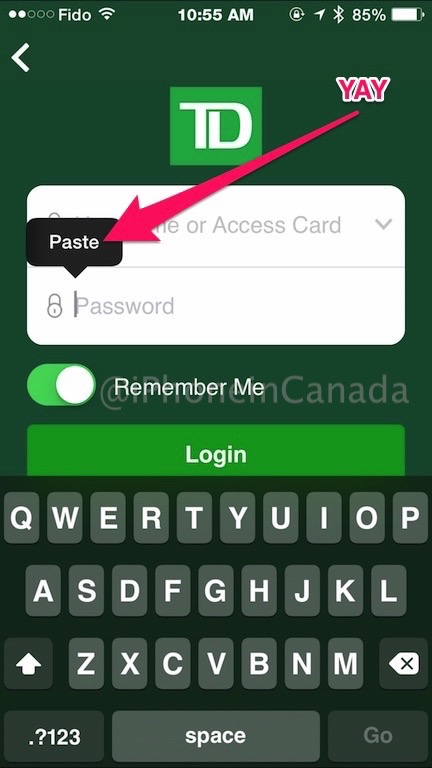
A couple weeks ago TD Canada launched their all-new iPhone app, but one major feature was disabled: the ability to paste in the password field.
For users with complex passwords, this meant pasting a password copied from an app like 1Password impossible, making it a major pain in the arse to login every time.
TD Canada has now updated their iPhone app to bring back the paste option in the password field, as seen below in our screenshot:
What’s New in Version 7.0.1
New in 7.0.1•Enabled pasting of passwords. Remember, you must maintain the care, control and confidentiality of your user name(s) and password(s) that you use to access TD online or mobile services.
•Various other bug fixes and optimizations
It’s great to see this change come so quickly, and it was probably assisted by the fact a member of TD Canada’s social media team on Twitter gave out some horrible security advice, which resulted in a massive online backlash.
Click here to download TD Canada for iPhone in the App Store. Let us know if you’re happy to see the paste option again!
Want to see more of our stories on Google?

P.S. Want to keep this site truly independent? Support us by buying us a beer, treating us to a coffee, or shopping through Amazon here. Links in this post are affiliate links, so we earn a tiny commission at no charge to you. Thanks for supporting independent Canadian media!

