
How to Reset and Restore Your iPhone Safely
Learn how to erase your iPhone in Settings or restore it using a Mac or PC, based on Apple's official Support video.
Yesterday, Nintendo’s highly anticipated mobile game Pokémon Go launched worldwide in select markets such as New Zealand, Australia and the U.S., but Canada was excluded.
Most likely, the game will hit Canada in a couple weeks, similar to the timeline Mittomo took to get here (that app was a snooze).
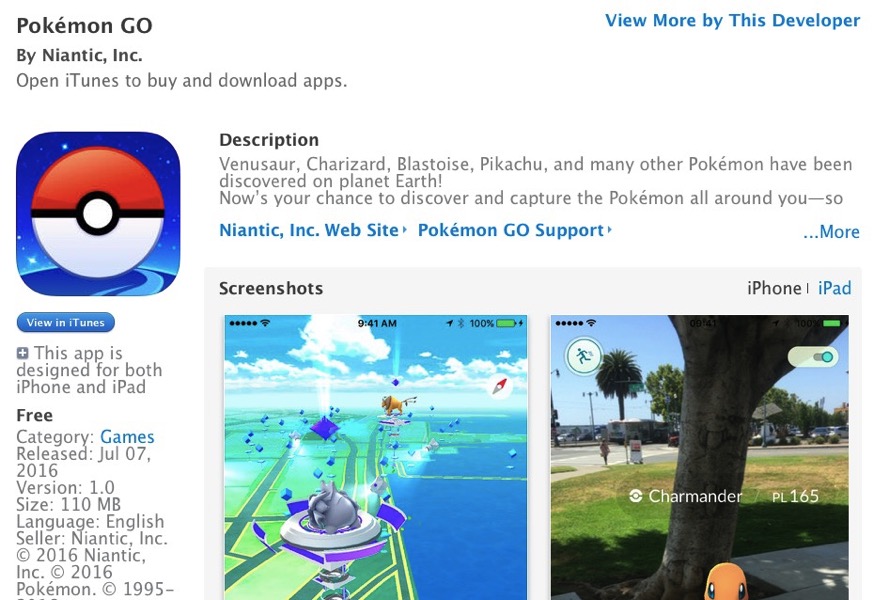
Want to learn how to download Pokémon Go in Canada right now?
Many of you probably know how to access the U.S. App Store already, so this is old news to you. But for those who don’t know, it’s fairly simple, as all you need to do is create a simple U.S. iTunes account so you can access the U.S. App Store and get the game. You don’t need a credit card, but will require a U.S. address (use a relative/friend’s address or get ‘creative’).
We’ve gone over the process of how to download an app from the U.S. App Store—click here to follow the instructions with step-by-step pictures–or check them out below (updated with pictures):
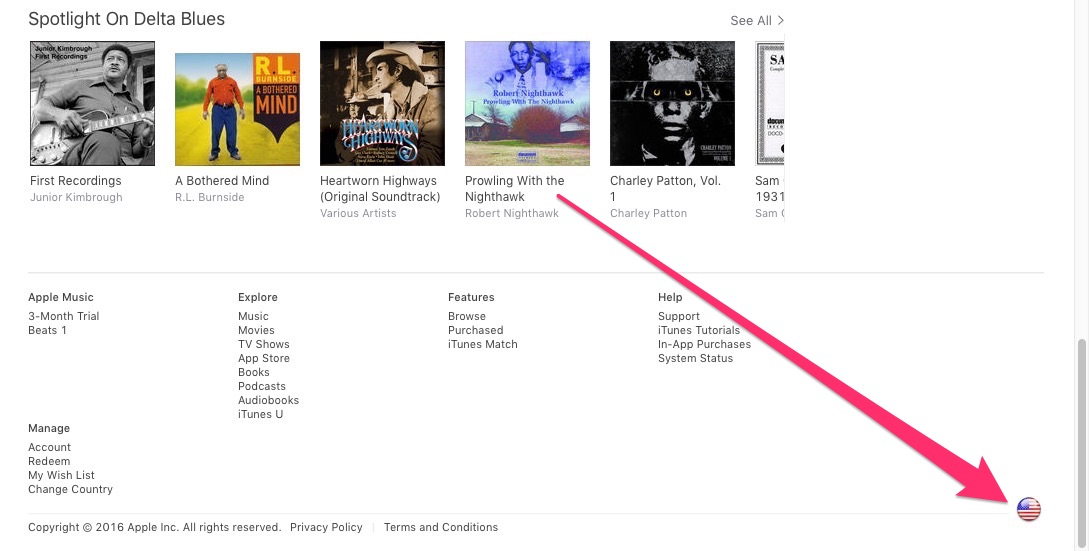
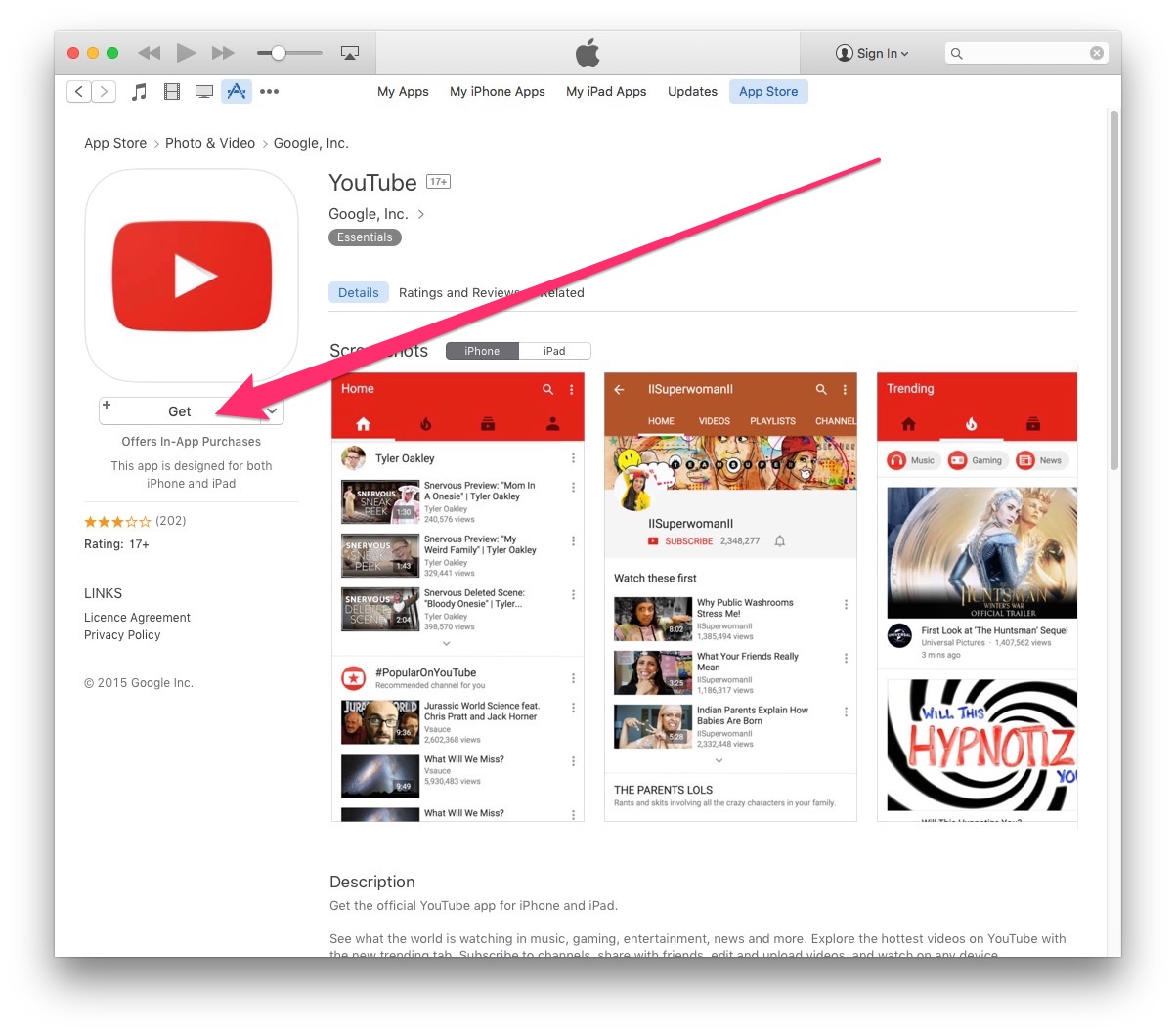
2. Find a free app to download and click “GET”. It must be a free app.
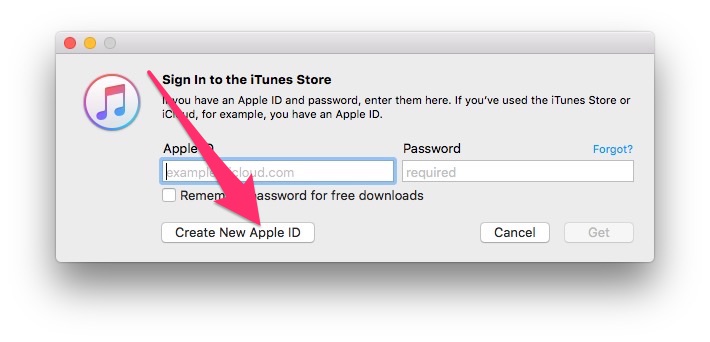
3. This will prompt you to sign-in to iTunes, but don’t do that. Click on “Create New Apple ID”:
4. After filling in your details, you’ll get to the payment method screen, where you will click on “None”:
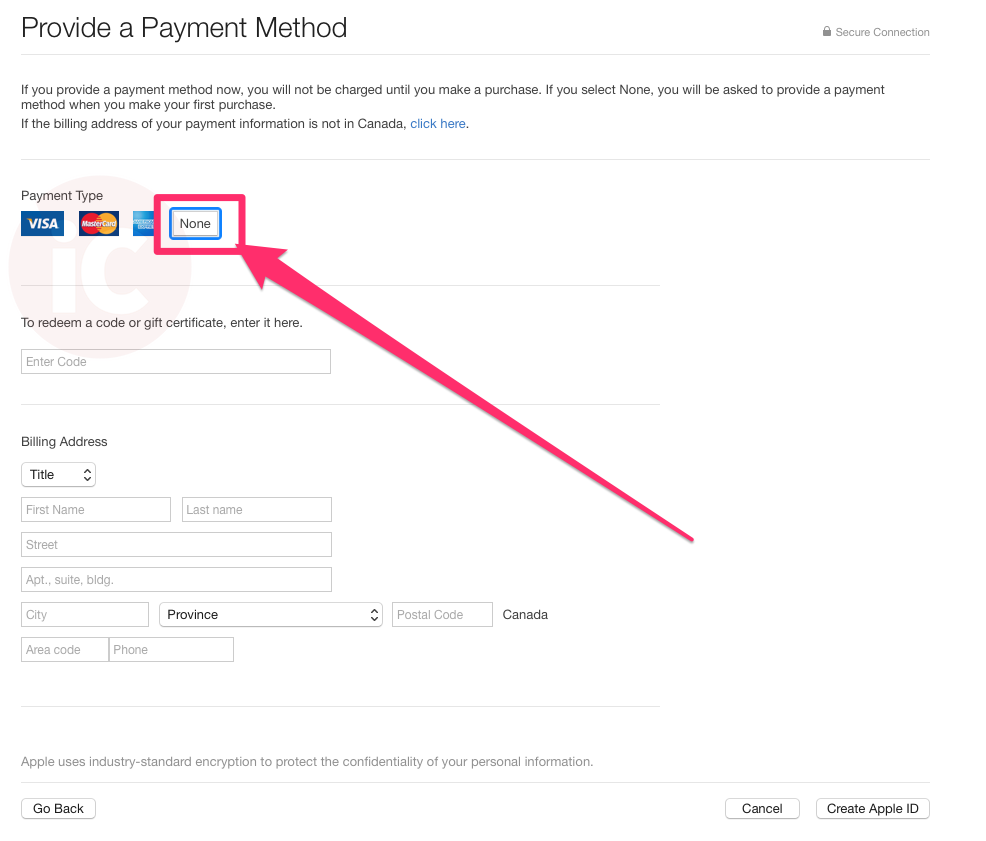
Once you’ve done this, just log in to the App Store with your new U.S. Apple ID on your iOS device, search for Pokémon Go, then download and install it. Voila! You can then use this U.S. account to download any apps that aren’t available in Canada.
There are caveats, though. Getting app updates means you need to sign into the U.S. Apple ID on your devices, which is a pain. Once any U.S.-exclusive app reaches Canada, I’ll usually delete it and re-download it from my Canadian account, so I can get updates without switching accounts.
Let us know if this works for you and how you’re liking the game!
Want to see more of our stories on Google?

P.S. Want to keep this site truly independent? Support us by buying us a beer, treating us to a coffee, or shopping through Amazon here. Links in this post are affiliate links, so we earn a tiny commission at no charge to you. Thanks for supporting independent Canadian media!


Yes it worked for me and I do it all the time for American content. I just downloaded will give the game a try.
If I were to download it from an American account and make a Pokemon GO account. After the Canadian version comes out, am I able to relog into the same GO account??
i dont think u will be able to
That guide no longer works you actually need an american credit card or itunes card
Even after you try to download a free app first?
You need to go on your PC/Mac
1- Log out of your existing Apple ID
2- Change the country in iTunes for the US
3- Go to the App store in iTunes
4- Click on GET to download a Free App (ex: Pokemon Go)
5- Click ”Create an account”
6- When they ask for you credit card info, click ”None”
🙂
That gives me for assistance a contact iTunes support
When you log out?
Me too how can I fix this ?!
Make a Gmail email
How about you explain step 2 better you fucking asshole
Wow have some respect. How old are you? 10 yo and you can’t wait to get Pokemon Go??!?
Scroll down iTunes and change the flag in the right corner for the US flag.
You welcome.
Actually I just used the first method and it worked….
I tried like literally 5 minutes ago and I get contact iTunes for assistance
Make sure you make a new emila that is gmail
that made it work for me
Hmmm thank you I’m gonna go try that
Hey…you can use any email…as long as you enter in an US address and you can use your own phone number or an alias number that works…I used the Yahoo email that I have the whole time and I just put down that and residence…I put down…I live at the Playboy Mansion lol 😛 It should work though. Good Luck! Any email provider you have is okay…just make sure to enter US address and Zip Code. You would be fine! When the Canadian version comes I would jump at the opportunity to switch everything! I am with Wind…Unlimited Data! 🙂
Did it this morning and it works fine. :p
Nice 🙂
Worked for me just now
am I the only one who cant do this?
It just gives me “For assistance, Contact itunes support”
HOW THE FUCK DO YOU CHANGE THE FUCKING COUNTRY AFTER YOU SIGN OUT????? this stupid guide dowsnt tell youhow to do that you fucking piece of shit!!!!!
lol you’re like 10. i’m playing pokemon go rn in canada and could be helping losers like you but nope 🙂
um, Ayla, his age doesn’t matter. plus Pokemon is actually for children. and besides, idk why you’re being so mean… why don’t you just help him??
I think saying that the kid is 10 is just him referring to the kid’s maturity. And I think he means that he won’t help this specific person because the commenter is being a complete ass. Instead of swearing and calling the article a ‘fucking piece of shit’ he could ask properly and politely, and thus, doesn’t merit assistance from people who can help him better. Not only that, the article DOES explain how to do what he’s asking, and so he should just read properly.
works up to the billing info part. don’t know an address to put in
look up a random restaurant
I put the white houses address lol
When it comes to billing it does not give me the ‘None’ option???
must be a free app
thats not what he meant, when signing up it requires a payment type for some reason
Did you try downloading a free app as per the steps?
Did you try to download the app first before creating an US iTunes account? If so…it would work and it would have shown “NONE” option…but make sure you redo your steps again. If you don’t see it…retry with a different Apple ID. It worked fine with me and I never actually followed the instructions…just went with the flow and I was able to get it to go through. 🙂
Yeah, I got it, had to use a Gmail account for some reason, it wouldn’t take my Outlook, but I can’t connect to the fucking server. Must be my carrier.
Which carrier? Big3? I am with Wind and it going smoothly!!! 😀
Is there gyms/poke stops rn in Canada?
Yep 🙂
Theres no “none option???
Make sure you download a free app first in iTunes
If you switch back to the Canadian ID what will happen?
Nothing–the app will remain but updates only available once you sign back into the US iTunes account.
dont do this hack. i tried it, theres no “None” option for the payment. so i stupidly put in my credit card information. itunes charged me $1 USD but the App store said that my credit card was declined. so not only did i get charged on my credit card for a buck, but i wasnt even successful in creating the account.
and yes, it was a free app.
At first…it show the “BUY” button and I pressed it and it download the app without paying for it…it is a free app! I saw the option where you can select “NONE” on the Credit Card information and it worked and I am thankful to the people on here and Gary!! 😀
Cheers
🙂
I FINALLY GOT IT!!!! IT EASY!!!!
NEED HELP…JUST LET ME KNOW?
If i redownload it on canadian itunes when it comes out will i lose my progress
Not sure? Is Pokemon GO saved on Facebook or Twitter? If it is saved on iCloud…you should be able to continue your progress in the Canadian iTunes once it is available? It should be able to link though.
When you first open the app you have to login to your gmail so hopefully your information is stored with your email!
Kool!! Is only just Gmail? Or can you use any other email providers? iCloud? Microsoft Email?
gmail
Thank you. 🙂 I will do that when I open the app…never started yet…so I will wait. Thanks though.
You would not need to re-download the Pokemon GO on the Canadian app store…it will automatically detect that you already have the app installed on the phone, which will result in…not having to do anything, but download the latest updates. That’s all.
none is not a option and i can not finish the account with out entering the infomation
What happen? What information is required to finish the process? Did you switch to the US iTunes on your Laptop/or PC? If you switch the iTunes to the US…you would find that Pokemon GO is available…you click on it and click the “GET” button and then it will require you to enter your Apple ID and password…which in this case, you would need to create the US Apple ID and Password…enter your real name…that what I did! When it came to the billing information and residence address…I saw the selection “NONE” and I clicked on it. The address part I use a real address residence which I put down Playboy Mansion as the address and Zip Code…and it should be working…unless I am missing something?
So can I log back into my Canadian App Store now?
Yes you can! But if you need to update the Pokemon Go app…you would need to switch back to the US email account…which I think is a long and tedious process. 🙁
Yes
it worked but there aren’t any pokemon for some reason. I live in canada
Maybe that a good thing? Or maybe they have not appear at the area your currently in? I am in Toronto…so it should be okay 🙂
i live in saskatchewan. there are gyms and everything but the only way pokemon will appear is if i use an incense.
What is an incense?
its an item in the game that lures wild pokemon to your location
Oh ok…I haven’t got the chance to try it out yet…I actually on the US app store and my GOD….there is so many GREATTTT apps!!!! I am happy to do this!!! I never thought about doing an US Apple ID account…but back to you…I will try it out and see if mine works and let you know if there is any problems.
Ive
Is that a Pokemon?
Sorry aha it sent in my comment without letting me finish 😉
lol okay…I guess your using an iPhone? lol 😛
Ive tried to do these steps on my phone without using a computer. Is that why it is not working?!
Yeah…it probably so…I used my laptop and worked perfect! Did you use the iPhone or Samsung phone and saw the “NONE” option on the billing information about the Credit card information..if so…it would work…but if you did not see “NONE” option on the phone…that means you should create an Apple ID on the computer it would be much better and the experience would be flawless without problems if you did it right. 🙂
Could you help me? When i click none it doesnt do anything… help!!
Yes…sure…what do you need help with?
It doesnt have the option of none on the U.S accounts for me. Did you find it?
It depends on how you did it step by step…you need to tell me how you did it because I think you missed a step before proceeding to the next step. It fairly easy.
howd you get it to work bro? same thing happened to me
That good!!! Good luck!!! 🙂
I did it all on my iPhone. It works and it’s great …except for there’s nothing close to me
It Says “Your Request Is Temporaily Unable To Be Processed” Why Does It Say That
Where does this say that? In the app? Or is it the app store?
When i click none i doesnt do anything…. why???
Okay…it should allow you to click “NONE” without entering the credit card information…if you are stuck…may I ask what are you using? Phone or Computer?
Text me: 647-235-0251…I will help you! I am gonna be away from my computer…but I am just gonna say that if you used your phone to do it…it won’t work for some reason when creating an US iTunes Apple ID…it best to use the computer…try that and see if it works. 🙂
i cant even find the game in my app store when I search it. Does anybody know why?
US App Store? Should be there
Create an Apple ID at the US App Store on the computer to access iTunes and get the Pokemon GO from there.
Yo what dress do i use for the billing address
I just searched up a McDonald’s in New York and I used that address
Any address…I use the Playboy Mansion in Los Angeles 🙂
theres no none option
Set up the new account through on your PC. Then when you log onto your new account on your phone and have to verify it, the none option will appear. Weird, I know, but that’s how it worked for me
Mine was different…instead…I did everything on the PC and then I was able to verify my Apple ID through my iPhone. 🙂
I just tested this method on my Mac in iTunes, and the ‘None’ billing option still appears after trying to download a free app first. This is the crucial step.
when i press none and click continue, it says i have to fill up the billing adress. what do i do for this. Im on a computer BTW
You’ll need to enter in a U.S. address…maybe a relative, friend…or…you can use your imagination.
Enter any US address and Zipcode…just make sure the Zipcode is connected to the address. It should be fairly easy as it took me less than 10 minutes to do the whole creating an US iTunes account. Good Luck!
I installed it just fine, but it says GPS signial not found!
it wont sync to my phone i have it on my computer now but it wont go on my phone!!!
Did you try downloading it from the US App Store? Meaning…if you created the US iTunes account…you can use the account at the app store to get Pokemon GO…but it should be able to sync Pokemon GO from the PC to your iPhone…if need help…just ask me.
I got it!!! Thank you
No problem! 🙂
All day it’s been telling me they can;t make my trainer account right now, and to try again in an hour. Is this because I made my U.S iTunes account on my phone? I’ve tried installing the app on my phone and that didn’t work, so I installed it again through my laptop, but it still isn’t working… Could they just be down all day or have I done something wrong? Every location is set for the U.S except for my laptop.
I don’t know? Are you trying to log into the Trainers account and not the Gmail account?
When I use a computer, it autofills Canada instead of letting me choose.
What do you mean?
How you change your Itunes to the U.S one? When I create a U.S Apple ID there’s no “None” option you gotta pick a payment method… Can someone explain to me in details everything to do? Like how to switch your Itunes to U.S one?!
It simple..if you have a PC and not using your iPhone
HOW TO GET “POKEMON GO” – USING AMERICAN (US) ITUNES – APPLE ID
STEP 1: Open iTunes on your PC/or Laptop (Windows or MacBook).
STEP 2: Go to ? Apps Go to the ? App Store ? Scroll down to the bottom right corner and click on the ? Country Icon
STEP 3: Choose your country or region – Select ? United States
STEP 4: Go to ? Pokemon GO and click on ? GET
STEP 5: If you have an US iTunes Apple ID and password – Fill out ? the required box (Apple ID and Password) – it would automatically download and install the app (which you do not need to continue to STEP 6)
OR
If you don’t have an US iTunes Apple ID and Password – Go to ? Create New Apple ID – Continue to STEP 6
STEP 6: Press ? Continue
STEP 7: Read the ? Terms and Conditions and Apple Privacy Policy OR skip that and scroll down and – click on the box that ? You Have Read And Agree To These Terms And Conditions. Once you done that – Click on ? Agree
STEP 8: Enter ? Email (the email that you use will be your Apple ID. ALSO: A verification email will be sent to this address) Enter ? Password (passwords must be at least 8 characters, including a number, an upper case letter. Don’t use spaces, the same character 3 times in a row, your Apple ID, or a password you’ve used in the last year) Choose and Enter ? Security Questions and Answers (3 security questions + your personal answers) – these questions will help Apple verify your identity in the future. Input ? Optional Rescue Email (this is optional and you do not need to fill it in if you do not need to rescue your email) – the purpose of the rescue email is that – if you forget your answers, Apple can use this optional email address to send you instructions on resetting your information. Enter ? Date of Birth (Month/Day/Year)
STEP 9: On the payment type – Click ? NONE! Enter and Fill out the ? Billing Address (Must be an US (American) address and zip code)
Eg.
• Mr. Texroy Junior Senior
Walt Disney World Resort
Orlando, Florida 32830, United States
(647) 235-XXXX
STEP 10: A verification email has been sent to (yourname@youremailprovider.com)
STEP 11: Press ? Ok and then your DONE!
REMEMBER: To verify your email and then your complete to get the Pokemon GO. Enjoy!!
did every step but the app still doesn’t appear on my iphone app store although it does show up on my mac
Did you try to sync it from the computer to your iPhone?
I’ve tried to get it to work on both my iPhone and my laptop, nothing is working because it never gives me the “none” option and Canadian credit cards don’t work for the payment part – I’ve tried.
Did you try downloading a free app first after switching to the US Store?
i just did. It gave me “for assistance, please contact the itunes support.” Does the app have to have 0 in-app purchases as well?
I am not sure…I only downloaded Pokemon GO as my first purchase app. It free though.
Did you even switch to the American iTunes and Go to the Pokemon GO to get the app…then you create an Apple ID…that how I did it.
I’ve pressed none for the billing but when I press create Apple ID it says a title is required and won’t allow for me to create without any billing info. How can I fix this?
You need to enter the billing address and you don’t need to enter your credit card information…you press none…that is the last thing to do before you actually are done and need to verify your account…but everyone seem to be stuck on the billing information section. 🙁
When I press none for billing info and press the Create Apple ID it says a title is required and wont allow for me to create, How can I fix this I need help
I don’t know what your using? iPhone or PC? It does not work well with iPhone…only on the PC. If you want…you can use my American US iTunes Apple ID and password to get the app…if you want?
Ya even the computer doesn’t let us choose a “none” option for the credit card thing.
Oh…maybe you did something wrong in one of those steps…because it worked for me.
Can I pls borrow it just to download it becaus dive been trying since it came out to get and I would really appreciate it. I would only use it to download. I would really really appreciate it thanks
I will…can I send it to your inbox or PM you?
can I use it too please lol I cant do it from a comp
I cannot create an id without billing info for some reason. If I could borrow someone else’s that would be really nice ????
Borrow what lol??
If you get someone else’s info, i would take it too !!
I’m trying to make an american Itunes account but it doesnt give me the option of NONE for method of payment? Help please
Did you try to get the Pokemon app before creating the Apple ID?
yes.
Did you got the Pokemon GO app or are you still trying to get the app?
yes with my canadian account first,then realized it was only in the sates
Can someone help me… I don’t know what adress to put in the billing adress..
You put the US address…just search up your favourite retail store and then use their address and zipcode. 🙂
I don’t get it. I get to the 4th step but then I gotta put in a street name, city, state, zip code, and phone number. How should I know all this?
Sorry my bad I read some other comments and put a target in Dallas Texas 🙂
That good! 🙂
You put a random US address…unless you know a relative down in the states…you can use their address and zip code.
Will we have to restart from the beggining when the app will be available in Canada. Also can we be banned for this? thanks !
No…you just download the Canada version…hopefully you used Google to save your progress or the Pokemon Trainer Club Account. 🙂
Also…you won’t need to download it because it will automatically know that you have the app…but if you want to use your Canadian iTunes account…you can do so…but your account on Pokemon GO will still remain untouched and your saved data won’t be gone.
Oh guys
If ur downloading bc of Pokemon go, there are limited servers for Pokemon go. The countries are: US, Canada, Japan, UK. You can’t play Pokemon Go if ur not in these countries.
I think everyone knows that…if they don’t see anything on their Pokemon map…then they don’t have Pokemon around them in their cities or countries.
can you switch back to canada after downloading and still play?
Yes
I don’t have a ‘none’ option. It lets me try paypal, but then paypal declines, as I have no American funds 🙁
Here…hope this help you…I trust you!!
tj.senior@yahoo.ca
iJunior7
Yayy thank you so much! I just downloaded Pokemon Go and logged out 🙂 It’s nice of you to help, you just made a girl very happy haha 🙂
lol…no problem…assuming your Caitlyn? But I am happy to help you. Good Luck and Cheers! 😀
Hey do you mind? I used your account as well but just for Pokemon Go as there was no none option 🙁 I SWEAR I DIDN’T BUY OR DO ANYTHING ELSE!! THANK YOU MY LORD AND SAVIOUR!
Mind if I use your account as well?
I don’t mind…you can use the account…and you can tell your friends if they want to use the account as well. When they officially have the Canadian version of Pokemon GO…you can use your iTunes Canadian and not the US Account to download the Pokemon GO and you won’t lose any files or data if you created a Pokemon Trainer Club or Goodle account. Best of Luck! 🙂
lol…wow…is it me or is everyone using this account? lol 😛 I don’t mind…and it okay if you download any apps lol 😛 Thank you…God Bless You!!! 🙂
It’s not letting me log into the paypal account 🙁
Are you using the American iTunes? You don’t need to enter your Paypal account…unless you planning to buy something on the US app store. The app is free.
I also used this hoe you don’t mind, just downloaded it then signed out after
It okay…but if you need to update the Pokemon GO app…you will need to sign back to the account and no problem…I am glad to help you.
wow thanks, saving us the trouble 🙂
No problem…good luck bro! 🙂
You are awesome! Thank you!
Thank you…no problem!! 🙂
And what about Android? Even my US Google Play account, it still won’t let me.
This is only for people with premium iPhones…Samsung does not apply!!! lol 😛
If you want Pokemon to work on a jailbroken iOS device, you’ll need to install tsProtector or similar jailbreak cloaking app from the Cydia store. The silly people at Niantic don’t want jailbreakers to join in the fun. Well, at least their developers weren’t that clever and it’s easy to work around the problem they tried to create.
Where can i get a u.s address?? Coz i dont have 1
Search online on Google…there is so many US address with Zip Code
Just put the white house addres
I dont know any address and zipcode in u.s can anyone help me??
Just put down…
Walt Disney World Resort
Orlando, Florida 32830, United States
Why can’t they just release it already in Canada! UGGGHHH
Yeah…I was thinking the same thing too…if you think about it….Canada was or still way behind on technology…for instance if you have the iPhone 6/6S…Apple Pay did not release until May/June 2016…whereas the other banks in the US, Australia, and China had it for so long. I think we might see it in coming weeks or months…but not next year…because that would suck literally!! 🙁
Canada behind in technology?! Because of the delay in Apply Pay?! Ya, buddy – you got it wrong. Being late in Apple Pay has nothing to do with technology. And have you been to the US… EVER?! They are just barely trying to roll out tap to pay right now, and sucking at it big time (for those few retailers that are on board). This year was the first time I didn’t have to sign a credit card slip at any of the places I shopped in the US. But again… nothing to do with being behind in technology. Other factors are at play.
I already know the US technology…thank you very much lol. I am saying that whatever Apple has a feature in mind…it only US-based and not catered to Canada or other countries…but limit to specific countries in the region. Canada to me is way behind with technology…why was Pokemon GO was not released in Canada then? The Niantic company favors only the US instead of Canada…both US and Canada are connected as North American countries…but Canada seem to be behind on everything!!! Sorry if I offended you but I just speaking in terms of technology and features. The stuff I want are always in the US and they can’t ship any products from the US to Canada. It sucks!!! Apple features…iTunes Radio and Apple News are only in the US along with other countries in the eastern europe and down south Asia or some other countries…but not in Canada. Sorry…but I want to know when they plan to roll-out Pokemon GO for Canadians and other international countries? Hopefully next month…if not…I am not holding my breath for them to release the app…I already have the app. 🙂
It’s ok to admit you are wrong, instead of fabricating more crap to cover up your error in thinking / speaking. What’s with these other BS statements…
“whatever Apple has a feature in mind…it only US-based”
“Canada seem to be behind on everything!!”
“they can’t ship any products from the US to Canada”
… over-dramatic much?
I am not going to argue with you….kmt…
Also…they released last month Apple Music Student discounts for Students at Universities. It only US and other countries…not Canada. I already sense that Canada will get it in the future…but by the time they do get that…it will be too late as everyone is used to the 9.99/month plan. Which Apple is too greedy and loves $$$ 🙁
NOTICE: If you need to update Pokemon GO…switch back to the US iTunes Account and download the app from there. 🙂
There is no none option for payment info? is it not there on the older osx?
Are you using the computer?
If you see my other comments…I posted my account username and password…so you can download the game…if you want? 🙂