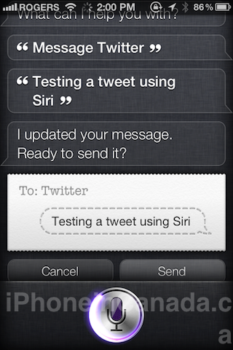
If you’ve tried to ask Siri to send tweets for you, it won’t work. But there is a workaround–enable text messaging within your twitter account, and save your country’s twitter short code to your Contacts. Once your account is confirmed, all you have to do is say “Message Twitter _____ ” and you’ll be sending out a tweet with Siri!
How to Setup Siri to Send Out Tweets to Twitter
1. Go to www.twitter.com/devices and enable text messaging.
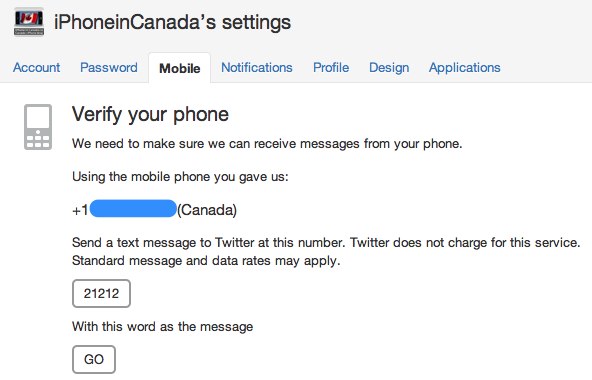
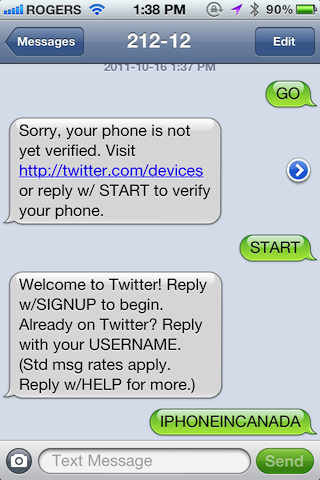
2. Verify your iPhone 4S with your account. The twitter short code for Canada is “21212” (here is a list of twitter long codes for your country). You’ll be asked for your username and password.

3. I disabled all text message notifications for twitter (I already have Push with Tweetbot on my iPhone).
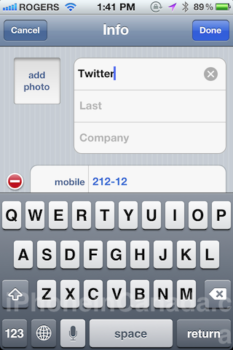
4. Add the contact number 21212 and save the first name as “Twitter”.

5. Done. Now just ask Siri to ‘Message’ twitter with whatever you want. If you’re going to use this frequently, make sure you have a suitable text messaging plan.
Siri is getting more and more powerful everyday. Let us know how this works for you!



Awesome tip Gary. Worked like a charm!
Siri tip: If you ask a Siri to “send a message” to someone you can imessage to she wont send an iMessage, she sends it as a text. BUT! You can ask to send an iMessage and it will be sent properly and appear in blue.
Thanks for the great Siri tips!
Ineed Siri s help
You can do this for facebook too. You activate facebook mobile under Account Settings –>Mobile then register your phone. Activate it and save facebook (FBOOK / 32665) then “Message Facebook” then say your message.
I need help from siri
you can also start the Twitter app and push the microphone button and ditacte you tweet , so this way you avoid sms fee
i need help from siri