If you’re a Netflix Canada subscriber, you may already know the U.S. Netflix has a greater selection when it comes TV shows, movies and more.
If you want to watch Netflix USA in Canada (this should also work for UK users and more), all you have to do is setup a virtual private network, or VPN, such as PureVPN or ExpressVPN
How it works is the VPN will give you an American IP, opening up the opportunity to view American content (your imagination can run wild here with other apps too). These VPNs will also bypass geo-restriction blocks from Netflix.
Ready to watch Netflix USA in Canada? Let’s get started…
1. Download and install PureVPN.
2. Follow the steps from the PureVPN iOS app to stupid the VPN on your iPhone or iPad. Once connected to a USA server, you’ll be able to stream Netflix USA in Canada.
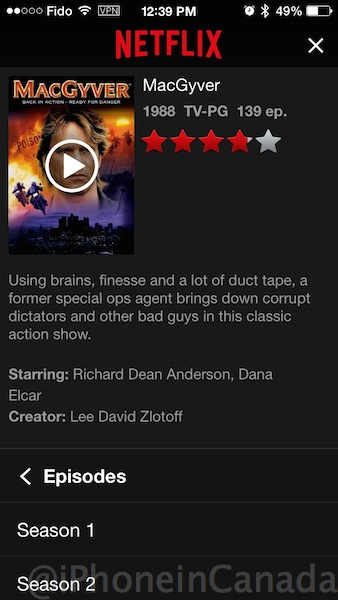
Your Netflix Canada account should now be showing the Netflix USA library, which includes 7 glorious seasons of Macgyver (not available in Netflix Canada), iPhoneinCanada reader Sheldon tells us (thanks!):
Once you have Netflix running, you can use AirPlay to stream it to your Apple TV easily. Also, you can use the site A Better Queue (it’s currently down from too much traffic but should be back soon) to find those highly rated titles based on Rotten Tomato ratings.
Let us know if you’re going to try this workaround and if it works for you. If you’re tired of using a free VPN, check out ExpressVPN or PureVPN as they are quite popular based on reviews on the web and also come with 30-day money back guarantees if you’re not satisfied.
Update Feb. 2019: this tutorial has been updated to reflect the removal of Onavo from the App Store. Netflix has implemented measures to prevent geo-restriction bypassing, but these paid VPNs will do the job.



I wonder if it also works with Onavo Extend as it also bounces through their servers when compressing the data and the setup looks the same..
Let us know if you’re going to try.
If you have a big or unlimited data plan, then yes as Onavo Extend only activates its VPN on cellular data and not on wifi. I tried running the VPN manually with Extend but it turns off once it detects your on wifi.
You can try installing Onavo Protect on top of Extend but Extend stop working properly. Onavo states that both Extend and Protect use the same VPN profile but it does not.
Well I’ll be MacGyver, it works!
Boom!
Works for me! Terrific!
Yay!
The only glitch I’ve noticed so far is that when I first turn on the VPN on my iPad, it occasionally runs for about 2 minutes and then turns itself off. Once I go and restart it, it stays connected until I manually turn it off. I spent several hours last night watching the WWE Network, which isn’t accessible in Canada, via this app. So I’m quite happy. This is easily the best iOS tip in a long, long time. Thanks very much for posting it!
Glad you’re enjoying it Mike!
MacGyver isnt even in HD 🙁
This is supposed to be a joke, right?
well yeah
Maybe you should tape two episodes together
This trick also works with the WWE Network, which isn’t available in Canada yet.
How come it won’t allow me to turn off VPN after it is installed?
Did you toggle off the setting ‘connect on demand’?
It won’t let me open it up to turn off the auto connect.
What stage of our steps did things go wrong for you?
I eventually figured it out. I had to go to settings then general to access the VPN. From there I could click on the i and open the menu.
can we delete the Protect app once the VPN certificate is installed?
I just did it and VPN still works. The Onavo Protect is just a front end interface and the VPN is a backend which is independent of the app.
Mine will connect the vpn however any US titles it says “This title isnt available to watch instantly It doesnt do this with the ones available on cdn netflix.
Sorry. Replying was glitchy. Ive tried to restart both my ph and the vpn a few times. Still receive the same msg. Any ideas how to fix this?
Looks like the VPN is not staying connected. Can you confirm that you have “Onavo Protect” and not “Extend”? If you have “Onavo Extend” then the VPN connection will drop when your using wifi and will activate when your on data which is how Onavo Extend is designed for.
which VPN service you guys using?
What is the cost of of this? You might be inclined to say “free” because you forget that when something is “free” then YOU are the product.
Onavo is a Tel Aviv-based mobile analytics company (now owned by Facebook) and their business is to capture and analyze mobile data use. By installing their VPN you are giving them access to all of your traffic, including (if you use POP or non-SSL/TLS IMAP such as Telus) your email addresses and passwords and all of your email and more.
As a Canadian using an Israeli service to access an American data centre who knows what protections you have but hey… it’s owned by Facebook; how bad could it be?
You have valid concerns. Which is why we wrote:
“Downsides of this? Onavo was acquired by Facebook last fall, so if you’re paranoid about the latter and your privacy, you might want to skip this.”
So users will have to make their own decisions here.
Works great. Thanks. Is there a similarly easy way to use VPN on a desktop Mac?
Won’t work for me. I believe I’ve done everything right, but I still get the Canadian Netflix.
Thanks for the article Gary .Why using a VPN when you can use a DNS service like UnoTelly? The DNS option is much faster and easier to use.
Followed instructions to a tee and Netflix still shows Canadian titles only
And I do have Onavo protect
I have app on iPhone and works fine, but on my iPad it works fine but it is pulling up London. Profile says its a U.S. vpn so not sure what issue is. Does this when I’m overseas and even in the US
It worked!!! thanks so much 🙂
Thanks for the article Gary. Netflix app (or Hulu, or BBC, etc) is great on iPad. If you live outside the USA, you can use tools like UnoTelly to get Netflix (or Hulu, or BBC, etc) on your iPad.
I love to watch Hulu on my Ipad that’s why i know various resources about how to set VPN on Ipad. One of the best resource is VpnRanks. This website provide best ranking for VPN Providers.
You can unblock Netflix from any location in the world with PureVPN.
By using vpn for Netflix everyone can easily access which is blocked. Just connect with vpn and watch Netflix in all over the world: http://www.vpnranks. com/5-best-vpns-for-netflix/
In past i have tried express vpn but i cant set it up on my Xbox
Recently i had the same issue with HMA, than tried Purevpn it worked on Xbox and smart tv yet speed is the issue
Any suggestion?
I get the American Netflix, but when I’m about to watch an episode of a show, it says “Error : you seem to be using an unblocker or a proxy. Please turn off any of these and try again”. But if I turn off the Vpn, I get the Canadian Netflix. What can I do?