
You Can Now Jailbreak iOS 16.4.1 with Palera1n 2.0.0 Beta 6
Codenamed Bakepale, the latest v2.0.0 beta 6 update to jailbreak tool Palera1n has just been released, which fully supports iOS 16.4 - iOS 16.4.1 jailbreak.
The TaiG team has released version 2.2.0 of their jailbreak tool, which supports an untethered jailbreak for iOS 8.4, made available by Apple earlier this morning.
Existing jailbreakers can now update to iOS 8.4 and jailbreak it with TaiG v2.2.0, which is out for Windows only right now.
How to jailbreak iOS 8.4 with TaiG v2.2.0? It’s pretty simple and similar to the previous iOS 8.3 jailbreak. But here are the basic steps:
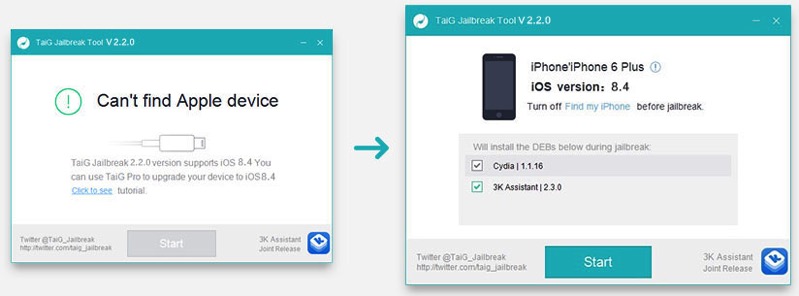
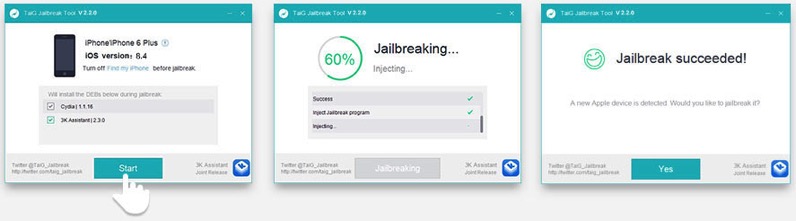
Let us know how these jailbreak steps work for you, as explained by TaiG.
If you can hold out for a day or two, that may be better as you can avoid any initial bugs or troubleshooting with this iOS 8.4 jailbreak release, as the next TaiG update will most likely fix any bugs people are having today. Save yourself some headache and listen to Apple Music instead.
Want to see more of our stories on Google?

P.S. Want to keep this site truly independent? Support us by buying us a beer, treating us to a coffee, or shopping through Amazon here. Links in this post are affiliate links, so we earn a tiny commission at no charge to you. Thanks for supporting independent Canadian media!


I’m guessing that Apple didn’t have time to patch the exploit in time for the 8.4 launch. This is very satisfying. Updating now to jump on Apple Music. =D
Enjoy 🙂
Very good advice Gary. I am happy we have the JB for iOS 8.4 but it’s always wiser to wait for few days so to avoid bugs
Thanks, I think it’s reasonable considering how quickly TaiG has been releasing updates and bug fixes.
Thanks, Gary.
Cheers Tim
Wow that was quick. I just upgraded and JB’s to 8.3 yesterday, and now have to re-do it all over again.
Is this compatible with the latest iTunes 12.2? The last Taig Jailbreak, I had to downgrade to 12.0.1 to get Taig to recognize the phone.
what is 3K Assistant?
Without looking my guess would be the third party Chinese pirate app store. I would uncheck this box before continuing.
Anyone tried this yet? Any problems/bugs?