With iOS 7, Apple has introduced a brand-new interface and a zooming in and zooming out effect, which – as you may recall – can cause some people to experience motion sickness. The fact is, you experience this zoom-in-and-out effect all the time, from opening the phone through closing apps and folders. To avoid any iOS 7 side effects, with iOS 7.0.3 Apple has introduced a great new feature and neat transition effect.
In case you find the zooming effect to be annoying or simply want to boost your iDevice’s performance, here’s what you need to do replace it with the excellent fade transition:
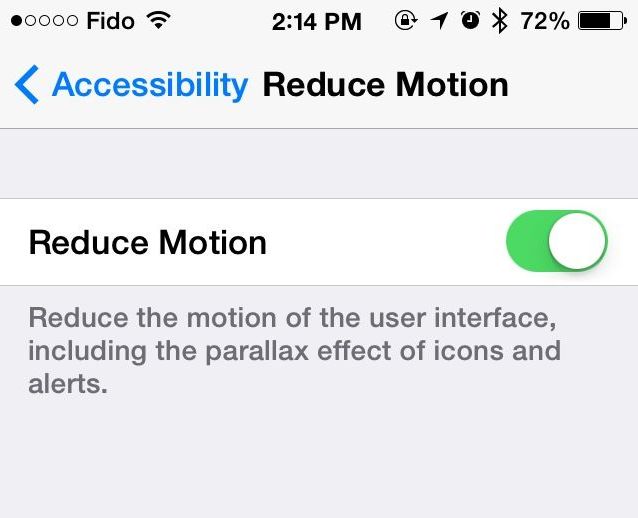
Step 1. Open the Settings app on your iDevice.
Step 2. Tap General and then Accessibility.
Step 3. Scroll down and find Reduce Motion.
Step 4. Toggle the switch to the ON position.
That’s it. You’ll notice the difference between the two settings in an instant as you hit the Home button to close the Settings app.
This setting will have a bigger impact for iPad users, given the screen size, but I love it on my iPhone, too. Since the zooming-in-and-out effect is gone, it also gives the impression of a speed boost, due to the quicker UI transition.
Enjoy!



Awesome! Thanks for sharing!
Great tip István…thanks! I was getting a little tired of those flying icons.
I use it too. It improves performance and battery life.
I wish Apple would allow us to set the animation transition time or buffer the UI gestures (or better yet, both!). I find myself constantly smacking the screen because I can’t navigate even half as fast as I used to on iOS 6. And I have an iPhone 5S now! I enabled this tip to reduce the transition time, but I do like the zoom better.
Not happy with the new update. Before the update we could reduce motion but still have the zooming effect (which I like). Now it’s all or nothing….
OH MY GOD thank you so much for this. I’ve been searching for a way of making my phone do this for so long!