
Apple’s AirPort Utility App is Being Removed From the App Store
Apple warns that "functionality is not guaranteed" when using AirPort Utility on iOS 27 or later.
Just a quick note for all the Skype for iPhone users out there. Skype for the iPhone has recently been updated to 1.0.2 and it includes a pop up warning users about running the app on modified iPhones.
Ever since the popular VoIP app was released for the iPhone, we’ve been able to download Skype in Canada by creating a free US iTunes account. Also we’ve covered how to use Skype over 3G and make unlimited calls to Canada/USA for $2.95US/month!
Whats New in This Version of Skype:
– Improved support for calling phone numbers that don’t have a country code
– Improved error handling when making calls to landlines and mobiles, which previously may have failed if you had a monthly subscription
– Resolved a problem with new account creation, which caused customers to be redirected to an incorrect web page, when making a purchase
– Fixed a problem, which caused the application to crash, when tapping a contact image (avatar) within a chat.
Does this Update Affect Jailbroken iPhones?
Anyways, the update for Skype comes with a pop up warning after installing the latest 1.0.2 update. A read on iClarified sent in this screenshot of the new warning:
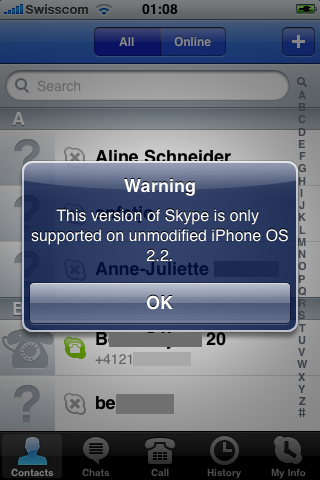
The user installed the new update on his 2G iPhone and Skype still worked perfectly. I’d like to see how this new version is working on iPhone 3Gs running 2.2.1. From the sounds of it, either Skype is trying to scare jailbroken users to avoid the update because it knows people are circumventing the “WiFi only” aspect of the app.
The first time I installed Skype on my iPhone, I ran into a problem with MobileSubstrate which caused the Skype app to crash upon start up. That problem has now been solved and Skype is working perfectly for me.
Users who have installed the Skype update on iPhone OS Beta 3 have discovered they are now limited to WiFi only (according to MacRumors forums). No more 3G calls! Aside from that, I’ve also read some conflicting reports about whether or not 3G calls will work after the update.
Anybody out there download and install the Skype 1.0.2 update, and have it working on a jailbroken iPhone 3G on 2.2.1 firmware? I’d love to hear your results! 😉
Want to see more of our stories on Google?

P.S. Want to keep this site truly independent? Support us by buying us a beer, treating us to a coffee, or shopping through Amazon here. Links in this post are affiliate links, so we earn a tiny commission at no charge to you. Thanks for supporting independent Canadian media!


I’m 2.2.1 on a jailbroken phone and installed the update to Skype last night. I got the message and thought “Oh Crap”!! There goes my 3G Skype! Anyway, I started testing it out and so far it’s ok. I just called Beijing from Ireland on 3G and it worked. So far so good…..
I retract my last comment… it’s not working anymore. I’m restoring from backup
Give it a couple days and im sure there will be a few ways to get around this… Still, crappy to read!
I have installed the Skype Update yesterday, I am 2.2.1 3G, and now i can’t do any 3G phone calls !!!!!!!!!!!!!!!!!!!!!!
Somebody out there please HELPPPPPPPPPPPPPPPPPPPPPPPPPPPPPPPPPPPP
Just updated to new Skype and got the warning message but it works ok so far on 2.2.1 jailbreak….
I upgraded Skype and I am still able to make calls on 3G. For anyone who can’t, if you haven’t emptied your trash after updating Skype, the old version of Skype will be in your trash. Look for Skype 1.0.1 1.ipa and save this file. You can revert back to the old version of Skype if you still have that file. If you’d like the steps to do this, please let me know.
I would like the steps please!
iPhone 3g 2.2.1(pwned) working with latest Skype over WiFi and 3G.
I have un-installed version 1.0.1 because after its installation, my iPhone starts to slow down on launching apps and my horizental/vertical rotation inside photo, calculator, iPod does not work anymore. After I un-installed Skype, things are back to normal. So has anyone experienced what I had with their iPhone with v1.0.1 and now 1.0.2 has fixed this slow down problem.
My iPhone is jailbroken and unlock to version 2.2
Shave please give me the steps to recover the. Older skype version
Installed skype, upgraded to 2.2.1, jailbroke, works over wifi. Haven’t set up Skype over 3G yet
Sorry Mido, I went through all the steps to downgrade Skype to the previous version, which I have done successfully with other apps, and now it crashes every time I try to launch it. If I figure out a workaround I’ll post it.
I did however have no problems going to the latest version.
im running orig skype on my iphone 3g,, gonna leave this update alone for now
Guys, remove the skype app and reinstall, skype VoiP over 3G will work normally.
Leeched the upgrade & yes …3G calls r not allowed anymore 🙁
Hey if at all possible could I get those steps off of you. This new version of Skype sucks it works 3G and WiFi but it lags so bad. Like when I go to end a call it freezes, the call is still active but i have to sit there and hit end call about 20 times before it actually ends it.
Hey if at all possible could I get those steps off of you. This new version of Skype sucks it works 3G and WiFi but it lags so bad. Like when I go to end a call it freezes, the call is still active but i have to sit there and hit end call about 20 times before it actually ends it.
Hi I would like the steps too please, the new version is a nightmare, cannot make any call at all.
Skype still works perfectly.. even if you get that message it doesnt seem to stop it from working..
I downloaded FWChanger and input the currrent version and build into that and “set custom Firmware verison) its a simple program for Tricking applications into thinkinng your running a diferent version of the Iphone OS that Skype message has since disappeared. So if that message is bothering you just download FWChanger from Cydia and be on ur way.
FWchanger on Cydia works!! Thanks Nick_Abby =)
i got the solutions friends…. 🙂
skype is working on my iphone 3G 3.0
here are the steps :-
1) download Skype 1.0.1 from here ” http://rapidshare.com/files/215843652/_Skype-v1… “
2) remove ur previous skyp version & restart ur iphone
3) copy ur downloaded Skype 1.0.1 file to iphone though itnues.
4) Run ur app
Enjoy ! 🙂
I upgraded my 3Gs not knowing about the warning and now I’m having all sorts of problems. Calls cut out or I can hear them but they cannot hear me. How do I restore from backup? Any help on that?
i got the solutions friends…. 🙂
skype is working on my iphone 3G 3.0
here are the steps :-
1) download Skype 1.0.1 from here ” http://rapidshare.com/files/215843652/_Skype-v1… “
2) remove ur previous skyp version & restart ur iphone
3) copy ur downloaded Skype 1.0.1 file to iphone though itnues.
4) Run ur app
Enjoy ! 🙂
MY Iphone 3Gs jailbreaked has logon problem with Skypr new version.
Only fist time after install , it works and Next I can't logon.
Delete it and install it again, it works only fist time.
I want to install preversion, but I don't know how…
I have the same problem. If you manually log off before closing the app it works just fine.
I updated my skype yesterday on my jailbroken 3Gs and I got screwed! wont work at all now. reinstalled it 5 times and it won’t work.
Ive been serching everywhere for someone who might know how to get the old version back?????
I’m 2.2.1 on a jailbroken phone and installed the update to Skype last night. I got the message and thought “Oh Crap”!! There goes my 3G Skype! Anyway, I started testing it out and so far it’s ok. I just called Beijing from Ireland on 3G and it worked. So far so good…..
I’m 2.2.1 on a jailbroken phone and installed the update to Skype last night. I got the message and thought “Oh Crap”!! There goes my 3G Skype! Anyway, I started testing it out and so far it’s ok. I just called Beijing from Ireland on 3G and it worked. So far so good…..
I’m 2.2.1 on a jailbroken phone and installed the update to Skype last night. I got the message and thought “Oh Crap”!! There goes my 3G Skype! Anyway, I started testing it out and so far it’s ok. I just called Beijing from Ireland on 3G and it worked. So far so good…..
I retract my last comment… it’s not working anymore. I’m restoring from backup
Give it a couple days and im sure there will be a few ways to get around this… Still, crappy to read!
Give it a couple days and im sure there will be a few ways to get around this… Still, crappy to read!
Give it a couple days and im sure there will be a few ways to get around this… Still, crappy to read!
Give it a couple days and im sure there will be a few ways to get around this… Still, crappy to read!
I have installed the Skype Update yesterday, I am 2.2.1 3G, and now i can’t do any 3G phone calls !!!!!!!!!!!!!!!!!!!!!!
Somebody out there please HELPPPPPPPPPPPPPPPPPPPPPPPPPPPPPPPPPPPP
I have installed the Skype Update yesterday, I am 2.2.1 3G, and now i can’t do any 3G phone calls !!!!!!!!!!!!!!!!!!!!!!
Somebody out there please HELPPPPPPPPPPPPPPPPPPPPPPPPPPPPPPPPPPPP
I have installed the Skype Update yesterday, I am 2.2.1 3G, and now i can’t do any 3G phone calls !!!!!!!!!!!!!!!!!!!!!!
Somebody out there please HELPPPPPPPPPPPPPPPPPPPPPPPPPPPPPPPPPPPP
Just updated to new Skype and got the warning message but it works ok so far on 2.2.1 jailbreak….
Just updated to new Skype and got the warning message but it works ok so far on 2.2.1 jailbreak….
Just updated to new Skype and got the warning message but it works ok so far on 2.2.1 jailbreak….
Just updated to new Skype and got the warning message but it works ok so far on 2.2.1 jailbreak….
I upgraded Skype and I am still able to make calls on 3G. For anyone who can’t, if you haven’t emptied your trash after updating Skype, the old version of Skype will be in your trash. Look for Skype 1.0.1 1.ipa and save this file. You can revert back to the old version of Skype if you still have that file. If you’d like the steps to do this, please let me know.
I upgraded Skype and I am still able to make calls on 3G. For anyone who can’t, if you haven’t emptied your trash after updating Skype, the old version of Skype will be in your trash. Look for Skype 1.0.1 1.ipa and save this file. You can revert back to the old version of Skype if you still have that file. If you’d like the steps to do this, please let me know.
I upgraded Skype and I am still able to make calls on 3G. For anyone who can’t, if you haven’t emptied your trash after updating Skype, the old version of Skype will be in your trash. Look for Skype 1.0.1 1.ipa and save this file. You can revert back to the old version of Skype if you still have that file. If you’d like the steps to do this, please let me know.
I upgraded Skype and I am still able to make calls on 3G. For anyone who can’t, if you haven’t emptied your trash after updating Skype, the old version of Skype will be in your trash. Look for Skype 1.0.1 1.ipa and save this file. You can revert back to the old version of Skype if you still have that file. If you’d like the steps to do this, please let me know.
iPhone 3g 2.2.1(pwned) working with latest Skype over WiFi and 3G.
iPhone 3g 2.2.1(pwned) working with latest Skype over WiFi and 3G.
iPhone 3g 2.2.1(pwned) working with latest Skype over WiFi and 3G.
I have un-installed version 1.0.1 because after its installation, my iPhone starts to slow down on launching apps and my horizental/vertical rotation inside photo, calculator, iPod does not work anymore. After I un-installed Skype, things are back to normal. So has anyone experienced what I had with their iPhone with v1.0.1 and now 1.0.2 has fixed this slow down problem.
My iPhone is jailbroken and unlock to version 2.2
I have un-installed version 1.0.1 because after its installation, my iPhone starts to slow down on launching apps and my horizental/vertical rotation inside photo, calculator, iPod does not work anymore. After I un-installed Skype, things are back to normal. So has anyone experienced what I had with their iPhone with v1.0.1 and now 1.0.2 has fixed this slow down problem.
My iPhone is jailbroken and unlock to version 2.2
I have un-installed version 1.0.1 because after its installation, my iPhone starts to slow down on launching apps and my horizental/vertical rotation inside photo, calculator, iPod does not work anymore. After I un-installed Skype, things are back to normal. So has anyone experienced what I had with their iPhone with v1.0.1 and now 1.0.2 has fixed this slow down problem.
My iPhone is jailbroken and unlock to version 2.2