As much as I love my iPhone 3G, the latest 2.1 firmware is still not the smoothest and stable yet. Apple has released a couple firmware updates so far and we have seen some improvements, but anticipation for 2.2 firmware can’t come any sooner. If you have jailbroken your iPhone, you’ve probably run into some more lag and just horrendous system speed.
The choice to jailbreak or not is entirely up to you. For myself, access to PDAnet, QIK, and some of the must have jailbroken apps is something that I enjoy. However, for some reason my iPhone 3G was at its slowest point ever and it was driving me insane. Wait times to launch apps such as the Phone, SMS, Mail, and just navigating around resulted in frustration and neverending pauses.
How to Speed up your Jailbroken iPhone 3G
Are you also experiencing laggy wait times and just general slowness? Well, here’s one simple solution to your problems. All you have to do is…
…uninstall Winterboard.
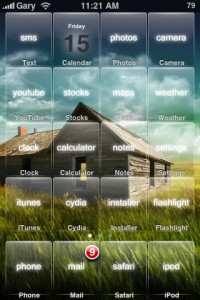
Yep, after doing some research and testing of uninstalling other apps, Winterboard is a major culprit. Sure, I love customizing my iPhone themes as much as the next person, but after uninstalling Winterboard I noticed the navigation and speed increased by 50%. So there you go, that’s my advice for the day. Uninstall Winterboard and I guarantee you’ll notice a difference in your iPhone. I would rather have a speedy iPhone instead of a laggy, customized theme installed. Let’s hope that 2.2 firmware will bring some more bug fixes our way!
Let me know if uninstalling Winterboard speeds up your iPhone 3G in the comments!
**Looking for an iPhone 3G case? Go get an invisibleSHIELD, the strongest protection for your iPhone backed by a 30 day moneyback guarantee, lifetime replacement warranty, and FREE shipping! Use coupon code iphoneinca for 20% off your purchase! Order today!**
If you enjoyed this post, please subscribe to my RSS feed, so you won’t miss any updates! You can also subscribe via email and have daily updates sent to your Inbox! Want more? Find out what I’m doing right now! Follow me on Twitter!



awwwww… I like winterboard =).
oh well… I have noticed lately that my phone is a little slow AND my battery drains just a little faster.
FK!
I knew it, but I didn’t want to admit it to myself.
So if you’re going to tell us to uninstall it, at least suggest another way to customize the phone.
Or tell us that some magic firmware, or magic update for Winterboard is in the works.
You know what, I was in the same boat as you. I loved my customized themes, but the lag was getting to the point where I would just get frustrated. Now, without WB the phone is actually pretty quick when moving from app to app. Let’s hope for an update to WB or a new firmware soon.
exactly why apple doesn’t theme or have winterboard on the app store
Apple doesn’t like to let users customize themes…I bet if they did, they would make a killing.
Thanks for the tip – any other tips for speeding up a jailbroken phone besides Winterboard? I never installed it, but mine’s so S-L-O-W.
Winterboard is one of the main reasons I jailbroke in the first place! I jailed my phone as of the last update, as I don’t like the lag in speed that jailbreaking does. I’m pretty happy with the features available in the unbroken phone and I’m confident that there will be customizable screens coming quite soon. Had dinner with Steve and his family last weekend and he let a little something slip! That’s all I can say right now (legally) 🙂
..
Everyone have a fantastic Friday and weekend!
I do noticed my 3G is slow these days at launching apps like Setting to turn on Wifi, Phone, etc. but I do like the winterboard theme. What to do…
Uninstall it and see the difference. You can always reinstall it!
Does it have to be uninstalled? can i just turn off all the themes (wall papers etc) but just leave like one or two things (such as the battery chargers)?
I think it is the app WB itself. Uninstalling seems to have the greatest effect on speed.
Yes, I also figure out this recently that Winterboard is sadly the reason slowing down my iPhone. Really missing the stable Summerboard in FW v1.1.x
However, uninstall Winterboard doesn’t mean you can’t customize your iPhone, you can still do them manually. Just copy the files inside the theme dir to the matching location in your iPhone then you will still get a customized iPhone with no lag !!!
Good point!
how do you install it manually through the themes folder as you say?
i miss summer board as well
Even not selecting any theme won’t help unless you uninstall.
Personally I’m guessing that Winterboard use too much system resource even though you are not loading any theme. Also, there could be memory leak for this program that’s why the longer you run the slower your iPhone is, until you reboot then get a bot better…..
i think the developer of winterboard has to address this issue. i love the app and would be sad to see it go, if there is something he/she could do so that we can continue supporting it. i’m even willing to pay for an effeciently run winterboard in the future!
Agreed!
I am definitely willing to drop a bit of cash to have this app work efficiently. Probably be the best bang for your buck compared to anything in the app store.
:p
Wow. Like night and day!
Told ya! 😉
My iPhone keep crashing (return to home screen) until I see this article! Now my iPhone really speed up and less crash!
Thx and hope dev. Of winterboard will address this issue soon!
wow it works like a charm thanks!
i wasn’t even customizing anymore…just had it for the sake of it, or in case a montreal canadien theme would come out.
Actually, springboard would occasionally go into ‘wiggle’ mode even after a short touch tap…uninstalling winterboard seemed to have solved this issue as well
You’re welcome guys. Let’s hope this gets addressed soon because I miss customizing the themes on my iPhone already!
I just want to know what springboard theme is the one in the photo D:
I love and want it, regardless of the lagging. 😛
Uninstalling WB is exactly what I did to speed up my phone! It made a huge difference. Loading SMS is still terribly slow, and I still only have 160MB of 500MB free of memory…any other ideas other than BossTools?
Thanks for saving me the troubleshooting. Wasn’t even using winterboard anyway since I have to provide a lot of “clean” screenshots 🙂
:(. You guys are right. I was afraid it was winterboard and got rid of it and walla. Things are ten times faster. Too bad cuz I honestly only really use the jailbreak for that program but the slow speeds are too much
hi i took your advice and uninstalled winterboard and the zippy speed is great but just out of curiousity what was the theme you have in the picture above. the see threw apps one
I’ve never installed Winderboard for that reason exactly. No problems here. a crash the odd time but RARELY.
Thanks for the tip. I wrote it up on my blog
http://www.touchmyapps.com
I noticed a speed difference right away. Also, I found that backgrounder had caused some stability issues as well. i uninstalled this a week before i deleted winterboard and noticed some increase in speed, but no where near the increase after getting rid of winterboard.
Louis
thank you i think much better now after uninstalling winterboard
Hey!
I have uninstalled Winterboard too, but…
I still noticed slight lag when I’m playing Tap Tap Revenge. That little lag made playing the game almost impossible.
Now I remembered a general fact: Installing extra system apps on any system consumes memory, even the little ones. So I uninstalled the “5 icons in the dock” tweak, and guess what?
The lag was gone!
This may be a hint for others: Background system apps and Springboard tweaks slows down your iPhone. The best thing to do is just uninstall them all, it really speeds up!
Can anybody verify whether or not winterboard slows down the iPhone in the new 2.2 firmware? I can’t tell but it seems to be running fine.
I recently pwned my 2G iphone to 2.2, was experiencing at least 6 seconds delay just opening ‘Settings’. I uninstalled Winterboard and immediately noticed just a 2.2 second delay when opening the ‘Settings’ page. Sure seems to me that Winterboard was slowing my iphone down.
what about summerboard? does that slow down ur iphone as much as winterboard?
Summerboard is the built-in menu from the iPhone. If you uninstall that, I don’t think you will be able doing anything on it.
I did a bit of research about this issue as well. I found the issue was caused by memory leak in the syslogd daemon. Uninstalling Winterboard will only delay the problem, not solve it.
I’ve written an analysis about the issue, here:
http://blog.thinkbulbs.com/2009/02/how-to-stop-your-jailbroken-iphone-from.html
My fix requires some knowledge of UNIX systems, so it may not be suitable for casual users. But I guess someone can “port” it to a GUI app in Cydia so casual users can access it.
Martin, that link does not work. I am very interested in what you were able to do to spped up a jailbroken iphone.
yay this speeds up my ipod touch loads!!!! i think i can liv without the themes
Winterboard’s running all the time and consuming cpu power thereby resulting in a prettier user experience at the expense of responsiveness. I’ve just uninstalled Winterboard and am now getting a snapper result. Although I like the customization usability is more important. “There’s always a price to pay”
In the absence of winterboard, i guess we have to SSH it. Placing icons of fav themes per apps. Background can be done via iphone’s background. I don’t know about the sound though.
What theme is that at the top?
I have a jailbroken iPhone 3g with winterboard and tons of customized things installed and i havent had one speed issue, just slightly less battery–but since the battery life sucks anyways, its not a big deal
well i uninstalled winter board and i must say that my iphone is much faster, i do miss winter board however, if you do feel the need to reinstall it, all the themes you had should still be available if you dont uninstall them because you had to install them via cydia to begin with…. hopfully that makes sense. cheers
I have iphone 3g 2.2.1 firmware and recently jailbroke it and installed winterboard and a TON of different themes… To me, there’s absolutely no speed different between jailbroken/jailed phone… if there is any problems to speak of it would be an occasional crash now and again (really only after I try to Background too many apps!!) and as far as speed no difference to speak of. Internet and WiFi works perfectly, no diff in speed there either. Trick is to just keep re-springing constantly to kill off any programs running in background u dont need. Get SBSettings to do this thru Cydia and keep a constant eye on your memory. Ive found optimal memory is in the high double-digits, (ie: 15-30 mb free). Good luck.
wow i would have thought the themes would take up some mem but i didnt think winterboard would use so many resources however im still curious as to what that theme is
You are kind of a Hero to me now 😉
i'll Miss winterboard, but my 3.0 3G is now … How to Say ? WOW ! ^^
its fast, battery lasts longer and i don't get networkloses all the time anymore
It's called Reveal.
Reveal
Hey what theme is that shown? The one with the shack and the grass? Email me back, thanks.
The answer is two comments above you!
Its called Reveal.
Whatever dude.
Yes! I had no problems to give up winterboard as long as I got to keep my 5 columns.
Excellent.
Thanks!
ON the 3.1 frimware there dose not seam to be any lag or slow down of the iphone and i have new themes and im always playing around with it 🙂
OMG I never thought I'd find the solution to it! Holy crap it is so much faster now! Thanks so much!
Yes it definitely made my phone faster and more usable. Thank you!
Cheers !
use “SwapMode” found it in cydia. use it when playing games and stuff. its fast as if you have a new jailbroken device and no other app installed. you can always turn it off and you'll have your themes again.
or its the slipknot theme i think…
Which theme is that? ( from the image displayed)
i timed it. 12 seconds to press unlock button, slide to unlock, click sms, then open the first text message.
then uninstalled winterboard, and it took 7 seconds. that's a huge difference.