iPhone 2.1 Firmware Released–Millions of Canadians Rejoice and Celebrate with Family
Okay maybe it’s not THAT big of an announcement, but this morning I woke up to a big surprise–firmware 2.1 had finally been released! There was a flurry of blog comments as many of you back East were already downloading the firmware while I was still sleeping like a baby. Anyways, as I wrote yesterday I was pretty excited and started the backup/update process myself. Let’s take a gander at my experience updating to 2.1 firmware with the following review.
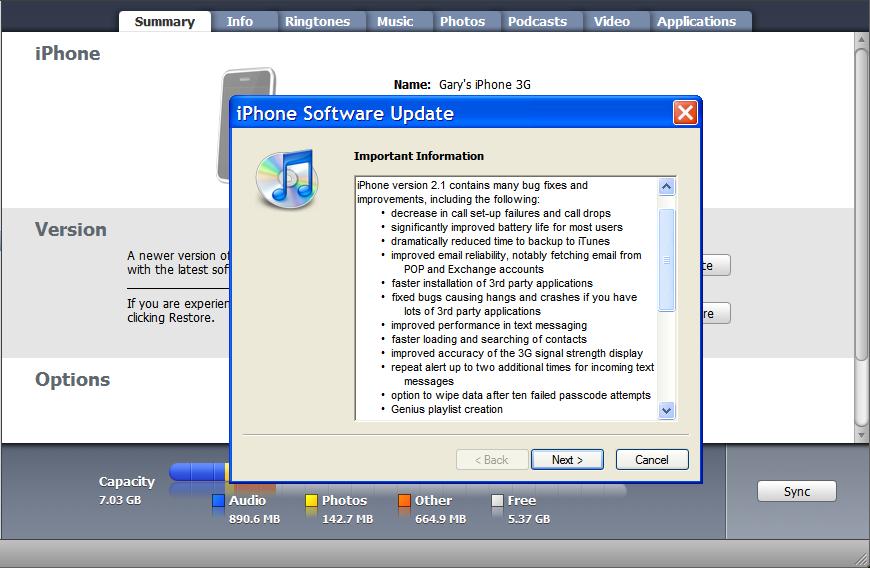
Here are the following official “fixes” from 2.1 firmware (quite the detailed list from Apple):
- Decrease in call set-up failures and dropped calls
- Significantly better battery life for most users
- Dramatically reduced time to backup to iTunes
- Improved email reliability, notably fetching email from POP and
- Exchange accounts
- Faster installation of 3rd party applications
- Fixed bugs causing hangs and crashes for users with lots of third
- party applications
- Improved performance in text messaging
- Faster loading and searching of contacts
- Improved accuracy of the 3G signal strength display
- Repeat alert up to two additional times for incoming text messages
- Option to wipe data after ten failed passcode attempts
- Genius playlist creation
The 2.1 update file is 237.8MB and was available in iTunes. I chose the “Download Only” option as I’m going to do a complete restore and fresh install of 2.1 on my jailbroken iPhone 3G. I want to ensure that my iPhone will be uber clean and factory fresh. Let’s take a gander at some of the observations I noted during my install:
- Once the restore process was completed, I just chose to restore from backup. Easy as pie. All my jailbroken apps are now gone. I’m willing to forego jailbreak apps for a speedier iPhone experience.
- I immediately noticed the keyboard lag had disappeared. I’m not lying this time, but really it’s gone folks! 2.1 feels very “snappy” and quick. However it’s not perfect–I just experienced my first freeze while I was using Safari and had to do a force reboot (I was trying to do a speed test).
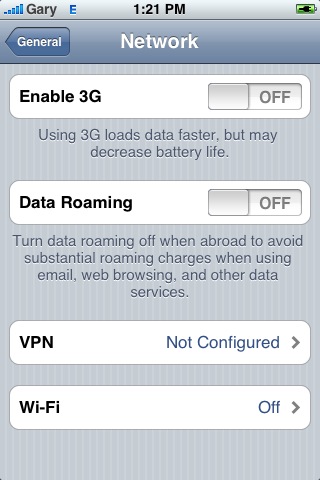
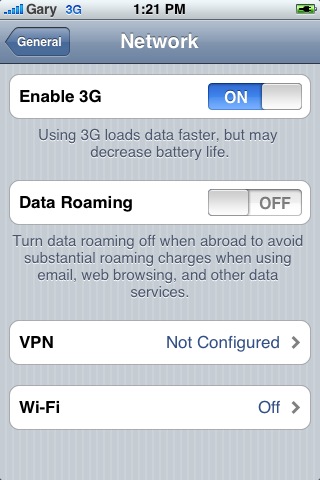
- There are new EDGE and 3G icons. Also, as you will see in the pics below, Erica’s MakeItMine app still has my carrier as “Gary” instead of Rogers! LOL. If I chose to “Setup as a New iPhone” and not backup, this carrier logo would be eliminated. But as for now, everything works great.

- Go to Settings–>General–>About–>Carrier reads “Rogers 2.6″…will be interesting what this means, if any.
- Modem firmware is now 02.11.07.
- I did another iPhone Speedtest to see if speeds changed at all…here are my unscientific results:
- WiFi now: 2912kbps; previously 2758kbps
- 3G now: 1529kbps; previously 839kbps
- EDGE now: 189kbps; previously 145kbps
- obviously these speeds will vary by location/time of day, so test for yourself!
So there you go folks, so far so good. Thanks to Apple for listening to its customers and submitting a fix for all the iPhone bugs that existed before. I’m not used to this super fast keyboard typing experience all of a sudden! It’ll be interesting to see just how my battery life will be improved with 2.1. I’ll try to follow up on this later after some more testing.
As for the jailbreak game, the Dev Team has jailbroken 2.1 on the iPod Touch. Could we see a 2.1 jailbreak coming our way? I can see it happening very soon…
How did your 2.1 update go?
Winner of the ivySkin XyloT3 is…
Congrats to Tim Aucoin for his wonderful poem! I let some friends decide for me, and they chose Tim’s poem as their favorite. Well done TIM and CONGRATS! Thanks to everyone who entered! Look forward for MORE giveaways coming your way!
**Looking for an iPhone 3G case? Go get an invisibleSHIELD, the strongest protection for your iPhone backed by a 30 day moneyback guarantee, lifetime replacement warranty, and FREE shipping! Use coupon code iphoneinca for 20% off your purchase! Order today!**
If you enjoyed this post, please subscribe to my RSS feed, so you won’t miss any updates! You can also subscribe via email and have daily updates sent to your Inbox! Want more? Find out what I’m doing right now! Follow me on Twitter!



Went smoothly – didn’t hang and there were no problems. Nice .
Unfortunately, there appears to be no significant difference in the operation of the unit.
Safari hung when I tried to use it, signal strength still not very good. Dropped my first call.
Apple’s marketing/hype machine works better than their products.
Alas.
I had an issue with Safari, but it turned out it was the website I was on that caused a slight hang.
It crashed on the Apple site for me.
Is there directions on how to do a complete restore somewheres available?
Plug in your iPhone, launch iTunes. Instead of clicking “Update”, click “Restore”.
Once it finishes, just choose to sync from a previous back up. DONE!
Anybody know how to activate the additional notifications for txts?
Forgot to mention, the additional notification is automatic. You’ll hear another reminder if you haven’t checked out an incoming text.
after reading this post i decided to do my own speed tests with v 2.1. i was lucky to get your old speeds. let alone your new and improved ones. but with the update my phone shoes a much stonger 3g signal. still had some safari crashes but the backup time is amazing at less than 30 seconds. still have some lag with the contact list and keyboard. no real change noticed there. although it was lighning fast before i reloaded my apps, and media. as for battery life i was getting excelent life as of 2.02 so it will take more time to really tell if battery life has changed. and i haven’t used the phone yet. initial test with email showed no fetching or push. time will tell.
Same here. Right now I’m testing with only 3G turned on and Fetch (every 30 mins) on. Will let you guys know how the battery fares!
Is there anyway to save all your jailbroken apps and settings?
So that after you restore and update to 2.1, and when the iphone-dev team comes out with an update, you’ll have all your cydia loving features in tact?
Check out iBaRes. I used this to back up everything, but have yet to restore from it. Supposedly, it does exactly what you’re looking for. The back up part works great.
Free download:
http://groups.google.com/group/ibares/web/ibares—homepage
The backup process is now INSANELY fast. It only takes a few seconds whereas before it would probably take an hour or so.
However, I can’t get my gps to work. Maps load fine but I can’t get it to locate me (besides triangulating).
I also had an issue with GPS, couldn’t locate me. I had this problem with 2.0.2 as well. Had to reboot and it worked fine.
My GPS also gave me trouble. When I touched on the button to find my location in the past, a window would come up and ask if I would allow location services to turn on, after touching “OK” everything would be on and working. After the update I could tell it (touch the ok button) to go all I want, but nothing would work. Then, right beside the “OK” button you could chose the “SETTINGS” button, so I did. At that point the maps app shut down, settings opened up and I chose and turned on location services. Then I closed settings, opened maps, touched to find my location, and then every thing worked fine. At that point I turned of location services again and tried the old way……., no way……, won’t work. So, is this an intentional move for Apple, or just a glitch that a few are experiancing? Anyone?
Very interesting. Read my experience above.
is the a way to turn off multiple text notification?
P.S.
Key board was lagging typing this whole post. What a joke this update was.
I think it’s on by default. I expect the option to turn it off will come via the recently released jailbreak soon.
Yup, I am 2.1 and my safari froze on a speed test as well. Had to force reboot. Could it be a potential bug?
I think it’s the speed test website…it doesn’t like Safari! or Safari doesn’t like it!
how come i don’t see my Genius playlist creation after updated to 2.1? does any one have it?
You need to go to “playlists” within the iPod app…try it.
if i go to playlist in iPod mode, i only see “on-the-go” , still no genius ><
I had the same problem. I restored my iPhone, synced it, and then I saw the “Genius” in the Playlist.
what? i have to restored my iPhone? will i lost all my sms message?
just did some more 3g speed tests. 1600-1800Kbps i’m impressed. i don’t have any answer as to why it’s so much faster now other than it’s 4 am and everyone in the right mind is asleep. with speeds like that i had to try out a few videos. you tube and truveo loaded videos without any lag and not a single stop in the video for buffering. if speeds like this were consistant on 3g we wouldn’t need wifi. also noticed with location serviced turned off it won’t ask you everytime you open the camera app if you want to use location.
I’ve decided to turn off WiFi permanently, it’s annoying to have the WiFi menu pop up all the time. If I need super fast speeds at home, I’ll turn it on!
Why don’t you just turn off the “Ask to Join Networks” option under Wi-Fi, and then it’ll just switch to your home WiFi without asking?
Because I hate WiFi. 🙂
Why do you hate WiFi? It would be faster than 3G (unless you have slow Internet)…
So I did a battery test, I am impressed…
Streamed youtube videos at 50% brightness from 5h51m before the iphone shut off by itself.
Cool! I am testing the battery right now…I hope to see some improvement as well.
Just updated too… with Fido, Carrier name is now Fido 2.6 too..
Interesting…
After I upgraded my frimware and Itunes I noticed I lost all my contacts in Outlook 2007. They are still in my iPhone. Have synced a bunch of times since and can’t get them to go back to my PC. Any ideas? I also sync my calandar and that is unaffected.
That’s weird…I don’t use Outlook but I’ll see if I can do some digging around.
This is so idiotic. How do companies get away with releasing a product this is incomplete or buggy?? Don’t get me wrong I love my iPhone but it’s not right. I have just updated to the new 2.1 and now my gps isn’t working properly and my speed is down on 3G.
Yeah, it can be annoying..just look at Windows and their constant stream of updates…at least Apple is addressing these issues in reasonable amounts of time!
i attempted to update but as soon as I plugged in my iphone, i got a blue screen of death. Looked it up online, there is apparently compatability issues with itunes 8, the iphone and HP printer softerware (no joke). Uninstalled my printer and everything is fine. But how do I print things now??? lol
LOL. Did you download the revised version of iTunes 8? I think that might help!
I thought MakeItMine was a Cydia app. How did you get it on your 2.1 iPhone?
I have noticed general speed improvements including the keyboard except when I starting typing this comment on your blog, weird.
It is! That’s the funny thing, it looks like it stayed on my phone during the backup. Just hilarious!
Updated yesterday and so far, great things. The backup process (I’ve only done it once since updating though) isn’t much shorter. It usually took 2-5 minutes for me unless I downloaded/updated an app from the phone. Now, it’s about 1-3 minutes to backup. Noticed 3G signal strength is a lot better. The contact list definitely loads a lot faster for me. Overall speed of surfing is faster as well. My GPS was working fine when I checked at home. The most impressive thing for me is the battery life. A definite increase. I’m on 3G right now on standby for almost 5 hours and it’s still almost full. Whereas before, I’d be probably at 75%. Whee!!
I am also loving 2.1 too! glad you enjoyed it!
What crap! One iphone shut down, two safari crashes, momentary icon lags, GPS has stopped functioning. I might as well be using Vista…
Hey so how do you get rid of Gary and replace it back with rogers? or can that not be done?
Open the MakeItMine app (from Cydia) and delete all the text in that textbox and hit “Ok”. That should reset the carrier text back to default (you may need to restart your phone, I don’t remember).
basketball shoes outlet Thank you very much for sharing!!To top!XX is a professional webside which offer lots of common sense of life and I have learnt a lot since my friends recommended it to me.There are several articles about this theme in XX,come on and have a discussion!
Went smoothly – didn’t hang and there were no problems. Nice .
Unfortunately, there appears to be no significant difference in the operation of the unit.
Safari hung when I tried to use it, signal strength still not very good. Dropped my first call.
Apple’s marketing/hype machine works better than their products.
Alas.
Is there directions on how to do a complete restore somewheres available?
Plug in your iPhone, launch iTunes. Instead of clicking “Update”, click “Restore”.
Once it finishes, just choose to sync from a previous back up. DONE!
I had an issue with Safari, but it turned out it was the website I was on that caused a slight hang.
Anybody know how to activate the additional notifications for txts?
Forgot to mention, the additional notification is automatic. You’ll hear another reminder if you haven’t checked out an incoming text.
after reading this post i decided to do my own speed tests with v 2.1. i was lucky to get your old speeds. let alone your new and improved ones. but with the update my phone shoes a much stonger 3g signal. still had some safari crashes but the backup time is amazing at less than 30 seconds. still have some lag with the contact list and keyboard. no real change noticed there. although it was lighning fast before i reloaded my apps, and media. as for battery life i was getting excelent life as of 2.02 so it will take more time to really tell if battery life has changed. and i haven’t used the phone yet. initial test with email showed no fetching or push. time will tell.
It crashed on the Apple site for me.
Is there anyway to save all your jailbroken apps and settings?
So that after you restore and update to 2.1, and when the iphone-dev team comes out with an update, you’ll have all your cydia loving features in tact?
The backup process is now INSANELY fast. It only takes a few seconds whereas before it would probably take an hour or so.
However, I can’t get my gps to work. Maps load fine but I can’t get it to locate me (besides triangulating).
Check out iBaRes. I used this to back up everything, but have yet to restore from it. Supposedly, it does exactly what you’re looking for. The back up part works great.
Free download:
http://groups.google.com/group/ibares/web/ibares—homepage
My GPS also gave me trouble. When I touched on the button to find my location in the past, a window would come up and ask if I would allow location services to turn on, after touching “OK” everything would be on and working. After the update I could tell it (touch the ok button) to go all I want, but nothing would work. Then, right beside the “OK” button you could chose the “SETTINGS” button, so I did. At that point the maps app shut down, settings opened up and I chose and turned on location services. Then I closed settings, opened maps, touched to find my location, and then every thing worked fine. At that point I turned of location services again and tried the old way……., no way……, won’t work. So, is this an intentional move for Apple, or just a glitch that a few are experiancing? Anyone?
is the a way to turn off multiple text notification?
P.S.
Key board was lagging typing this whole post. What a joke this update was.
Yup, I am 2.1 and my safari froze on a speed test as well. Had to force reboot. Could it be a potential bug?
how come i don’t see my Genius playlist creation after updated to 2.1? does any one have it?
just did some more 3g speed tests. 1600-1800Kbps i’m impressed. i don’t have any answer as to why it’s so much faster now other than it’s 4 am and everyone in the right mind is asleep. with speeds like that i had to try out a few videos. you tube and truveo loaded videos without any lag and not a single stop in the video for buffering. if speeds like this were consistant on 3g we wouldn’t need wifi. also noticed with location serviced turned off it won’t ask you everytime you open the camera app if you want to use location.
So I did a battery test, I am impressed…
Streamed youtube videos at 50% brightness from 5h51m before the iphone shut off by itself.
Just updated too… with Fido, Carrier name is now Fido 2.6 too..
After I upgraded my frimware and Itunes I noticed I lost all my contacts in Outlook 2007. They are still in my iPhone. Have synced a bunch of times since and can’t get them to go back to my PC. Any ideas? I also sync my calandar and that is unaffected.
This is so idiotic. How do companies get away with releasing a product this is incomplete or buggy?? Don’t get me wrong I love my iPhone but it’s not right. I have just updated to the new 2.1 and now my gps isn’t working properly and my speed is down on 3G.
i attempted to update but as soon as I plugged in my iphone, i got a blue screen of death. Looked it up online, there is apparently compatability issues with itunes 8, the iphone and HP printer softerware (no joke). Uninstalled my printer and everything is fine. But how do I print things now??? lol
I thought MakeItMine was a Cydia app. How did you get it on your 2.1 iPhone?
I have noticed general speed improvements including the keyboard except when I starting typing this comment on your blog, weird.
Updated yesterday and so far, great things. The backup process (I’ve only done it once since updating though) isn’t much shorter. It usually took 2-5 minutes for me unless I downloaded/updated an app from the phone. Now, it’s about 1-3 minutes to backup. Noticed 3G signal strength is a lot better. The contact list definitely loads a lot faster for me. Overall speed of surfing is faster as well. My GPS was working fine when I checked at home. The most impressive thing for me is the battery life. A definite increase. I’m on 3G right now on standby for almost 5 hours and it’s still almost full. Whereas before, I’d be probably at 75%. Whee!!
Same here. Right now I’m testing with only 3G turned on and Fetch (every 30 mins) on. Will let you guys know how the battery fares!
Same here. Right now I’m testing with only 3G turned on and Fetch (every 30 mins) on. Will let you guys know how the battery fares!
Same here. Right now I’m testing with only 3G turned on and Fetch (every 30 mins) on. Will let you guys know how the battery fares!
Same here. Right now I’m testing with only 3G turned on and Fetch (every 30 mins) on. Will let you guys know how the battery fares!
I also had an issue with GPS, couldn’t locate me. I had this problem with 2.0.2 as well. Had to reboot and it worked fine.
I also had an issue with GPS, couldn’t locate me. I had this problem with 2.0.2 as well. Had to reboot and it worked fine.