
You Can Now Jailbreak iOS 16.4.1 with Palera1n 2.0.0 Beta 6
Codenamed Bakepale, the latest v2.0.0 beta 6 update to jailbreak tool Palera1n has just been released, which fully supports iOS 16.4 - iOS 16.4.1 jailbreak.
Happy New Year everyone! 2009 is upon us and we have some big news to report from the iPhone Dev Team regarding their 3G software unlock, yellowsn0w.
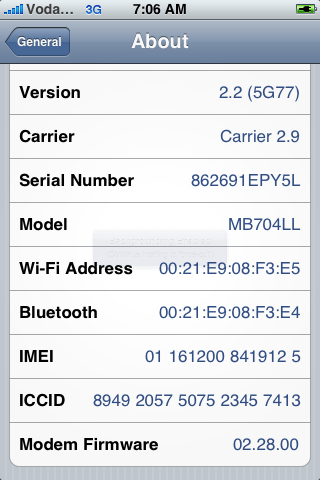
Turns out that the iPhone 3G software unlock will work for baseband 02.28.00, which is the baseband from 2.2 firmware! So that means we no longer will need to use PwnageTool to create a custom 2.2 firmware to update from 2.1. You can just click “update” in iTunes to get to 2.2 then launch QuickPwn.
How to Update from 2.1 to 2.2 Firmware Using a “late 2008” MacBook
So when I found out this fabulous news, I updated my iPhone 3G to 2.2 firmware this morning and jailbroke using QuickPwn 2.2. Here are the Cliff notes of what I did:
1. Plugged in iPhone, launched iTunes, clicked on Update and 2.2 was installed.
2. Downloaded QuickPwn 2.2, launched it, followed the instructions and jailbroke successfully.
3. I bypassed the DFU mode problem with my aluminum MacBook by using a memory card/USB hub I had kicking around. My first attempt getting into DFU mode worked like a charm!
Problems: On the last step of the jailbreak, QuickPwn instructs you to wait for the iPhone to reboot to finish the process. However, my iPhone was stuck in an endless reboot loop that constantly had the Apple logo displaying. What I did was after a few reboots I just unplugged the USB cable from my iPhone and did a manual force reboot. The iPhone came back to life and Cydia/Installer was on the homescreen, which meant success!
Other people how have ran into this rebooting issue reported that doing a clean 2.2 restore to update, rather than clicking “update” will solve this issue. The problem lies with installed iPhone apps that interfere with the final step somehow.
What You Need to Know about the iPhone 3G software Unlock, yellowsn0w:
Here is a basic summary of what you need to know right now:
– Since yellowsn0w will be available via Cydia, that means your iPhone must be jailbroken. The easiest way is to update to 2.2 via iTunes, then jailbreak using QuickPwn (for both Windows and Mac OS X users).
– 2.2 firmware’s baseband has been included so everyone’s iPhone 3G can be unlocked. The world rejoices!
– yellowsn0w is completely removable through Cydia, the command line, and iTunes.
– yellowsn0w will be released in Cydia sometime today. Patience is a virtue!
So there you have it everyone. If you were holding out on updating to 2.2 firmware, the wait is over. Update away, jailbreak, and wait for the release of yellowsn0w!
Read more here.
**Looking for an iPhone 3G case? Go get an invisibleSHIELD, the strongest protection for your iPhone backed by a 30 day moneyback guarantee, lifetime replacement warranty, and FREE shipping! Use coupon code iphoneinca for 20% off your purchase! Order today!**
If you enjoyed this post, please subscribe to my RSS feed, so you won’t miss any updates! You can also subscribe via email and have daily updates sent to your Inbox! Want more? Find out what I’m doing right now! Follow me on Twitter!
Want to see more of our stories on Google?

P.S. Want to keep this site truly independent? Support us by buying us a beer, treating us to a coffee, or shopping through Amazon here. Links in this post are affiliate links, so we earn a tiny commission at no charge to you. Thanks for supporting independent Canadian media!


Is there a link to get QuickPwn for 2.2 without using BitTorrent. My work computer wouldn’t allow me to install BitTorrent soft. Thanks.
Here is the link I downloaded QuickPwn 2.2 for OSX from: http://jmcoon.net/QuickPwn_2.2.dmg (this was posted on iClarified)
PC computer I use 🙂
LOL. I guess in that case the above won’t work. Try this: http://imodzone.net/QuickPwn22.zip
You might also need this: http://appldnld.apple.com.edgesuite.net/content.info.apple.com/iPhone/061-5778.20081120.Aqw4R/iPhone1,2_2.2_5G77_Restore.ipsw
As you said. Update to 2.2 via iTunes, run quickPwn 2.2 (follow its insturction) to jailbreak, use Cydia to get YellowSn0W and all will be unlock…
Will this work if I used Pwnage Tool 2.2 rather than QuickPwn? Sorry if this is a bit of a noob question.
It should as long as your are on the latest baseband 02.28.00.
Thanks!
Hi Everyone,
I’d just like to say that I did a clean restore and used quickpwn 2.2 on a PC (I don’t have a usb hub so I couldn’t jailbreak on my Mac!) and found success. I too had the endless loop problem the first few times but after doing a clean restore, I found success!
Update: I restored from backup to get back all my stuff and Cydia disappeared!!! I googled how to fix this problem and all you have to do is enable then disable restrictions. My Cydia reappeared!
I have modem firmware 02.30.03 on my iPhone3G version 2.2.1 (5H11).
Can I still jailbreak my phone?
Nobody talks about Firmware 2.30.03.
Please help
Is there a link to get QuickPwn for 2.2 without using BitTorrent. My work computer wouldn’t allow me to install BitTorrent soft. Thanks.
Is there a link to get QuickPwn for 2.2 without using BitTorrent. My work computer wouldn’t allow me to install BitTorrent soft. Thanks.
Is there a link to get QuickPwn for 2.2 without using BitTorrent. My work computer wouldn’t allow me to install BitTorrent soft. Thanks.
Here is the link I downloaded QuickPwn 2.2 for OSX from: http://jmcoon.net/QuickPwn_2.2.dmg (this was posted on iClarified)
Here is the link I downloaded QuickPwn 2.2 for OSX from: http://jmcoon.net/QuickPwn_2.2.dmg (this was posted on iClarified)
Here is the link I downloaded QuickPwn 2.2 for OSX from: http://jmcoon.net/QuickPwn_2.2.dmg (this was posted on iClarified)
PC computer I use 🙂
PC computer I use 🙂
PC computer I use 🙂
LOL. I guess in that case the above won’t work. Try this: http://imodzone.net/QuickPwn22.zip
You might also need this: http://appldnld.apple.com.edgesuite.net/content.info.apple.com/iPhone/061-5778.20081120.Aqw4R/iPhone1,2_2.2_5G77_Restore.ipsw
As you said. Update to 2.2 via iTunes, run quickPwn 2.2 (follow its insturction) to jailbreak, use Cydia to get YellowSn0W and all will be unlock…
As you said. Update to 2.2 via iTunes, run quickPwn 2.2 (follow its insturction) to jailbreak, use Cydia to get YellowSn0W and all will be unlock…
Will this work if I used Pwnage Tool 2.2 rather than QuickPwn? Sorry if this is a bit of a noob question.
Will this work if I used Pwnage Tool 2.2 rather than QuickPwn? Sorry if this is a bit of a noob question.
It should as long as your are on the latest baseband 02.28.00.
It should as long as your are on the latest baseband 02.28.00.
It should as long as your are on the latest baseband 02.28.00.
Thanks!
Thanks!
Hi Everyone,
I’d just like to say that I did a clean restore and used quickpwn 2.2 on a PC (I don’t have a usb hub so I couldn’t jailbreak on my Mac!) and found success. I too had the endless loop problem the first few times but after doing a clean restore, I found success!
Hi Everyone,
I’d just like to say that I did a clean restore and used quickpwn 2.2 on a PC (I don’t have a usb hub so I couldn’t jailbreak on my Mac!) and found success. I too had the endless loop problem the first few times but after doing a clean restore, I found success!
Update: I restored from backup to get back all my stuff and Cydia disappeared!!! I googled how to fix this problem and all you have to do is enable then disable restrictions. My Cydia reappeared!
I have modem firmware 02.30.03 on my iPhone3G version 2.2.1 (5H11).
Can I still jailbreak my phone?
Nobody talks about Firmware 2.30.03.
Please help
These are all great tips. Thanks for a great source.