Hey all!
Today we have a review for an iPhone application called “GPSpy”. GPSpy (pronounced “GPS Spy”) is developed by a local fellow Canadian and the application unleashes the full power of your iPhone 3G GPS receiver and delivers more advanced GPS data than the stock GPS on your iPhone.
GPSpy by Blue Globe Software
This week I got my hands on GPSpy from the iTunes App Store and I have been having a lot of fun with this app. Most of us are familiar with the GPS we have through Google Maps on our iPhone 3G and most of us are aware that the capabilties with that GPS app are fairly limited. This is where GPSpy comes in. GPSpy unleashes the iPhone’s GPS capabilties by delivering more GPS and tracking related data, in a much more accurate and user friendly form.
Below I am going to list some of the functions that you can have on your iPhone 3G while using GPSpy:
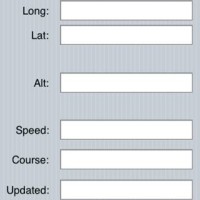
1.) You can see your current longitude and latitude with estimated accuracy (something that has been very very requested for the original Google maps that ships with the iPhone)
2.) You can see your current altitude, speed, and course (see image above)
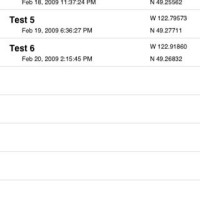
3.) You can bookmark any location scans that you have done for further use later on and can view any existing bookmarks as well.
4.) You can email your bookmarks for viewing outside of your iPhone or for use in your favourite GPS tracking program (on a PC or Mac for example)
With the above listed data, the iPhone becomes a powerful and useful GPS device. Some of the uses and benefits of this data are GeoCaching, mapping, hiking, or any other activity that requires location mapping. So, as you can see, GPSpy takes the existing GPS receiver in your iPhone 3G and bumps it up to the next level.
Now some of you may be concerned about battery life, but have no fear! As we all know, the GPS in the iPhone 3G uses a ton of battery life, but GPSpy helps us out with this. GPSpy lets you allocate how accurate you want the GPS to deliver (more accuracy = less battery life) and how often you want GPSpy to update your location (frequent updates = less battery life).
However, me just talking about it does not do the app justice. I know you outdoor adventurers out there are just dieing to try GPSpy and so you shall! I am going to give away four (4) free promo codes to download GPSpy in the iTunes App Store. However, please note that you will require a USA iTunes account (read how to make one here! It takes 35 seconds!).
So, how can you get a promo code? That’s easy!
Visit the GPSpy home page, watch the Demo Video, and be one of the first 4 people to post in the comments below (here on the blog) the FOUR BOOKMARK LOCATIONS that are listed on the iPhone in the Demo Video.
The first four correct responses win. (Promo codes MUST be used BEFORE March 16!)
For those looking for GPSpy, you can find it in the iTunes AppStore!
Good Luck!!!!
***If you enjoy reading my posts, please Support X1’s Corner by click here!***



Tech Park, UBC Parking Lot, Church, My Driveway
Thanks for a chance to win (hey, East coast Canada!!!!)
Tech Park, UBC Parking Lot, Church, My Driveway
Tech Park, UBC Parking lot, Church, My driveway
tech park, ubc parking lot, church, my driveway.
Thanks for the great lead!
Tech Park, UBC Parking Lot, Church, My Driveway
Tech park, UBC parking, church, my driveway.
You can just say the answer of the first 2 people, and not watch the video 😉
Tech Park, UBC Parking Lot, Church, My Driveway
Thanks
Great review, gonna check it out 😉
xGPS 1.2 is finally out. Voice and turn-by-turn directions really makes knowing your long/lat location… unnecessary O-o
Tech park, UBC parking lot, church, my driveway.
xGPS rocks!!! GPS Kit is great too!
if you are constantly using your gps are you using data? if you travel to the states and use your gps are you charged for data roaming charges? It don’t have a iphone as of yet but this is a concern of mine as I drive a truck and am looking for an all in one device.
thanks!!!
with xgps you can download your maps via wifi and then use Offline mode. That should force it to use the maps you’d have previously downloaded and saved.
thanks cgyrunnner!!! i have been looking for this answer for sometime now!!!
Tech park, UBC parking, church, my driveway.
Tech park, UBC parking, church, my driveway.
Tech Park, UBC Parking Lot, Church, My Driveway
Thanks for a chance to win (hey, East coast Canada!!!!)
Tech Park, UBC Parking Lot, Church, My Driveway
Tech Park, UBC Parking Lot, Church, My Driveway
Tech park, UBC parking, church, my driveway.
Tech park, UBC parking, church, my driveway.
Tech park, UBC parking, church, my driveway.
Tech park, UBC parking, church, my driveway.
Tech Park, UBC Parking lot, Church, My driveway
Tech Park, UBC Parking lot, Church, My driveway
You can just say the answer of the first 2 people, and not watch the video 😉
You can just say the answer of the first 2 people, and not watch the video 😉
tech park, ubc parking lot, church, my driveway.
Thanks for the great lead!
tech park, ubc parking lot, church, my driveway.
Thanks for the great lead!
tech park, ubc parking lot, church, my driveway.
Thanks for the great lead!
tech park, ubc parking lot, church, my driveway.
Thanks for the great lead!
Tech Park, UBC Parking Lot, Church, My Driveway
Thanks
Tech Park, UBC Parking Lot, Church, My Driveway
Thanks
Tech Park, UBC Parking Lot, Church, My Driveway
Thanks
Great review, gonna check it out 😉
Great review, gonna check it out 😉
Great review, gonna check it out 😉
xGPS 1.2 is finally out. Voice and turn-by-turn directions really makes knowing your long/lat location… unnecessary O-o
xGPS 1.2 is finally out. Voice and turn-by-turn directions really makes knowing your long/lat location… unnecessary O-o
xGPS 1.2 is finally out. Voice and turn-by-turn directions really makes knowing your long/lat location… unnecessary O-o
xGPS 1.2 is finally out. Voice and turn-by-turn directions really makes knowing your long/lat location… unnecessary O-o
Tech Park, UBC Parking Lot, Church, My Driveway
Tech Park, UBC Parking Lot, Church, My Driveway
Tech Park, UBC Parking Lot, Church, My Driveway
Tech park, UBC parking lot, church, my driveway.
xGPS rocks!!! GPS Kit is great too!
xGPS rocks!!! GPS Kit is great too!
xGPS rocks!!! GPS Kit is great too!
if you are constantly using your gps are you using data? if you travel to the states and use your gps are you charged for data roaming charges? It don’t have a iphone as of yet but this is a concern of mine as I drive a truck and am looking for an all in one device.
thanks!!!
with xgps you can download your maps via wifi and then use Offline mode. That should force it to use the maps you’d have previously downloaded and saved.
thanks cgyrunnner!!! i have been looking for this answer for sometime now!!!
thanks cgyrunnner!!! i have been looking for this answer for sometime now!!!