
Apple’s AirPort Utility App is Being Removed From the App Store
Apple warns that "functionality is not guaranteed" when using AirPort Utility on iOS 27 or later.
Update May 30, 2010: Skype 2.0 has been updated for 3G calling. Check the App Store!
Want to use Skype to make calls when you’re out of WiFi hotspots? Imagine if you could use Skype ANYTIME, ANYWHERE by using your Rogers/Fido data plan! You can do so by following the steps below…
1. Jailbreak your iPhone (follow our guide here). If you’re on an iPhone 3GS, I’d highly suggest purchasing 3G Unrestrictor to allow Skype to work over 3G.
If you’re using an iPhone 3G, just install VoIPOver3G via Cydia, and it will automatically hack Skype to work over 3G.
2. Turn off WiFi to test the 3G capability. Launch Skype, login. Now, go try to make a call and voila! Skype over the Rogers/Fido 3G network on your iPhone! The sound quality is amazing! Listen for yourself with the Skype Test Call.
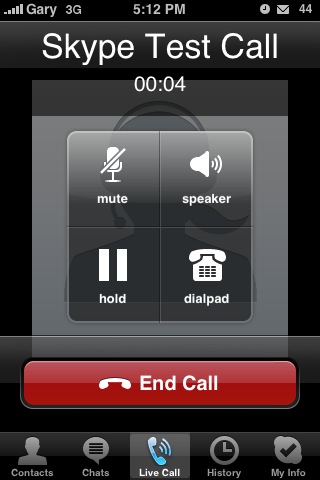
3. Now with calling over 3G, you can subscribe to Skype and pay $3 for unlimited calling to Canada/USA! AND get Caller ID for Skype!
Enjoy making calls over 3G. Don’t worry, it won’t use up your 6GB data plan unless you’re talking for 24 hours straight non-stop. Skype has been one of my favourite apps now because of this little hack. Let me know how this works for you!
Want to see more of our stories on Google?

P.S. Want to keep this site truly independent? Support us by buying us a beer, treating us to a coffee, or shopping through Amazon here. Links in this post are affiliate links, so we earn a tiny commission at no charge to you. Thanks for supporting independent Canadian media!


hi,
thanks for this. As of this morning you dont need the intelliscreen bit it would seem
N
Nice tutorial but too complicated. Here is short working tutorial.
1. Go to Cydia and install (if not already on your phone) 3 apps:
a. Open SSH
b. Mobile Substrate
c. VoiPover3g
resping when done
2. Download to Your PC app. called DiskAid (freeware)
3. Connect an iPhone to PC with USB cable
4. Open DiskAid and copy (drag) /Library/MobileSubstrate/DynamicLibraries/VoIPover3G.plist to any location on PC
5. Open this file with text editor and add following line to it without quotes “Filter = {Bundles = (”com.Fringland.Fring”, “com.apple.AppStore”, “com.audiofile.Interstate”, “com.apple.MobileStore”, “com.skype.skype”);};” and save it.
6. Drag the file back to /Library/MobileSubstrate/DynamicLibraries using DiskAid overwriting old one
7. Disconnect an iPhone and restart or respring, no needs to reinstall Skype.
Now You can enjoy VoiP call over 3g network 🙂
Thanks for the summary. It’s better to include details as some people are new to this. 🙂
Sounds simple enough…LOL.
That should chew through 6gb nice and quick.
We’ll have to see about that. Time to put it to the test! 😉
Works great. Thanks.
Skype still crashes when I attempt to enter login info even with MobileSubstrate updated. Any suggestions?
Delete the Skype app, reboot, reinstall. Try it over the air, and plugged in. That might work.
Great work on this!!!
Thanks for the tip. I just tried and it works.
One question, what’s the use of intelliscreen? It works over 3G without intelliscreen. Besides, the license is only good for 10 days. What happens after 10 days?
Thanks,
A new Mobile Substrate released today. No more Intelliscreen needed.
Seems like you have mis-spelled with your TVUPlayer in your file “VoIPover3G.plist”?
Yeah, that was a screenie from a while back. 😉
URGH!!!
I can’t get Opnessh to work on my iphone. I have tried 100 times and still no luck. It tries to connect and then says it is unavaliable.
I have done all of the setting recommend by the post and can’t get in. Could it be something with my router? Do I need to change any preferences?
If anyone could help I would really appreciate it.
Are you on PC/Mac? What FTP program?
The app works but crashes after a little use. I have updated the mobilesubstrate. On 3G and on Wifi, it crashes. Plus, it does not seem to support bluetooth devices which means it is useless in the car.
Great worked like a dream, thank you
HI –
Can’t locate Mobile Substrate. Any idea what repository it’s in?
Thanks
Matt
Fantastic. Just fantastic. This canuck thanks you greatly.
VoIPover3G just got updated on CYDIA so there should be no need to modify the .plist file anymore.
Thanks for the update!
Updated voipover3g, checked that plist contains skype.skype.com, reinstalled skype
still get error message for 3g calls
So fricking Awesome … 3G Skype call works awesome ..
testing but ran out of credit 🙁 will try again with credit. heheh.
Worked for me! Now to get a plan!!
i need big help …. i did fellow all the steps but Skype still crashes when I attempt to enter login and i do have MobileSubstrate updated.
i did delete the Skype app, reboot, reinstall and still crashes 🙁
how can i get my old setting back ? so i can use skype with wifi
It works, but just like Fring the outbound audio has a very distracting 3-ish second delay. It’s a nice hack for the sake of it, but practically it’s not really worth it unless you’re calling overseas.
Wow, it seems to work great over 3g! Now someone just needs to hack it so it can access my contacts. 🙂
Hey does anyone know if there’s a way to use this app with with the itunes store? What’s the identifier that will work so I can download over 10mb songs/podcasts? I tried com.apple.itunes but that doesn’t seem to work. Thanks!
One other issue I have is how it can’t (because of apple’s twisted sdk rules) use the proximity sensor to turn off the display when making a call. Oddly my face didn’t seem to press any buttons, but it makes for a drain on battery life.
Hi,
Anyone know where the VoIpover3G is located in Cydia because I can’t find it?
Thanks
Its there , I just searched in Cydia …
I search for the VoIPover3G app on my sons ipod and its shows up inside the Systems folder. I search on my Iphone and its not there?
Wierd?
Woops, looks like I was wrong, the proximity sensor works with skype. Interesting how apple permits exceptions for certain companies (e.g. Google and now skype)
Nm, looks like I was wrong again, the skype app is allowed to use the sensor for it’s purpose.
i have an ipod touch. i want to be able to install the skype app? how would i do this? i will only be using wi-fi and nothing else.
Brilliant! Absolutely brilliant! Works flawlessly. I am so happy that I found this and can bypass the stupid rules we have here in Canada.
How do I use my 2G jbroken unit for skype via EDGE … would it work ? … Thanks !
Thanks for your fantastic blog! Apologies for my ignorance – I have a contract and 6GB data plan. I’ve successfully downloaded skype, thanks for great instructions. Skype test call sounds perfect! If I make skype to skype calls over wifi, am I using data? Do skype to landline/mobiles, use data if wifi on? I don’t understand why wifi must be turned off?
Thank you very much for this wonderful post. after installing VoIPover3G I don’t have to worry about being on wifi only , now i can use it on 3g..
Hi , I am on the 500mb plan with rogers , but i don’t use 3g services as much.. If i am using the skype service on 3G , would it impact on my 500mb? if yes then how much. anyone knows? I just don’t wanna be using skype care free and next thing i know , i get a $200-300 dollars bill from Robbers, ops i mean Rogers..
I imagine it uses much less than Slingplayer and that use ROUGHLY 220Mb/hour (and uses your battery faster than you can charge it practically, lol.)
Anyone tried this with the 3GS yet ?
As of version 1.0.2, VoIPover3G does not work properly on the newly released jailbreak for OS 3.0 on iPhone 3GS — as soon as one installs the app, the app store, skype, and a number of other apps crash at launch. Removing VoIPover3G fixes the problem. Now waiting around on the solution…
I'm an amateur at this, and I wanted to know if this will work with the 3.0 version of the iphone. Any response would be appreciated. Any comments on the amount of data it uses?
I'm an amateur at this, and I wanted to know if this will work with the 3.0 version of the iphone. Any response would be appreciated. Any comments on the amount of data it uses?
Just noticed this is linked right at the top of the main page, yet is pretty outdated.
Any chance all the stuff thats no longer needed can be removed – the article doesnt need to be very big at all these days 🙂
BTW anyone else have problems having 2 iTunes accounts on your phone? I registered on the US one to get Skype, but now when I try to sync my phone its saying this phone is linked to another itunes account and offers to delete all my apps for me 🙁
Just noticed this is linked right at the top of the main page, yet is pretty outdated.
Any chance all the stuff thats no longer needed can be removed – the article doesnt need to be very big at all these days 🙂
BTW anyone else have problems having 2 iTunes accounts on your phone? I registered on the US one to get Skype, but now when I try to sync my phone its saying this phone is linked to another itunes account and offers to delete all my apps for me 🙁
Does anyone know of this post is for the 3GS? thanks so much.
Thanks for the help! Works perfect!
u dont have to jailbreak for skype – sign up to the american itunes store (you dont need a cc) then just download the skype app. before you get skype be sure to authorize your computer with your new us account and buy a free app first (then just delete it).
This is all very well, but how does one simply get a “US iTunes” account? I tried, but as soon as I entered my Canadian Visa card # (I don't have a US one), using my brother's US address, it bounced me, would not allow me to proceed! Do you know of a workaround?
With Skype being offered in Canada now is this info still relevant? Also what is the benefit of jailbreaking your iPhone and using the Skype feature anyways? One more thing: seeing as how Skype is now available in Canada do you even need to jailbreak your iPhone anymore? Thanks to respondents.
Using the 3G network with skype is the goal for me. I have a 3.0 os, do I need to jailbreak my phone, and how do I best do that?
I did this exact thing. It worked… Sound quality though… After using it for two weeks I noticed a few things… 1. In order to have good sound quality on the other end… I needed to be NOT moving & PERFECT 3G reception! Another thing I noticed is that if I was moving (car… walking) I could hear the people fine but on the other end I'd be cutting out constantly. I decided to restore my phone bc the 3G consistency isn't good enough to use VOIP over it. I have a 6GB Plan and the latest iPhone 3Gs 32GB if there is someone out there who doubts my results. I also used it with my older iPhone 3G 16GB & had the exact same thing! :S Not worth wasting time for now!
Has anyone else had an issue with the sound quality? I've been on the edge of doing this to my phone, but I feel limited in doing it myself, so I will get it done by someone who offers the service, but this feedback makes me question whether I should bother, so any response would be greatly appreciated!
The sound quality over 3G is pretty awesome. Try it out for yourself. The best part is adding SkypeOut credit and getting Caller ID for Skype. Now your friends won't ignore your calls!