
You Can Now Jailbreak iOS 16.4.1 with Palera1n 2.0.0 Beta 6
Codenamed Bakepale, the latest v2.0.0 beta 6 update to jailbreak tool Palera1n has just been released, which fully supports iOS 16.4 - iOS 16.4.1 jailbreak.
When I first jailbroke my first gen iPhone, the source for 3rd party apps was through Installer (also known as AppTapp). Now, as I’ve moved on to the iPhone 3G, Installer has taken a backseat to Cydia, which has emerged as the only place to download apps.
Cydia is great but it does have some shortfalls. For example, it takes a LONG time to load (I’m beginning to think “Reloading Data” will soon be a permanent imprint on my iPhone’s screen!) at times, and when repositories are down Cydia can just stop functioning altogether. Installing and uninstalling applications can be a multi-step process that is time consuming.
Enter Stage Left: Please Welcome Icy Into Your Life
The folks that gave us the original Installer have recently introduced Icy, which essentially is Cydia but about 100x easier to use. Icy is RipDev’s take on Cydia, and their little app makes using Cydia a BREEZE! Good bye long wait times, welcome to the future of installing/removing 3rd party apps!
How to Install Icy on your Jailbroken iPhone
1. Launch Cydia. Go to Manage–>Sources–>Edit–>Add
2. Enter the following: http://apt.ripdev.com …hit Add Source afterwards.
3. Go to Sections–>Packaging–>select Icy, and install it.

4. After the install, respring and launch Icy.
Upon launching Icy, you should see a very simple layout. Categories, Sources, and Installed are your choices along the bottom (and Search in the top right corner). Go ahead and select any app to install it. You’ll soon be amazed at how well Icy works at installing a program. Try uninstalling an app and it’s equally as easy.
You can also view Icy in landscape mode. What makes Icy so quick is that sources are only refreshed when you want them to be. The app takes up minimal resources and downloads repos very quickly.

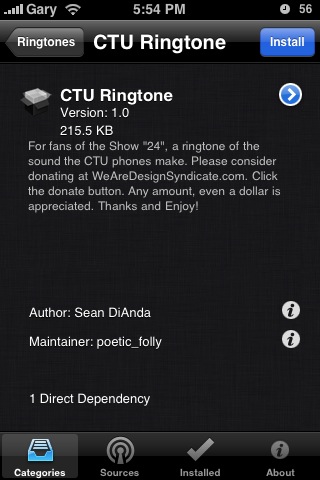
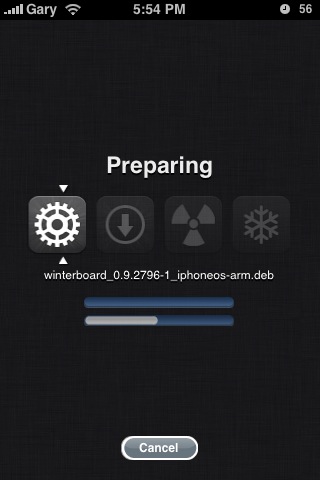
Check out the following screenshots of my installation of the CTU ringtone from 24:
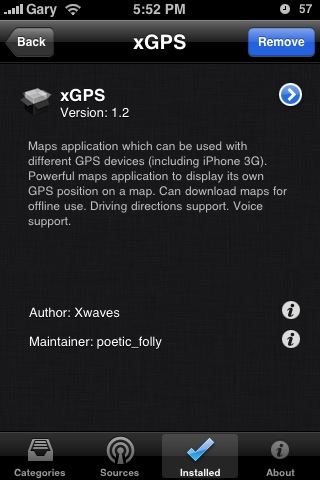
…and here are some screenshots of me deleting xGPS
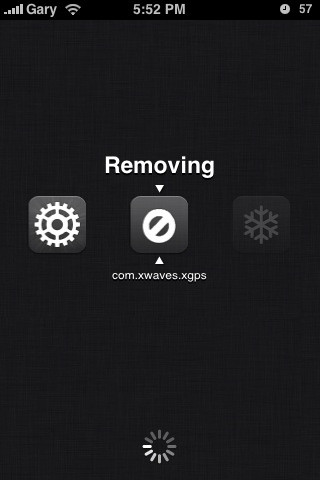
Icy is an awesome alternative to Cydia when you need to install/remove apps quickly and painlessly without constantly waiting for sources to refresh. Definitely give it a try and let me know what you think of it!
Want to see more of our stories on Google?

P.S. Want to keep this site truly independent? Support us by buying us a beer, treating us to a coffee, or shopping through Amazon here. Links in this post are affiliate links, so we earn a tiny commission at no charge to you. Thanks for supporting independent Canadian media!


Great post. I have not installed Icy yet but plan to try it out sometime… LOL Will let ya know how it goes.
Cheers!
I just did a restore on my iPhone, and then a re-jailbreak, and Cydia is way faster than it used to be. I think the more sources you have added, the longer it takes to “Load Data”. I’m going to try out Icy, though. Looks good.
The amount of sources you have installed makes a BIG difference to loading times. But I enjoy them all, so I have all installed haha
Thanks for the info, greatly appreciated. I love Icy!
x0x0x0
Maria
Book Reader
Version 1.2 is out!
Awesome, just upgraded this morning too!
installed icy, now every time i run Cydia it crashes…anyone experience that??? do i have to re-jailbreak my iphone???
Just been forced by the expiry of beta 4 to move to beta 5, for which the QuickPWN option is suddenly Cydia alone, rather than Icy alone as was true for the previous. It’s nice to have a working Cydia, but this article helped immensely as I missed the simpler, more transparent functionality of Icy. Fairly new to jailbroken iPhones – didn’t do it at all for OS 2.* but I am investigating a degree in iPhone development – and so am a Icy and Cydia virgin, so to speak. Therefore, I can feel fairly unbiased in my opinion. I can see the merits of both, and understand from my research that Installer -> Cydia -> Icy. Honestly, I never used Installer, and am aware that it wasn’t the friendliest app, but my vote is with Icy. My reasons? Mostly, the transparency of seeing dependencies and the cleaner – ad free – interface. So, thank you for helping a n00b recover what he considers to be a better app.
ive down loaded icy before and didnt work right so i followed your advice re downloaded it and the same thing i had before it shows everything i guess its supposed to show but all i can do is delete the packages i already have there is nothing to down load in categories it just says recent packages i highlight that and it goes to another screen thats blank helppppp i really like icy butt i cant do nothing but delete packages i already have what am i doing wrong???????
Hello, hope you can help. I downloaded http://apt.ripdev.com and icy that went good but when I open ict I have no packages, Can you help?? Cydia is a nightmare, Thanks
Great post. I have not installed Icy yet but plan to try it out sometime… LOL Will let ya know how it goes.
Cheers!
Great post. I have not installed Icy yet but plan to try it out sometime… LOL Will let ya know how it goes.
Cheers!
I just did a restore on my iPhone, and then a re-jailbreak, and Cydia is way faster than it used to be. I think the more sources you have added, the longer it takes to “Load Data”. I’m going to try out Icy, though. Looks good.
I just did a restore on my iPhone, and then a re-jailbreak, and Cydia is way faster than it used to be. I think the more sources you have added, the longer it takes to “Load Data”. I’m going to try out Icy, though. Looks good.
The amount of sources you have installed makes a BIG difference to loading times. But I enjoy them all, so I have all installed haha
The amount of sources you have installed makes a BIG difference to loading times. But I enjoy them all, so I have all installed haha
Thanks for the info, greatly appreciated. I love Icy!
x0x0x0
Maria
Book Reader
Thanks for the info, greatly appreciated. I love Icy!
x0x0x0
Maria
Book Reader
Version 1.2 is out!
Version 1.2 is out!
Awesome, just upgraded this morning too!
Awesome, just upgraded this morning too!
installed icy, now every time i run Cydia it crashes…anyone experience that??? do i have to re-jailbreak my iphone???
installed icy, now every time i run Cydia it crashes…anyone experience that??? do i have to re-jailbreak my iphone???
Just been forced by the expiry of beta 4 to move to beta 5, for which the QuickPWN option is suddenly Cydia alone, rather than Icy alone as was true for the previous. It’s nice to have a working Cydia, but this article helped immensely as I missed the simpler, more transparent functionality of Icy. Fairly new to jailbroken iPhones – didn’t do it at all for OS 2.* but I am investigating a degree in iPhone development – and so am a Icy and Cydia virgin, so to speak. Therefore, I can feel fairly unbiased in my opinion. I can see the merits of both, and understand from my research that Installer -> Cydia -> Icy. Honestly, I never used Installer, and am aware that it wasn’t the friendliest app, but my vote is with Icy. My reasons? Mostly, the transparency of seeing dependencies and the cleaner – ad free – interface. So, thank you for helping a n00b recover what he considers to be a better app.
I can’t add ripdev for some reason. I keep trying and all I get is repo not found. Am I doing something wrong? Help! I’m sick of cydia. I get dizzy just thinking about it! Thanks a million!
Cydia is a nightmare…. Icy is way way better than that crunky old cydia!!
HELP!!!!!! I keep trying over an over to install it but when I do it keeps saying that I can’t!
Get rock then dumbass
I don’t have Cydia and I don’t know how to get it I keep searching and I am very anxious. Everyone else has it and i don’t know what to do
You have to jailbreak your iPod or iPhone I would watch someone on YouTube called icrackuridevice he’s real good
I can’t get the rip dev source