
Apple’s $250 Million Siri Lawsuit Could Pay U.S. Customers Up to $95
Apple's official $250 million settlement portal is live, offering up to $95 to US users impacted by delayed Siri AI features on iPhone 16 and 15 Pro models.
The best part about iPhone 3.0 firmware is the ability to email more than one iPhone photo. Gone are the days where we had to select one photo painstakingly at a time! Anyways, here’s a relatively “old” tip that I’ve been meaning to share with those who don’t know about it yet–how to email full size iPhone 2G/3G/3GS photos.
How to Email Full Size iPhone 2G/3G/3GS Photos
Essentially, you will be sharing your photos using copy and paste instead of the default “Share” option in Photos. Here are some instructions for those people who need hand holding:
1. Launch Photos. Click on Camera Roll.
2. Click on the “arrow” in the bottom left corner. Highlight images you want to the full size image of. Click Copy.
3. Exit Photos and launch Mail. Compose a new email. Click Paste. Email.
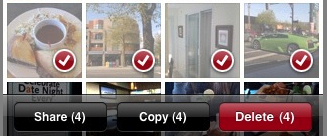
Voila! Your images will now be in full 2048×1536 resolution (on the iPhone 3GS) instead of the old 800×600 resolution. A quick test shows the file sizes below:
Picture emailed via “Share”: 133KB
Picture emailed via Copy and Paste: 1.2MB
So as you can see, the sizes differences are pretty significant. If you’re looking to print images or use them as desktop wallpapers, obviously the high resolution method is the way to go! Anyone out there been using these frequently?
Want to see more of our stories on Google?

P.S. Want to keep this site truly independent? Support us by buying us a beer, treating us to a coffee, or shopping through Amazon here. Links in this post are affiliate links, so we earn a tiny commission at no charge to you. Thanks for supporting independent Canadian media!


Right on, cheers
This is great. I didn't even notice there was a difference till now! Thanks for sharing!
Haven't been emailing pictures that often, but I use this method, as well.
I use Mobile Fotos ,, it now sends stuff big and the latest Update also supports 3GS video ,,
sending via Flickr Email address .. will shrink photos to 800*600
Also a 3GS Flickr Group Discussion About this very topic
http://www.flickr.com/groups/1123988@N20/discus…
JP
Great tip. Thanks. And does anyone know if there's a limit to how many photos you can copy and paste? I've tried over 5, but it shows 5 pictures and the remaining pictures are just boxes with the filenames.
I wrote Photo Resize to solve the “1 photo at a time” issue you complained about. Even with OS 3.0 you can still only send 5 photos at once, my app lets you send 15 at once. Unlike this method though it will resize them to make the process go quicker and use less data (the intent of the app), so if you need the original full size it's not for you.
Check out my PhotoToMac app specifically designed for this purpose. PhotoToMac transfers camera roll photos in full resolution to your Mac over WiFi.
http://www.galarina.eu/PhotoToMac/Galarina.html
Check out my PhotoToMac app specifically designed for this purpose. PhotoToMac transfers camera roll photos in full resolution to your Mac over WiFi.
http://www.galarina.eu/PhotoToMac/Galarina.html