There’s been a lot of hoopla lately about the latest “iPhone worm” that apparently will Rickroll your iPhone. The worm makes its way to your iPhone through SSH, since the default password is “alpine” for every single install of OpenSSH. Now, before you get freaked out, you don’t have much to worry about if your iPhone is NOT jailbroken. This exploit only applies to people who…
1. Have a jailbroken iPhone
2. Have OpenSSH installed and active
3. Have the default password “alpine” still
If the above does not apply to you, breathe a sigh of relief. Actually, even if the above does apply, I would put money down that you have a higher risk of getting hit by a car than getting this Rickroll worm!
How to Change the Default SSH Password on Your iPhone
To secure your iPhone from this worm is very simple. All you have to do is CHANGE the default SSH password!
1. Download and install MobileTerminal via Cydia (MobileTerminal is basically a terminal windows just like in OSX)
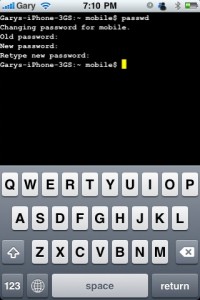
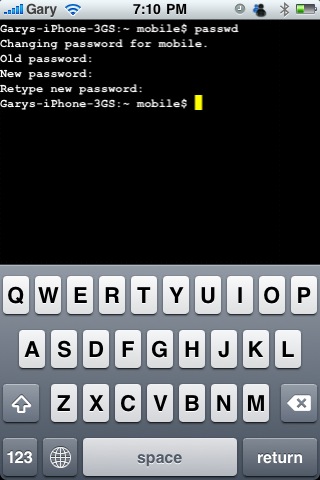
2. Launch MobileTerminal. Type in the following command:
passwd
3. Enter your old password which is “alpine”. Then enter your new password (twice).
4. Done. Pretty easy, eh?
Extra Security Measures to Prevent Unauthorized SSH Access
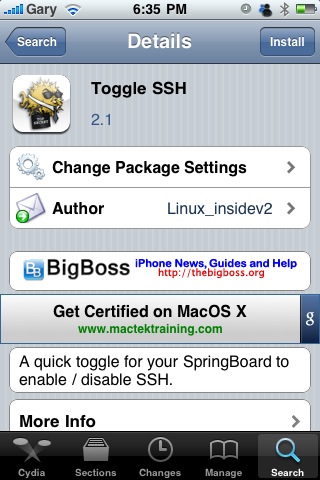
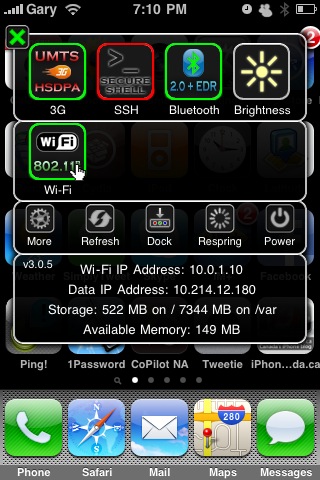
Turn off SSH when you’re not using it. The fastest way is by installing SBSettings (if you haven’t already), then Toggle SSH. Still scared of something bad that’s going to happen? Do not jailbreak your iPhone. This ain’t rocket science!

So there you have it. This post was inspired by SaintJohnShawn via twitter! Hope this little tutorial helps you out! Relax, you’re safe now. No more crying yourself to sleep at night!



Nice guide! I'd recommend changing ur password to be safe.
mobile terminal doesnt work on 3.1.2 so this is useless.
This is just changing the mobile password. Don't you also need to change the root password? –> type “su root”. Old password is still 'alpine'. Then replace with new password and then logout
Your comment is quite useless, indeed.
then yours would be even more useless? have a workaround for 3.1.2 users?
There may be a workaround or there may not be, but simply stating that
the post is useless serves no purpose other than to flag yourself as a
troll.
Next time try a constructive comment or maybe make the effort to find
a fix yourself and comment about that. Locating a fix on your own
effort would be far more beneficial to you and the blog readers than
simply stating that the post is “useless”.
Wake up.
Me pointing out that mobileterminal doesnt work on 3.1.2 serves the purpose to let others know who are running that firmware not to think there is a problem. I tried to boot up MT a dozen times and it would always crash and made the effort to find a fix to realize it doesnt work on 3.1.2.
Im awake. Chill out.
The first part of your comment was awesome. Awareness for 3.1.2 is a
good point. It's the useless part that was unnecessary.
Not everyone even has 3.1.2, so this post is far from useless. That's
all I'm saying. Show some respect to the writer.
Two possible fixes:
1.) don't have cydia and icy or rock installed together
2.) check out this board http://www.google.com/m/url?cd=2&client=safari&…
That's odd because that screenshot of MobileTerminal was taken from my
iPhone 3GS on 3.1.2 firmware. So MT works fine on 3.1.2.
What repo you installing from?
Saurik Repo, off of Rock. There are about a half dozen comments on the package that it crashes with 3.1.2. And its happening to me, it wont open. 3G jb with blackra1n, 3.1.2.
Hmm, weird. My suggestion would be to install Toggle SSH if you
haven't already. It would be extremely rare to get hacked if SSH is
only on at times when you're using it.
This story is purely FUD anyways!
I have toggle SSH and only have it on when Im using it. But changing the password would be a safeguard if I forget to toggle off after Im done. I dont wanna get rick rolled lol
thanks Gary and X1Zero, big fan of the site and all your tips and info!
Thanks for the posting, hopefully this helps spread the word and will prevent any of these issues going on elsewhere!
I was going to say the exact same thing! The simple and complete way to secure is to type following commands and follow prompts:
su root
passwd
passwd mobile
Mobile Terminal is running on my 3GS at 3.1.2, but it doesn;t change the password, when I go through these steps. OpenSSH password is still the default.
ToggleSSH seems to be the way to go.
Happy to help. Please reply back if you find anything new
Don't forget to also change your root login as well.
I have 3.1.2 and mobile terminal works. Root password needs to be changed as well. After following the tutorial, type in “login”, type in root and alpine as the password.
Once logged into root, type the command passwd, you will then be prompted for the old and new password.
Good idea, this would be a good extra step. Although I'm pretty confident toggling off SSH would solve everything in a jiffy. Never can be too safe though!
Only problem “for me” is that I have found that sometimes I forget turning off “SSH” via SBSettings. This would leave my iphone vulnerable.
Mobile Terminal is working on the 3G with 3.1.2 as well. Passwd steps have to be done for both 'root' and 'mobile' in order for this to be effective.
Aha. Yes, thank you. So, on my iPhone 3GS, at firmware 3.1.2, Mobile Terminal worked fine. Changed passwords for both root and mobile.
Is there a tutorial on here that tells you how to find “Installer” under System and how to find System to begin this whole process: Step 1: Install BSD Subsystem (found in the Installer under �System�)
Step 2: Install Open SSH (if not already installed, also found in the installer under �System�)
Step 3: Download a SFTP program. (I prefer Cyber duck myself linked here http://cyberduck.ch/ but I also use Mac, for windows user to popular tool is WinSCP linked here http://winscp.net/eng/download.php – download2)
Step 4: Open your new SFTP program. With Cyber duck you must click on Open connection in the top right of the window (WinSCP users I apologize I have never used the program and would be of no help from here, I have heard it is self explanatory though�)
Step 5: A new window will pop up. Click the drop down menu and select SFTP. Then enter your phones IP address which can be found by going to Settings-?Wi-fi-? then clicking the blue button beside your Network.� The your screen will look similar to this screenshot with your phones IP address.
Enter the user name as �root� and the password as �alpine� (unless you changed it in the past) then click connect
Step 6: You are now in your phones File hard drive. Click the drop down menu and click �/�. From there you can navigate around the phone.
Again I'm trying to find System first and then Installer under System because I have no idea where to look for this on my iPhone. Is it in Cydia? Thanks to those who take the time to read and to reply.
Will there be an update to this post as to what's the best way to change the root password and other password in order to keep the iPhone safe or should I keep reading up on the comments?
Hello?!?!?!? Would anyone mind either helping me out with an answer or at least direct me as to where I might find the info/answer I'm looking for? Thanks to those who take the time to read/reply.
Hi.
I am insure of what the problem is.
Can you give it to me in about 1 paragraph?
I'd like to install Open SSH on my iPhone but I don't know where to find my iPhone's “Installer” under the iPhone's “System”. I don't know how to find the iPhone's “System” for that matter. Is that more concise? Hopefully you understand what I'm looking for and trying to accomplish. I'm not a techie so maybe I'm not describing/elaborating/explaining properly.
Yes, but I can't find “Installer” or System on my iPhone to follow the instructions that I posted on the iphoneincanada.ca website for that post. v v v v v v v v v v v v v v v v v v v v v v v v v v v v v v v v v v v v below.
Same here. On every reboot/respring SBSettings toggle defaults to on. Does anyone know how to default to off??
If you cannot use MobileTerminal then just log into your phone via SSH from another computer. Once logged in the exact same commands apply as in the OP and comments. Just in case there are any crazies who've installed SSH server without really knowing why (and therefore don't know how to log in remotely):
Use SBSettings to obtain your phone's IP address, then in Terminal (Mac) or Command Prompt (Windows):
ssh root@<IPhone IP address>
After a delay, accept the prompt, then you'll be logged in and can proceed with the password changes.
You do all of this from Cydia, you don't need to dig into your phone's disk. Just open Cydia and install OpenSSH.
Speaking of root passwords, I installed Ubuntu the other day using Wubi, and Wubi refuses to allow you to install without setting up a root password.
the proper way to change the password is to open terminal
type
su
then type
alpine
then type
passwd
then type your new password
the proper way to change the password is to open terminal
type
su
then type
alpine
then type
passwd
then type your new password