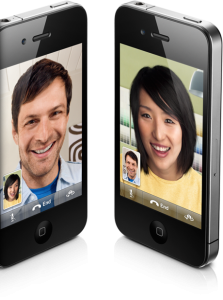
One of the major new features in the iPhone 4 was FaceTime. FaceTime, for those not in the know, is Apple’s video calling service between iPhone 4 devices.
On launch weekend, millions of Canadians picked up an iPhone 4 and when attempting to FaceTime, the call wouldn’t connect. Jumping into the settings menu for FaceTime revealed that FaceTime was “waiting for activation”. Activation, in this case, seemed to take hours. So, how do we fix this?
How To Fix FaceTime ‘Waiting For Activation’
To fix the FaceTime activation message, follow the steps below:
1.) Turn on WiFi by going to Settings > WiFi and connect to your local WiFi network.
2.) Go to Settings > General > About and wait here (about a minute) until you receive a carrier update prompt. After the update, the carrier field should say “xxxx 7.2”, where “xxxx” is your carrier name. If the carrier says “xxx 8.0” or later, continue to step 3.
3.) Now go to Settings > Phone. Turn off FaceTime and turn off “Show My Caller ID”. Then, turn iPhone 4 off (slide to power off method).
4.) Turn iPhone 4 back on. Go to Settings > Phone. Turn “Show My Caller ID” back on and turn FaceTime back on. Make a call to another iPhone 4.
5.) If you are running iOS 4.1 or later, go to Settings > General > Reset > Reset All Settings.
Give the above steps a try and comment below on your success (or failures!).



I was wondering if you can get one of your “sources” to provide stock information on these iphones
First comment! Yes.
I still have yet to get my iPhone 4. All Apple Stores and Rogers stores are out of stock. 🙁
i think you were a little late. lol
i figured all these steps when i first got the phone on friday, and got it working lol. But still a great guide non the less.
Thanks guys ^_^
A friend that owns a Fido store in Ottawa said a shipment is coming this week, friday the latest 🙂
Doh!
Well I still don't have an iPhone 4 in my hands. Boo for the lack of info on restocking dates.
Btw, it is in Settings/Phone, not Settings/General/Phone..but thanks for the post
Ziggy
does face time waste your data allowance each ?
No
Starting Tuesday.
No FaceTime is currently wifi only, so your data will not be affected.
Wifi Only so… no ^_~
I know that FaceTime currently works on WIFI only. Does it use minutes if not what will happen when making calls to US
What about if your cant even connect to wifi in the first place! it says its connected to the internet but won't load any pages on safari or any of the apps. I tried restoring it and forgetting all network settings aswell.
No. It's just like skype
If you phone the US and then switch to FaceTime once connected, you'll have to pay for the call, but if you go to contacts and select facetime from a contact's page, it will attempt to connect strictly using WiFi. If the person at the other end is not connected by WiFi it just won't work.
millions? really?
Step 1 and Step 2 should be ok, just wait because the carrier is updating, at the same time, configuring facetime. No need to turn off facetime and caller ID, no need to turn the phone off.
Tried all steps
Still “Waiting for Activation” 🙁
With Virgin Mobile, had phone since Friday
Try the following:
Plug your phone into itunes and have itunes check for OS update to 4.0.1 If there is an update, install it and retry. A friend had a problem with facetime activation and this method solved it.
I am in vancouver area. I was at Bestbuy store on Friday morning around 9.30am to pickup my phone. I was no. 6 in the line and was very positive that I will get my iphone 4. I am with rogers by the way. But when store opened at 10 am they guy told me that they only have four iphones for Rogers/Fido and only one of them is 32 GB. All the five people in front of me were either with Rogers or with Fido…..I was shocked…..then I quickly ran to other rogers dealers in the area but result was same…..I was out of luck.
Ever since, I have tried calling Apple store, Rogers dealers, Best buy, future shop but everyone is out of stock and they have no information, when they are getting new stock…..it is very frustrating.
Do you have any inside information?
SMS must also be active and available for Facetime to initiate. A friend who had SMS blocked on their account at the carrier level (due to unsolicited SMS's they were being asked to pay for) discovered that the block was preventing FT from activating.
Literally within seconds of the block being lifted on the carriers computers Facetime activated on both of their phones.
My phone is updated to 4.0.1 and the carrier is updated to 7.2 still nothing.
The techies at Virgin Mobile will be back tomorrow morning and i'm hoping they can help me out
Mine was having a hard time too. I just did a complete reset all settings. After my phone reset, I did a manual restart by holding the power. Once it booted mine was fixed.
I have reset many times, even restored many times. Still nothing. I'm pretty sure im a unique case 🙁
Well if resets and device restarts don't help perhaps call your carriers tech support and have them take off, then re add your mms. And perhaps trouble shoot farther. I had to have my mms added back when I transfered my 3GS to i4. Some reason it screwed up. Many report with a lack of mms support FaceTime won't work
im also with Virgin and im having the same issue. nothing will solve it. might be something on Virgins end of things?
You're not a unique case. I'm with Virgin, on firmware 4.0.1 and I have the carrier update. I've reset settings and completely restored the phone. Nothing seems to fix it.
Out of curiosity, has anybody else been getting texts from 11111111111111 that say “Woops! Your message didn't go through. Visit virginmobile.ca and click Help to see if the carrier you're texting is supported. Thanks.” I have a feeling that it's related somehow.
Hey I dont have anyone to facetime with yet, however im trying to get facetime to activate. When i do steps 1 and 2, i dont get the xxxx7.2. My carrier is Bell, and the options I get are Automatic, Bell, Bell. What do I do in order to activate facetime? Leave it on automatic, or pick one of the Bell options? Any input would be appreciated. Thanks
Have you followed the above steps?
Yeah I have they dont seem to make a difference. I dont think step 2 is working, or I dont know what option to go with. My choices are “Automatic” which is what it was set on before, “Bell” and “Bell”
Sounds like you're in the “carrier” menu, which you don't need to be.
You should be in Settings > Phone
I havn't received any strange text messages. I've been going back and forth between Apple and Virgin Mobile support and even they are conversing with each other about it. No solution yet, I'm pretty confident it's nothing on my end, as i've updated everything, reset everything, restored countless times, done all the tricks suggested on various message boards. Still “Waiting for Activation”
It doesn't require resetting anything. We have applied the above steps on
over 20 iPhone 4 units and all worked after!
@Ex Were any of them on Virgin Mobile? I'm curious as to whether ANYONE on Virgin has been able to place a FaceTime call.
What is happening with people who have multiple SMS's to pay for because of facetime using the 44……… number to SMS?
Unfortunately, no.
Here's mine… I'm from Vancouver too. Went to Wireless Wave 4:30am in the morning.. waited outside till 7:45. Got in, they were stupid. Only had 2 32 for Bell. Tried to look at the plans, they wouldn't offer me 6GB. I was so adamant that I knew Bell were offering 6GB data. They kept saying that I was wrong. Frustrated feeling that I've wasted my time in the line up and we just left. Also my brother who (was with us) was FOR SURE eligible for Fido upgrade, the guy at Wireless Wave said too bad you aren't eligible. My bro double checked twice on the website and twice over the phone. So the guy at Wireless Wave wouldn't even try to help. That made us hate Wireless Wave. We will never go there again. So we went to Simply Computing close by, there was a guy who was very kind that happened to arrive work at 8:30 where the store was opening at 9:30, he asked us what we were looking for.. we requested 2 32s and he told us not to waste our time in the lineup. So we were thankful for that. Why? We walked over to FutureShop close by and we got in the line up as we were the 4th person there. Guess what? We wanted Rogers/Fido 32GB phones, they were already taken by the first 2 customers meaning they only had 2 in stock. I was bummed. Good the FutureShop employees came out to make sure that we aren't wasting our time in the line up and went over each of us in the line up to see what we were planning to get and which provider. So the guy said we have 3 32 GB for Telus. We were skeptical and wanted to see how it goes. We were pleasantly happy! We go the package more than what we wanted and expected! Free Voice Mail, 6pm 600 shared mins, both of us getting 6 GB data, unlimited, no system access fee or activation fees, all for 65 bucks each phone plus taxes. CRAZY! We switched to Telus as Rogers were pain the butt as my wife was a long time customer and they wouldn't budge with 6GB plans as they claimed that they don't have that offering. I was just plain disappointed with Rogers. No wonder now they're paying out $500 for referrals. Looks like they lost handful of customers. Their loss
WORKED FOR ME 😀
Ex, please help!!!1…..I brought my Canadian unlocked back down to Boston, and am using T-Mobile USA. Well guess what? After trying activate facetime for the past 3 days, i have incurred abput $6 in United Kingdom Text Message…and its still not activated.
Was that first batch of Canadian I4s actually coming from UK?? Maybe UK Refurbs, trying to pass onto Canadians? I mean, why does FT activation need to respond to a UK Text number? Why couldnt it have just been done through iTunes…Im feeling a little dissapointed in having spent $659 for this just to have now $6 of UK texting fees..and i wouldnt even mind so much if it actually activated FT, but its not even activating….:(
FAIL! Ive tried this several times. please help!!! (Rogers)
I spoke with a CSR at Virgin last night and they said they don't support Facetime yet. WTF? It says it's a “standard feature” on the Virgin iPhone 4 webpage. Needless to say I've sent a strongly worded email to their customer support. Anyone else get this answer from Virgin?
called virgin mobile today and they said it was a network problem and it will be fixed in a couple of days and they will send out a text message to all iphone 4 users telling them
worked like a charm, thanks a lot.
I can not modify Show caller ID? any ideas??
Tried it, on an unlocked nad jailbroken 4.0.1 iphone 4, I activated it with Tmobile Sim (hoping it will only read Tmobile Carrier Bundle) did everything you said, Unfortunately No Go.
@esteban7705 – did everything didn't work. I'm with Bell, the carried update stays on 7.0 never goes to 7.2 Please if someone finds a solution email at esteban7705@gmail.com Thank you.
Finally fixed it. Didn't have MMS on my plan. Face Time Uses MMS the first time you use ti to register, Another thing that I did but don't know if have anything to do with the fix was to take the sim card out for a few seconds, that was the only way the carrier updated to 7.2 I hope this helps. Let me know.
MMS is not a requirement of FaceTime.
Do you have mms on your plan ? I underestand FaceTime Uses MMS the first time to register your number on the server and allow the conection with other Face Time users ! I hope this helps. contact me if you want: Esteban7705@gmail.com