Update 4 (May 26, 2013): Another VPN solution is SunVPN, which has worked very well for people as well. Check it out here. A similar VPN service many have signed up for is NordVPN, which has servers based out of Panama.
Update 3 (June 2, 2012): Looks like Hotspot Shield VPNs have stopped working altogether on iOS devices. One pretty awesome paid VPN alternative is HideMyAss, which is $6/month and works pretty well on iOS and Android devices. Click here to check it out (it’s currently on sale).
Update 2 (Aug. 17, 2011): It appears Hotspot Shield’s iPhone page is no longer supported, but the service still works. Enter the details as shown below. You can also access Netflix USA with your Netflix Canada account by adding this VPN to your iOS devices.
If you’re browsing on your iPhone on an open WiFi network, you might want to secure your connection with a VPN (Virtual Private Network). If you want to access US-only content and have your IP US-based, you can also use a VPN.
We’ve talked about setting up a paid VPN solution via Witopia to use the ABC iPad app in Canada, but there is a free solution via Hotspot Shield. PC and Mac users have used Hotspot Shield for a while now, but there is also a solution for iPhone users.
Here’s how to setup your Hotspot Shield VPN on your iPhone (according to their guide):
1. Turn off WiFi. Then find the VPN settings in
Settings -> General -> Network -> VPN -> Add VPN Configuration:
Enter the following details:
Select the IPSec tab/pane
Description: HotspotShield
Server: 68.68.107.101
Account: n5tfrq
Password: n5tfrq
Use Certificate: OFF
Group Name: hss
Secret: hss
2. Save the settings and hit the “HOME” button to quit. Make sure to turn Wi-Fi back “ON”.
3. To activate Hotspot Shield on your iPhone, the VPN setting needs to be turned on.
Settings –> VPN –> ON
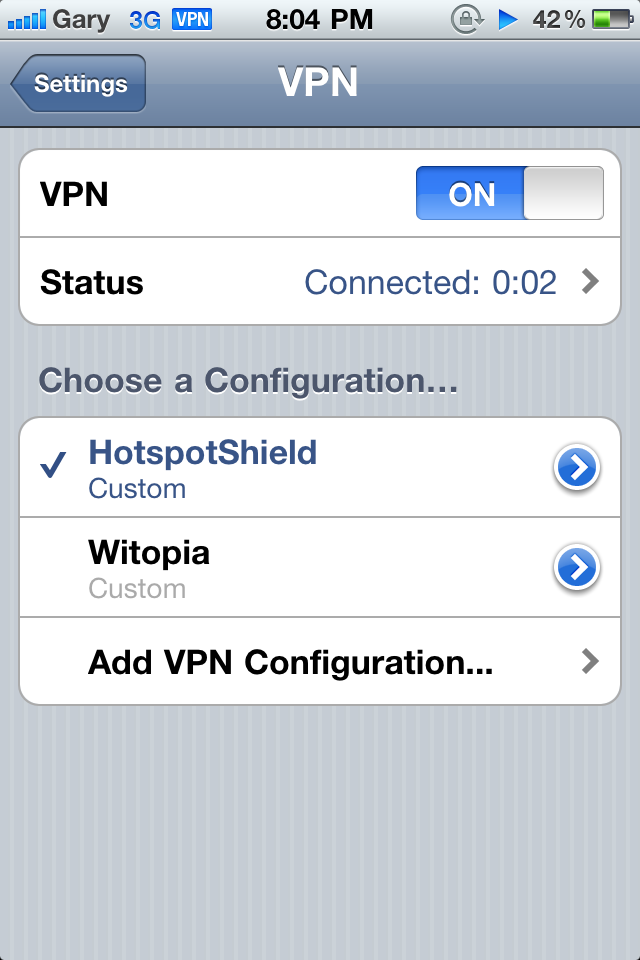
If you entered your info correctly, your status will change to “Connected” and you’ll see a VPN icon appear at the top iPhone tray. If you can’t connect, power down your phone, and turn it back on and try again.
Hotspot Shield worked over both 3G and WiFi.
Accessing US-IP Only Websites
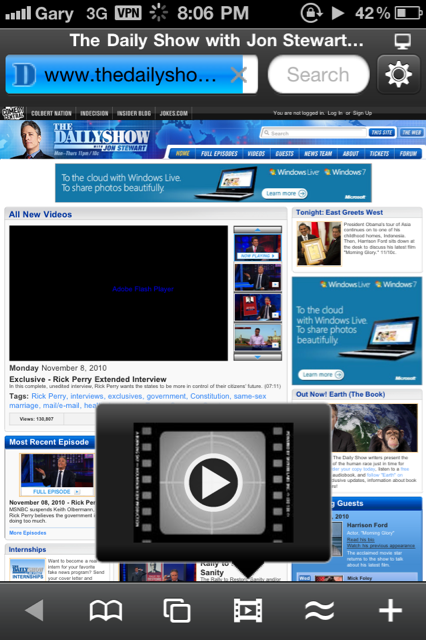
With Hotspot Shield’s VPN enabled, I was able to make better use of the Skyfire app. Watching content from the US such as The Daily Show worked without a problem. I was also able to use Pandora, which is only available in the US App Store and works only in the USA in Canada. I’ll have a brief tutorial on that later.
Hotspot Shield’s VPN did take a couple tries to setup though. There are various login/password accounts provided and if one doesn’t work, try another (you might have to reload the page in a different browser). I did this and it worked for me.
Also, the VPN doesn’t stay on forever as it will turn itself off after a brief period of time. Nonetheless, for a free VPN solution on the iPhone, Hotspot Shield does the job for your immediate needs.

Let me know how Hotspot Shield for the iPhone works for you in the comments!
[Hotspot Shield]



I use hotspot shield all the time. I like it 😉
Very useful info!
welcome to 2008.
which web browser is that in the last screenshot?
VPN is old news for geeks, but I’m sure a lot of people found this useful.
Worked the first time! Thanks for the good info.
I got the Daily Show just fine without turning VPN on??
But it did install fine.
I’ll try ABC Player with it.
I tried CBS.com with VPN on to see if I could watch some TV shows but it said I could not access CBS from my iphone as my carrier does not support it??
Don’t you mean 1998 like your birthday?
Skyfire
Much appreciated… Kudo’s to all the geeks who already knew this old news…
Worked awesome thanks so much!
Great info! Keep up the good work people!
omg!!! this is aaamazing. it worked right away. i can now use pandora in canada. THX so MUCH.
I just hope it will continue working
🙂
I used this free mobile VPN service since one month ago:
http://www.mobilevpn.net
It uses PPTP VPN type and works on most smartphones like iPhone, Android phones or tablet like iPad, no software installation is needed. Speed is up to 1.2Mbit/s, very smooth when watching hulu.com or yourtube.com video 🙂
Free account/password posted in their web site, every time after VPN is connected, make sure to visit http://www.mobilevpn.net for one time then you will be able to use the free VPN service for 4 hours, it’s network bandwidth and performance is really good 🙂
Actually it can be used in windows xp/7 or mac osx OS as well 🙂 Enjoy!
Gooooood
I want new VPN for free qukkle. K205699@gmail.com
I have tried this several times and it keeps not working. I get a VPN icon at the top of the screen, but then there’s no connectivity at all. I can’t check mail, download apps, access websites…. anything. As soon as I disconnect VPN, my connectivity comes back. Note that it doesn’t matter whether I am using 3G or wireless.
Any suggestions?
Thanks
Yes, same it tried with different logins but No connection, Even thought i See the VPN sign on the top of my iPhone. Can anyone help us with that?
im getting this problem can any one help <<<>>>
vpn server did not respond
vpn server did not respond
same here 🙁
Config went well for me on an iPad2. However I think that this is not working when you VPN through a Wifi connection. I suspect the Apps store as well as Safari to privilege the faster Wifi connection rather than the VPN one… Will keep on trying ‘though.
Config went well for me on an iPad2. However I think that this is not working when you VPN through a Wifi connection. I suspect the Apps store as well as Safari to privilege the faster Wifi connection rather than the VPN one… Will keep on trying ‘though.
Its too slow while using hotspot in iphone4.
Its too slow while using hotspot in iphone4.
i can’t get account id! how did you all get it?!:(( can anyone help me?!
i can’t get account id! how did you all get it?!:(( can anyone help me?!
Thx a lot team
Thx a lot team
Thx a lot team
Thx a lot team
Thx a lot team
This worked flawlessly on my Ipod Touch 4G! I can now use the CW full episodes app and the TV.com app from Canada! YAY! Thank you sooooooooo much!
It worked on the iPad.
why it is disconnecting everytime ? i am facing problem with it ……….
Very usefull! It solved my problem with VoIP call in vodafone uk!!!!
Thanks!!!!
Works for a few minutes no more than that. I suspect this service will shut down soon.
hi every body, how can i find or resset my password that i forgoten?!!!!
and now i c the error diabled cant establish 2 ituns
Hey guys, can u give me hss account id & password.. I cant create one, coz’ im working here in UAE, and the site is blocked.. Pls help me.. Thanx and godbless
it says vpn account didnt response please help!!!
I used it for months,it was good but from yesterday it says “the vpn server did not respond”.what should i do?
I have used it for months,it was good but from yesterday it says that”the vpn server did not respond”,what should i do?
Just set this up, VPN accepted and connected but Pandora Internet Radio which is what i set this up for wont connect – are these VPN login details still active?
thanks for guiding how to set up VNP account , you are the best hero No.1
VPN server did not respond
Same for me VPN server didn’t respond
thanx very good
VPN server did not respond
VPN server did not respond