You Can Now Jailbreak iOS 16.4.1 with Palera1n 2.0.0 Beta 6
Codenamed Bakepale, the latest v2.0.0 beta 6 update to jailbreak tool Palera1n has just been released, which fully supports iOS 16.4 - iOS 16.4.1 jailbreak.
As a reader, I visit iPhoneinCanada.ca everyday. As a writer, I seem to drop in and out, depending on my schedule at home. As a graphic designer, I have released a few themes in Cydia, but haven’t done so in a long time. Well, today I have released a new add on for the Zeppelin tweak, bringing logos for all the Canadian carriers of the iPhone.
The Zeppelin tweak, available in Cydia for free, allows you to easily change the carrier in the status bar to whatever logo you want, without installing Winterboard. Although the tweak does come with a few logos, you can also add your own. You just have to SSH (or use a USB program like DiskAid) into your device and navigate to Library>Zeppelin. Here you’ll see how the packages are put together, what to name the files, and what side your .PNG images should be.
I decided to make myself a Rogers logo for this tweak, and then realized there are probably a lot of other Canadians wanting the same. Then I thought, well there are a bunch of other carriers in Canada, and all those customers might want the same thing. The images are easy enough to create, if you have basic knowledge of Photoshop. For the black status bar, you will want a white image. In the silver status bar, you can create a colour image. This is not a strict rule, so you could have all the same image for both, but the way I have done it stays closer to Apple’s design in iOS.
Here’s a preview of all the logos I have created:
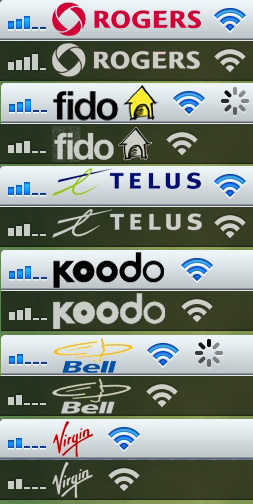
The great thing about these logos, is I have put them all in one package, and it is now available in Cydia, for free! It will be in the ModMyi repository. You will have to have the Zeppelin tweak installed, to use these. Enjoy! I’d appreciate any feedback you may have. You can comment below, or follow me on Twitter at @rorypiper.
Want to see more of our stories on Google?

P.S. Want to keep this site truly independent? Support us by buying us a beer, treating us to a coffee, or shopping through Amazon here. Links in this post are affiliate links, so we earn a tiny commission at no charge to you. Thanks for supporting independent Canadian media!
I prefer Make It Mine or FakeCarrier to set my name as my carrier.
If anyone wants a colour batman logo here is the folder. Just upload it to the /library/zeppelin directory.
http://ge.tt/8AG8QDD?c
file expired
Werd man same here. Fuk Fido. I wanna c my name on my device. They already get enough from me.
On fact having there logo on my status bar would make me enjoy my phone LESS. For that is why I sprung myself from jail.
To see my name. Not the useless company that rips us off every month.
Why is it the old Bell logo?
You might want to include such pertinent info as what the package is called on the repository. Modmyi is hardly bereft of files. I’ve found two Telus Carrier Logo packages and both require Winterboard so are obviously not yours. Nothing under “Canada” or “Canadian” either.
….
It’s called Zeppelin.
Zeppelin is the package to enable the carrier logo change. The Canadian carrier logos aren’t in the default package, they’re separate. It’s that separate package which isn’t named.
Search for canadiancarriersforzeppelin. It also works (atleast for me) if you search for just zeppelin.
This is the jivhg’s (author) instructions of how to install your own custom logo:
————–
1. rename the images as follows and place them into a folder.
a. Default (The one that goes on the silver bar) -> silver.png (or silver@2x.png)
b. Lockscreen/Homescreen/FSO -> black.png (or black@2x.png)
c. Notification Cener -> etched.png (or etched@2x.png)
2. Place this folder with your images within it in /Library/Zeppelin.
3. Terminate the settings application if it is already running and open Zeppelin
4. Your new logos should be in the list
—————
The png should be 20 pixels in height; 2x.png should be 40 pixels in height.
If you have set MakeItMine in SBSettings; delete custom text first and set it back to default carrier name.
If you have Fake Operator tweak, you need to uninstall it first for Zeppelin to work.
Telus is not centered and looks like poop.
Anyone interested in making a little Canadian flag logo? That’d be cool.
http://ge(dot)tt/8i8hmDD?c
Remove the (dot) with a .
If you want the Canada flag to be different shades/colours based on lock screen notification centre, let me know.
Also made a colour batman logo. I like it better then the one on their.
http://ge(dot)tt/9m51oDD?c
Remove the (dot) with a .
there*… sorry.
can anyone do a better or the new Bell logo. thanks!
The blue bell logo?
yes!
k jsut a sec… photoshop crashed.
http://ge(dot)tt/8VYkxDD?c
replace (dot) with a .
If you think the L’s are to close together jsut let me know.
look nice!. Thanks!
Any other requests? 😛
My girlfriend wanted hello kitty so mind as well upload it here as well.
http://ge(dot)tt/8jZU0ED?c
Replace (dot) with a .
Yo! nice work with the carrier logos..and since you’re filling requests too, could you do the honors for me 😉 Here’s my carrier’s website : http://www.telenor.com.pk (Telenor). Thanks
Hey sorry for the late reply.
http://ge(dot)tt/87TlKFD?c
Replace (dot) with a .
If you want a different log just send me the link.
The link won’t open for me.. replaced (dot) with ” a ” . In fact, none of the http://ge(dot)tt/ links are opening for me 🙁
Thanks mate, looks great, a bit stretched though! Only if you could add the text with it and make the logo one size smaller (equal to the largest signal bar), it would be perfect 🙂
Here is a link to it:http://www.telenor.com/en/resources/images/TEL_h_pos_3D_c_100mm_tcm28-29470.jpg
A bit scratched?
Scratched, no..streteched sideways, yes 🙂
(read again mate..hehe)
Ok well i am going to have to make the text alot bigger and fatter for it to be readable.
I dont think its stretched, it looks fine on iphone 4s. Are you using 3gs or below?
Also i dont know how much smaller i can make it. as you can see in all of the images above… they are bigger then the signal bar.
http://ge(dot)tt/8K5WhGD?c
Replace (dot) with a .Last try. Its hard to make the logo small enough but still keep it true to the original.
If its not what you want, then have fun with photoshop cause I cant get it apparently lol.
No I got the 4S and it’s perfect now, thanks! Appreciate the extra effort 😉
Has anyone had the problem that when you disable Zepplin, you’re carrier name doesnt reappear. I had this problem so I removed Zepplin
Stupid question – Did you press the “Apply & Respring” button?
Yes I did.The problem is I use Springtomize 2 to set my carrier name to whatever I want. When I applied a image with zepplin and then disabled zepplin as to just have the name back for the carrier it wont show any name
I have Springtomize too & I have no issues. I think you need to go into it’s settings & navigate to Status Bar & make sure Use Fake Carrier is turned on & under Hide Status Bar Elements check that Carrier Name is turned off as well
My logos
http://aur1g.com/zeppelin-loghi/
I installed zeppelin and my phone restarted in safe mode and everytime I restart it stays in safe mode until I uninstall zeppelin. Any ideas?
very nice tweak, using them now….thank
RORYPIPER