

Tim Cook’s New Chairman Pay Package Shows He’s Not Really Leaving Apple
Looks like Tim Cook stepped down as Apple CEO last week, and the early read out of Cupertino is that he is not exactly disappearing into the furniture. In Sunday's Power On newsletter for Bloomberg, Mark Gurman argues the first signs of the Ternus era still have Cook looming large, and the new executive-chairman pay...
So is there anything interesting about this update? Certainly not enough seen yet to blow a jailbreak. And NO mention of battery life, which was supposed to be “really” fixed this time.
When will the notes from exchange be supported on the iPhone???
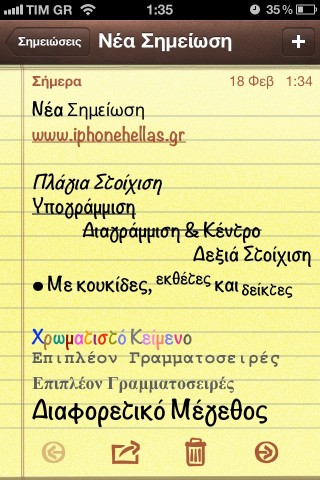
I would love to see colour and bullet formatting come to Notes & Mail. However, I doubt this screenshot was created on an iOS device. Notice how the text doesn’t line up with the background lines? More likely, this note was created on a Mac in Mail and synced over to an iOS device, which causes spacing abnormalities like this, in my experience anyway.
I’m 100% sure that this note was written on a Mac in Mail…
It’s easy to reproduce…
and by the way, I wrote some parts in Textedit app….
You can type bullets in iOS by pressing and holding the “-” key or by going to the “third keyboard” (numeric shift key then hit the “#+=” shift key). Awkward, forgettable, but doable.
Simplenote’s cloud syncing of notes is the killer feature because I can access my notes wherever I want. I don’t even bother with the native Notes app.
I love SimpleNote for that. So great.
It’s such a simple feature that easily puts it above the native Notes app. Ever since you guys featured it a long time back, I’ve had it, and been using it. I have the most random crap recorded in there, but that’s what the app is perfect for!