
Starlink Expands Free Mini Rentals to More Canadians
Starlink expanded its free Mini rental to invited customers on every Residential plan in Canada. Details on eligibility, monthly costs and return terms.
Sometimes it is the simple things that give us so much joy in our day. We came across this great tutorial over at Snapguide, that shows you how to calibrate the Home button on your iPhone, iPod Touch, or iPad. Occasionally you may notice that your Home button isn’t quite responding the way it should. You can’t get to the home screen right away, the app switcher won’t reveal quick enough, or Siri is slow when being invoked. In some cases, this can be a hardware issue, but you should try this tutorial. It actually worked for me.
I have my iPod Touch 4G jailbroken, so when the system UI slows down a bit, I just blame it on something I have installed from Cydia. After performing this calibration, I have noticed my Home button is more responsive. There are three simple steps:
1. Open any of the stock apps on your iDevice, like Weather, Maps, or Calender.
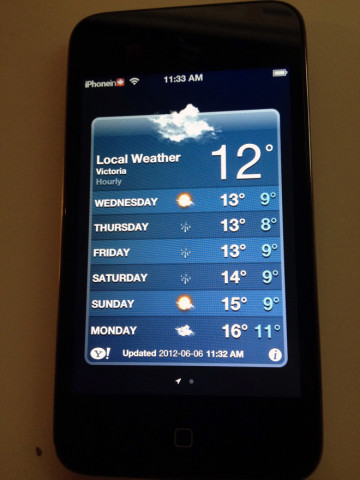
2. Press and hold the power button on top, until you see the power off slider appear.
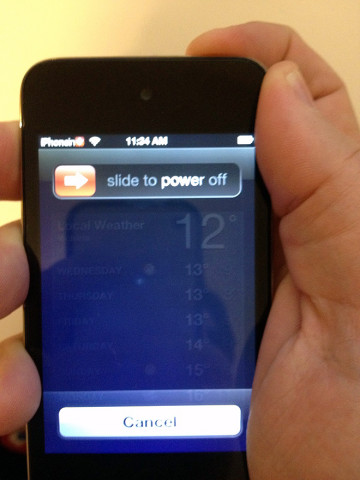
3. Then press and hold the Home button until the power off slider goes away.
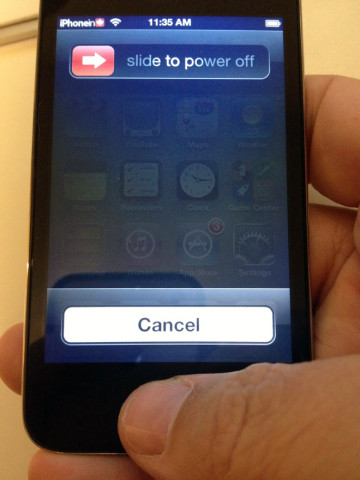
That’s all there is to it. If it worked for your device, you should now notice a much more responsive Home button. Let us know if this tip worked for you, in the comments below.
Want to see more of our stories on Google?

P.S. Want to keep this site truly independent? Support us by buying us a beer, treating us to a coffee, or shopping through Amazon here. Links in this post are affiliate links, so we earn a tiny commission at no charge to you. Thanks for supporting independent Canadian media!


This tip works for my 4S just as well as its worked over the years with my 4 and my 3G. An oldy but a goody.
Worked on my 3Gs. thanks
Talk about timing. I -just- started having a bunch of trouble with my home button yesterday. Gave this a shot and now it works perfectly; maybe even better than before…
Well that worked! I was wondering why when I double tap the home button sometimes it just goes to the search page.
Oh and my device is a iPhone 4.
I am very skeptical about this. The home button is just a simple on/off button, it’s not a sensor or an analog thing. Why would it need calibration? It either works or not. Am I missing something?
It’s never made sense but it usually works. :).
Wow! This really worked for my iPhone 4!
I had noticed the button getting sluggish over the last few months, then I tried this and it’s good as new!
I had gotten used to almost pressing through the phone. I’m sure it appreciates the calibration.
Thanks for the tip!
had no effect on my iPhone 4; still as sluggish as before
BIG thanks! Worked on my iPhone 4. Every time I would push the home botton from sleep mode the iPod features would come up… it was slowly driving me crazy.
begin to notice my home button is not so responsive too. Did the calibration above and seems more responsive now. Thanks. My iphone is the 4S
OMG, this totally worked for my iPhone 4. A few months after getting my phone, the Home button only worked when pressed on the left side only. If pressed in the middle, or to the right, it would not register. I wanted to go to an Apple Store to exchange it, but kept putting it off until my warranty expired. Now, it’s working like new! Thank you so much for this article.
Im generally very skeptical about these things, even though comments might be positive. After all how can thins force quit method work to fix a hime button that seems to obviously be havinf a mechanical problem.
Thing is it works though. So yeah i know this isnt some magical fix for a mechanxal issue, but it seems to be a software issue (really have no idea why though) an this fixes it. My iphone 4 home button slowly started responding less and less to the point that double click would work so rarely i stopped using it for that, and going to home screen was an exercise is pressing the button at a certain angle
Well i finally got sick of it after about 4 months and an expired warranty and i was looking into eiter jailbreking my phone to install a cydia app to use as a home button or to order a replacement button off ebay. Well the enay method was about 40 steps on ifixit but i stumbled across this method just 4 days ago and it miraculously fixed the button where it is now working flawlessly. Ice tried restoring setting up as new resetting network settings rebooting etc and mothjng worked until this.
So why the long story?? Its obviously been debunked but i want someobe to explain why this works for so manu people. If it was a a software issue would apple have fixed it since ive been having this problem all the way sibce ios 4 till the recent 5.1.1
I was skeptical too but when I saw this article it gave me hope that I wouldn’t require a hardware replacement for my iPhone 4. It’s been a great phone for the most part but the Home button has been driving me nuts by not responding to double-clicks properly… sending me into Search rather than bring up the multitasking bar.
Tried this fix and the Home button seems fine now… there’s no arguing with success I guess.
It doesn’t seem to be force quitting the app since when you do this, the app that you launched ie. weather app to do this trick is still shown in the taskswitcher.
Wow! I thought that my Home button was getting defective as it was hard for it to respond correctly. I did this and WHAM, it’s instant.
Thanks 🙂
worked for me on my iPhone 4. Sluggish / unresponsive home button before. Not any more! Thanks!
Just because one guy says its bunk, why take his word a gospel?
I was having problems on my 4 thought I might need button replaced,
Now works great
+1
I should add that this worked for my iPhone 4 without opening one of the stock apps (step 1). I did it from the Home Screen, and it fixed my Home button problems.
wooow! this worked, thanks 😀
Awesome. Totally fixed the unresponsive home button on my iPhone 4. Huge thanks!
Hasn’t worked for me, but my iPhone is really bollocksed. The only thing that works for me is to plug it into a charging point. Absolutely no rhyme or reason to it stopping working, but plugging it in fixes it. If anyone has a hypothesis- let me know.
Cheers
I did the calibration thing several times. On other sites they suggest to push home button AS SOON as the power off slide comes up. I did it and the home button now works flawlessly.
Before I was using Assistive Touch cause my home button was almost dead. Now it works on 99% of cases. Myth or not if it works I’m fine with that. We could even call it a MIRACLE for what I’m concerned.
fuuuck it works!!! 😀 cant belive
didnt work for me :(( what to do?