
Apple’s AirPort Utility App is Being Removed From the App Store
Apple warns that "functionality is not guaranteed" when using AirPort Utility on iOS 27 or later.

Earlier this evening, AllThingsD reported sourcestold them Google Maps for iOS was to be released tonight. Well, that has turned out to be true as Google Maps for iOS is now available for download.
Navigate your world with Google Maps, now available for iPhone. Get comprehensive, accurate and easy-to-use maps with built-in Google local search, voice guided turn-by-turn navigation, public transit directions, Street View and more. Use Google Maps to discover great places to eat, drink, shop and play, with ratings and reviews from people you trust. Sign in to save your favorite places and quickly access all your past searches and directions from your computer, right on your phone.
Search * Find addresses, places and businesses around the world with Google local search. * Discover places to eat, drink, shop and play, with ratings and local reviews. * Sign in to sync your searches, directions, and favorite places between your computer and your phone.
Directions * Get voice guided, turn-by-turn driving directions. * Find your way by train, bus, subway or walking directions. * Access live traffic information in cities across the world.
Street View and imagery * View 360-degree panoramas of places around the globe with Street View. * See inside more than 100,000 businesses worldwide. * View high resolution satellite imagery of locations around the world.
Simple and easy to use * An entirely new Google Maps experience on your iPhone. * Newly designed and streamlined interface for even easier navigation of your world. * Use gestures to explore the map and browse results.
So far, after a quick download and test, I must admit it feels great to have Google Maps again on iOS. The interface of this app is quite slick for a first release from Google, and includes swipe gestures to access satellite view, traffic, public transit and a link to Google Earth.
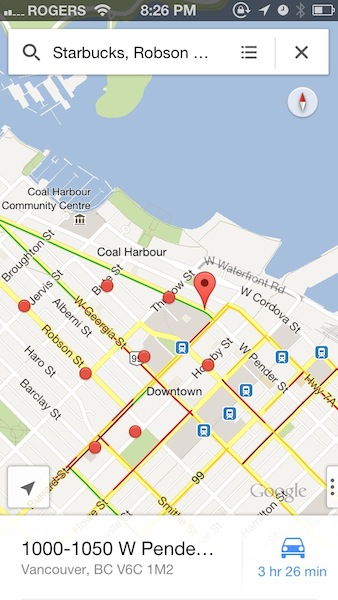

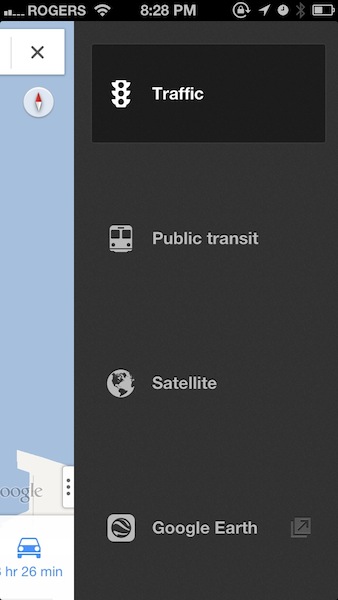
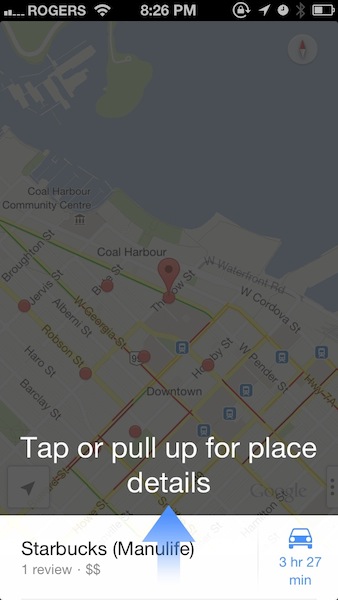
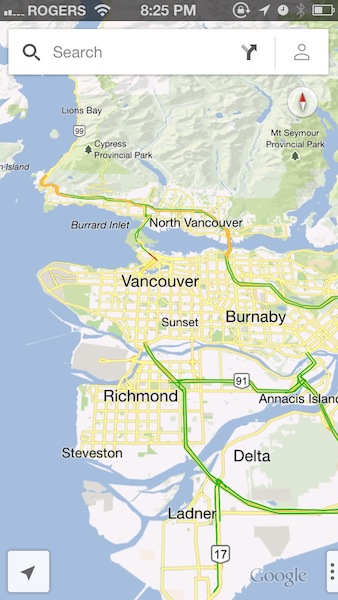
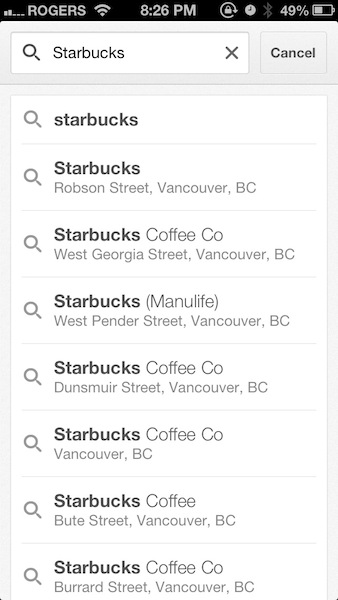
You can tap and hold anywhere on a map to drop a pin location, then get street view as well. You can use two fingers to tap to zoom out of map views, just like you can in Apple Maps. Transit directions are back along with Street View, without needing to hit up a mobile page. Seriously, well done Google on this release. So far so good and we can’t wait to test turn by turn directions tomorrow.
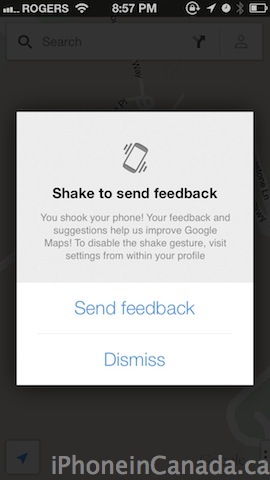
Check out this out–all you have to do is ‘shake’ your iPhone to send feedback. So cool:
Apple removed Google Maps from iOS 6 and went with their own in-house solution which has proven to be troublesome for many users. The Apple Maps fiaco has resulted in CEO Tim Cook publicly apologizing for its failures and also the firing of Scott Forstall.
Click here to download Google Maps for iOS. Let me know what you think of it so far.
Update: Google explains they have also released a Google Maps SDK for iOS, to allow developers to launch Google Maps instead of Apple Maps. This is big news, folks:
Alongside the newly designed Google Maps for iPhone, we’re also excited to announce the Google Maps SDK for iOS. With the Google Maps SDK for iOS, developers can feature Google maps in their applications on the iPod Touch, iPhone, and iPad. Also, the SDK makes it simple to link to Google Maps for iPhone from inside your app, enabling your users to easily search and get directions.
Here is the Google Maps for iPhone promo video:

Want to see more of our stories on Google?

P.S. Want to keep this site truly independent? Support us by buying us a beer, treating us to a coffee, or shopping through Amazon here. Links in this post are affiliate links, so we earn a tiny commission at no charge to you. Thanks for supporting independent Canadian media!


Great job. much better than the original google maps app. Finally!!
HALLELLUJAH!!!
judging by all your posts I take it you’re happy lol.
Just slightly 😛
That would be a safe assessment
Kudos to Apple for doing the right thing here.
So far it’s awesome. Very responsive, quick, and smooth. Oh how I’ve missed Google’s Maps!
interestingly, google maps app can be used as a transit app, launched from apple maps.
BTW Gary I love how everything always relates back to Starbucks for you, even in your screen shots! haha
I am a Starbucks JUNKIE! I can’t hide it. 🙂
Yesssssssss
Now, iPhone is kicking Android’s ass!! We officially have the best of both worlds. Who’s lost now? Samsung, is time to call Iron Mountain to shred all your advertisement…
lol I find this kind of funny but Google maps has the mapping in my area wrong, where as apple maps has it correct. It is a new area but still funny xD
Looking for places in the area is gonna be a hell of a lot more convenient with this now 🙂
Way different than the previous version on iOS so this took some getting use to.
After about an hour now I like the new changes
Apples Maps has been chucked into the same folder with Stocks, Weather and Game Center!
Apple, take note: this is how a maps app is done… properly.
well I just deleted Nokia maps(should be dead for sure right?) Also whatever else I had.
Only going to use Apple maps and google maps. Never had a problem with apple maps but I always liked Google maps and the new features are awesome.
I deleted Nokia maps but still have NAVIGON US&CAN for driving in the mountains with no reception or while travelling to US (app doesn’t use data at all)
I deleted Nokia’s map app right after installing it. It sucked.
Well, isn’t that interesting. They’re vector maps, and there’s turn-by-turn navigation available. Aren’t those the two big reasons Apple said that they wanted to switch to their own mapping solution for?
Ah, this is nice. Finally, colors that make sense and small streets that are actually visible! And it’s super snappy!
If I recall, comments you made in a previous article, you were all for the crappy Apple maps, and didn’t think Google would release a decent maps app. LOL
This is true. Google proved me wrong.
The biggest things I liked about Apple’s maps solution was that it was vector and had sexy built-in turn-by-turn navigation. I didn’t realize Google was going to be bringing those things to the table. (Although after playing around with it, it doesn’t seem to be fully vector but a bit of a hybrid, in a good way. Their solution feels even snappier than Apple’s.)
I did mention somewhere that I wasn’t a fan of the colors in Apple’s maps. The green parks stand out WAY too much. I also don’t like how thin their minor streets are displayed until you zoom in super close. I sent feedback to them about this, although who knows if anyone reads that feedback, let alone decides to change things based on it.
There are a few minor things with the Google app I don’t love, like the font choice (Helvetica Light is beautiful but a little harder to read), but bottom line, I’m quite happy with what Google has produced here. I wasn’t expecting it, and I’m pleasantly surprised.
Yes that’s true but in all fairness to Apple, I believe when they had asked Google about turn-by-turn, Google said “no” or wanted some ridiculous amount of money to do it. So Apple said forget it, and said if we want to deliver this functionality to our users we’ll do it ourselves.
Now, did they execute on that well? Hell no – they did a terrible job. But I do
understand the approach they took.
Yes, that is what Apple said, but Apple can also be very demanding in their negotiations. Seeing what Google did here makes me think that perhaps Google was willing to work with Apple on providing those features, but Apple wanted them to work a particular way that Google wasn’t willing to deliver. Perhaps it was money, perhaps it was simply that Google felt they had solutions that would work just fine and didn’t want to spend the hours to re-work a system the way Apple wanted it. I’m sure there’s a bit of greediness and stubbornness in both camps. Either way, I find it interesting.
Finally something useful, instead of apple crap maps.
although i think the whole “apple maps catastrophe” was blown way out of proportion, it’s nice to have google maps back. it seems really snappy.
Thank God, Finally!!! Can’t stand this dumbass Apple map any more
Just dumped my apple map icon into “etc.” folder 🙂
Too bad I can’t permanently delete this piece of junk.
How to make Google map app my iPhone DEFAULT map without jailbroken ? Thanks
Not possible
This is a bad move Apple. Don’t let the devil get a foothold on you. Stick to your original plan, you’re not working hard enough at updating your own maps database. What are you gonna do, kick Google Maps out again when iOS 7 comes out? Then this story gets repeated again next year. Google is making money off Apple products and they’re laughing at us!
What are you talking about? It’s not a bad move. They are giving the user the option to CHOOSE which maps to use, instead of shoving their crappy maps app down our throats by force. CrApple maps is one of the main reasons why many people still haven’t upgraded iOS 6.
Strange most of my favorite apps are from/ for Google stuff on my Apple iPhone! Does that make me a closet Android wannabe?
LOL! We won’t tell. Using the Gmail iOS app is powerful if you have multiple accounts linked to one account and numerous filters etc; it’s an experience Mail cannot match.
Here’s hoping Apple looks upon these apps as a reason to improve it’s own offerings.
transit and the search ability for local shops isntantly makes this a winner…
Big time.
Though I must say, Apple, don’t give up the ship. This is just transient. Work hard and one day show these upstarts what’s what. When the shine comes off Google, as it is happening to Facebook, you can come in and acquire the parts you like and incorporate them in your, by then, much improved map application. Which pretty much means street view for me the rest works fine for me. No map app dedicated program or even GPS unit is perfect. If you want to use anything blindly you are an imbecile. If this makes anyone angry or uncomfortable, the look in the mirror.
how to choose destination or address from the address book? Would very much like to pick from/to address from the contact. Please help.
It’s not available in this version of Google Maps … Maybe in the next update.
Ok. Just want to make sure I’m not missing anything. Lets hope they add that in.
I find the Save function buggy. I saved a few locations but when I tried to search for them again, it does not show up as Saved locations. Am I the only one having this problem? I would not need to save if I can have access to the address book for location. Anyone knows how?
Thanks
Ignore the buggy saved. It works now. Found it under the account head that looks like where the address book would be
I’m curious to see how much data is used to find, driving directions between Apple map vs Google map.
Okay I know everyone’s going to jump all over me but I don’t think this app is much better than the Apple Maps.
Amazingly enough there’s less controls/options and its pin point accuracy is no different.
Sorry I just don’t see how it’s better … It’s nothing like the original native app … I’m sticking with the other maps and deleting this one …
OMG I CAN’T BELIEVE YOU WOULD SAY THAT YOU’RE SO RIDICULOUS!!!
Ok just kidding. You’re entitled to your opinion! I can kinda see your point. I’m sure there are some areas where Apple Maps is better. But … prob not too many of them. 😛
Personally I’m gonna continue using both. I’m curious to know if Apple will make their Maps much better over time.
OMG I CAN’T BELIEVE YOU WOULD SAY THAT YOU’RE SO RIDICULOUS!!!
Ok just kidding. You’re entitled to your opinion! I can kinda see your point. I’m sure there are some areas where Apple Maps is better. But … prob not too many of them. 😛
Personally I’m gonna continue using both. I’m curious to know if Apple will make their Maps much better over time.
“I’m curious to know if Apple will make their Maps much better over time.”
No. I’m pretty sure they are going to do nothing and let it rot just like Apple does with everything else.
[intense sarcasm – in case it wasn’t obvious]
Umm… I can’t tell if you’re kidding. There HAVE been examples of Apple giving up on things. Remember Ping? (That crap social sharing part of iTunes?) And that’s just to name one. So, yeah. It wouldn’t be the first time Apple has given up on something.
Ping?! You’re comparing their current and ongoing investment in Maps to Ping??? That’s like comparing a book to a piece of paper.
I’m just saying, you act as if Apple has never abandoned an idea before.
Just having actual accurate search results makes Google Maps for iOS blow away Apple Maps.
It’s funny you say that because when I search for my house, in a new development, iOS Maps finds it exactly (it even shows me that I’m in my family room) but google old and new shows me down the street – nowhere close.
As I’ve said a hundred times, iOS Map fiasco was completely exaggerated and no mapping app is without its own flaws – including almighty google.
Apple Maps is not perfect, I agree. But it wasn’t very good at searching for businesses. Google Maps was able to locate my dentist’s address by just punching in his name. Apple Maps? Fat chance.
Geez Gary … He is your dentist, shouldn’t you already know where he is? 🙂
I have my dentist as a contact. So it has the address. haha!
Nope!
Apple fan boy right here.
Aren’t we all? This is a fanboy site … Or are you a trolling fAndriod … Methinks the latter …..
I’m really torn here. I love how much information google maps has (more places, street view etc), but I feel like apple maps’ UI looks better. Especially when it comes to turn-by-turn. Just imagine a perfect world where apple designed the UI for the maps app, but google provided all the under the hood information.. Oh man, one can only dream
They have been doing that since 2007 😛
Minus the driving feature of course
Is there an easy way to search for address’ in contacts?
I couldnt find any way to pull contact address into the app.
When Google puts out a maps app of this quality, it’s hard not to notice how much of an uphill battle apple has in developing their own mapping to be at the same level but in a fraction of how long it took Google.
Does anyone know how to change building names? My workplace is incorrect and I’d like to edit what’s there..?
shake it baby! (Send feedback/Report a mapping issue)
Shake to report feedback
Thank you!, both!
After fiddling with it for 5 minutes, I’m very impressed. And the SDK is great news, since Apple doesn’t want us to have control over our default apps.
No iPad version?
It’s coming soon says Google.
I am not getting turn-by-turn navigation or voice-guided directions. Is this feature unavailable in Canada? Anybody else have the same experience?
It works here. Did you tap on the ‘car’ icon and let it start?
Yes. Here’s what I did: (1) type in destination query (2) select destination from results list (3) tap car icon (lower right-hand corner) (4) select first route route from list of routes offered. Now the map zooms out to show the entire route (top-down view). My location is shown by a blue dot. When I start moving, the dot moves on the top-down map view, but the turn-by-turn does not start. No navigation assist occurs. Am I missing a step somewhere? (PS: I’m trying this on an iPad, but it does have GPS.)
Did you tap ‘start’ in the bottom right?
Interesting, it doesn’t show a ‘start’ button, only ‘preview’ (see attached screenshot). The iPad isn’t on 3G, and I started my test with a WiFi connection, hoping the nav data would be cached on the device. Now I suspect the feature is completely disabled if you don’t have 3G data. Thanks a lot for your help. (Edit: I tried to attach a photo but it doesn’t show up here.)
I have an iPhone 4 and I am trying to move Apples maps from my home screen to a folder as I have dowloaded the new Google maps, but everytime I try and move Apples maps and push the home button to complete the move my phone shuts down and the Apple icon appears and then I have to enter my password and the maps icon is back on the home screen.
Is anyone else having this problem and how can I fix it?
Thank you
i haven’t updated to iOS6. is there a clear difference between the default maps on iOS5 and this one?
Michelle, as different as night and day. Far superior!
This is pretty much the death of apple maps. The vast majority of users will eventually download google maps and apple knows the user base won’t stand for another iOS release sans such a ubiquitous app like this. This is something that google does better. Apple has never been a web software company and they suck at it so far. It’s taken google years to get their maps to where they are. In order for apple to overtake them they’ll not only have to catch up, but exceed them in a really big way that makes people take notice. I say, fat chance.
The native Apple app truly is crap, not blown out of proportion, it sucks.
This Google Map is awesome though, I just wish the Nazi’s at Apple would let me set the Google Maps app as the default map app