
You Can Now Jailbreak iOS 16.4.1 with Palera1n 2.0.0 Beta 6
Codenamed Bakepale, the latest v2.0.0 beta 6 update to jailbreak tool Palera1n has just been released, which fully supports iOS 16.4 - iOS 16.4.1 jailbreak.
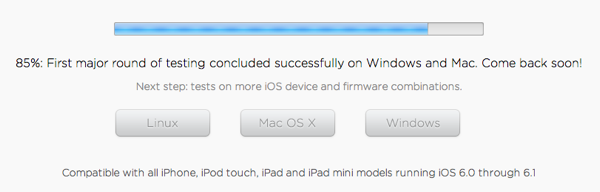
Last night we told you the evad3rs jailbreak team had updated their evasi0n jailbreak website to note the completion was at 80%. Shortly later in the evening the team updated the website to note the jailbreak was at 85% completion, with the first major round of testing on Mac and Windows completed. The team notes up next will be more tests on various iOS devices and firmware combinations.
How to prepare for the iOS 6.1 jailbreak? Back up your device to iCloud or iTunes, then update to iOS 6.1 within iTunes via a complete restore (instead of over-the-air) as recommended by the Evad3rs. If you’re currently jailbroken, consider backing up your tweaks via OpenBackup first before updating.
The jailbreak will be coming anytime now, as it’s now “Sunday fun day”, as hinted by @MuscleNerd a while back. The day you have long awaited for is coming soon!
Want to see more of our stories on Google?

P.S. Want to keep this site truly independent? Support us by buying us a beer, treating us to a coffee, or shopping through Amazon here. Links in this post are affiliate links, so we earn a tiny commission at no charge to you. Thanks for supporting independent Canadian media!


Would be funny if they didn’t release it today 😛
Or the progress bar is all BS and they are not even remotely close
Ya there just making it up…like come on
True, since the Superbowl just started and nothing new on the website reguarding the jailbreak.
What to do if I upgraded my iPhone5 over the air? Is it maybe I simply need to download a copy of the iOS6.1 on the hard drive for jailbreaking reason or something else?
According to the website you won’t need the actual .ipsw file. You will need iTunes though 😉
What do you think iTunes downloads when you update?
When you update iTunes… iTunes. If you’re talking about firmware, he is referring to OTA.
you see his point though, OTA is the update, its just packaged differently because the OS is running and has to temp the ipsw and then apply it. Not sure how much of a difference it will actually make. Interested in seeing if people do it with and with out OTA update.
No. You are screwed.
Derp.
no hes not..
Just restore via Itunes and you should be good to go.
you just have to connect to your computer and do a restore. In the future its always best to do the update through the computer to your phone if you plan to JB. OTA works fine usually, for my other devices I do that (Apple tv, iPad) and i rarely have issues. Not sure why its more stable if you do it the other way if you plan to Jailbreak.
I got a feeling it won’t matter if you updated in iTunes or OTA…like relax
Is it just me, or does anyone else thinks “Sunday Funday” is referring to the Super Bowl?
ITS AT 90% NOW!!!! CANT WAIT!!