
Microsoft 365 Support to End on Older Macs and iPhones Starting in July
Microsoft is ending core support of Microsoft 365, Office 2019, and Office 2021 on older Macs and iPhones, starting July 13th.
iOS 7 beta 3 has arrived, as expected, within two weeks of the second beta, and contains bug fixes targeting Airplay, Calendar, Contacts, Music player, Newsstand, etc. In addition, the third beta contains several UI tweaks, as detailed briefly below.
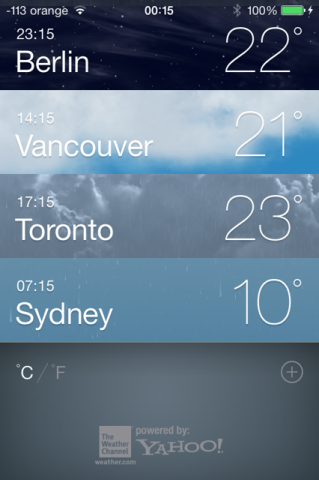
The first tweak that captures the user’s attention is the new font set used system-wide. With iOS 7 beta 3, Apple has moved from the Helvetica Ultra Light to a heavier font, presumably Helvetica Neue Regular. The change is most obvious in the Messages app, Weather app, Notification Center, and the Settings app.
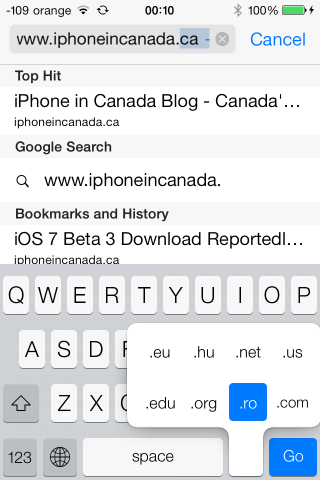
With the new Safari, Apple has decided to ditch the .com button, and changed it to a simple period button. The convenient .com, .net and .org domains can be accessed by holding down the period button.
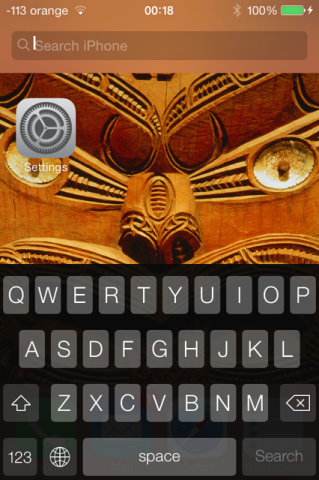
The third beta has also targeted the search iPhone feature: if you go to the home screen and swipe down, the text seems to swing to the left now (or is it just me?) like an animation.
The app has been updated to show small gray dots on days when users have scheduled events.
When users download an application on their iDevice running iOS 7, they will notice a circular install timer instead of the dated download bar.
The iOS 7 beta 3 Siri includes development versions of new male and female Siri voices for English and French, and a male voice for German. Also, Siri sounds more human-like now.
Another noteworthy tweak is that app folders are more transparent compared to the previous two beta versions.
Overall, iOS 7 beta 3 brings much needed performance tweaks as well, and feels much smoother than beta 2.
Want to see more of our stories on Google?

P.S. Want to keep this site truly independent? Support us by buying us a beer, treating us to a coffee, or shopping through Amazon here. Links in this post are affiliate links, so we earn a tiny commission at no charge to you. Thanks for supporting independent Canadian media!


I love it. Beta 3 big difference.
Thanks for the thorough rundown. I haven’t had the time, or the energy to go through my phone this evening. Now I don’t have to!
Thank God for the new fonts, the skinny ones were ridiculous!
i guess reviews are mixed
They should drop Yahoo! for weather updates … They’re always wrong … I like Weather+ … I’m not sure where their data is pulled from but it’s very accurate.
which is a shame since the stock weather app is stunning
Recently switched back to iOS6. I couldn’t figure out any way to restore all of my photos in Safety Photo+Video after upgrading to iOS7. Bummer. iOS7 was constantly freezing up and crashing on me, even with stock apps, so I think I’m going to hold off for the final release.
Still a big item missing. The wwdc keynote showed call blocking with 2 options, complete block and going to voice mail. Beta 3 shows a blocking option, but in reality only sends it to voice mail. This is wrong because you still have to check it. True blocking you would never see.
They still haven’t fixed the issue with folders on the dock and not animating.
They should bring back transparent bgs in the notification centre and safari tabs. It’s all black now.
Messages font is too thick now in my opinion.
found the solution for the transparency, settings, general, accessibility, turn increase contrast off
agreed about the fonts
Thx!!!
I wish I could keep the high contrast on just the control center
Really liked the pulsing lightning bolt when charging… too bad it was removed.
iOS 7 Beta 3 is leaps and bound more stable than Beta 2. It’s been a good upgrade, and stable enough now that I’d consider giving it to my wife and mother. The Shared Photo & Video Streams have been great (my son was born last Wednesday, so we have lots of pictures and videos we are sharing with the family). But the iOS 6 users in the family can’t see the videos, only the photos.
congrats on the new arrival
Can someone please tell me how theb battery life in the ios 7 beta releases so far compare with ios 6? Just curious.
On my iPhone 5 ihas been excellent on stand by. Does use little more while in use.
Good to see that they still seem open to design changes like which font to use. Based on that screenshot it still doesn’t look like they’ve found the right balance, but I’m hoping they’ll nail it by the time iOS 7 goes public and I get to try it out. 🙂
Here’s hoping they also redesign some of the uglier icons by then. Here are some beautiful icons that fit the new look: http://dribbble.com/shots/1109343-iOS-7-Redesign?list=users
In my opinion, this is how the icons SHOULD look. They seem much more Apple-like than Apple’s icons. Check out the side-by-side comparison: http://dribbble.com/shots/1109343-iOS-7-Redesign/attachments/141296
Now that I’ve seen this comparison: http://j.youens.com/Q7Qb/o
I kinda prefer the light version of Helvetica Neue. The screen hinting on the regular version looks awful. 🙁
dude you arent wrong, the light was so elegant, i cannot stand this font change
As much as I like the weather app – it is not accurate enough or gives enough information. Plus it seems that if you are using custom ringtones they no longer work.
Message read would be good ? Like with BBerry
Read receipts are already available in iOS 6.