With iOS 7, the operating system UI redesign also brought an important change: a new, very lightweight font that can make text difficult to read throughout the whole system, including menus, notifications, and the Home screen.
Some of our readers complained that they are having difficulties reading the text with the default font. We have good news for them, though: there is a simple, one-tap remedy for this. While iOS 7 doesn’t allow users to change the default font, the change will increase the weight of the font, and, best of all, the change will take effect systemwide.
How to make text easier to read in iOS 7
Step 1. Go to “Settings” > “General”
Step 2. Open “Accessibility”
Step 3. Scroll down and find the “Bold Text” toggle
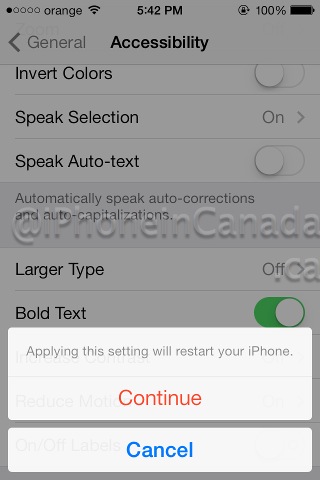
Step 4. Restart the iPhone when asked. That’s it!

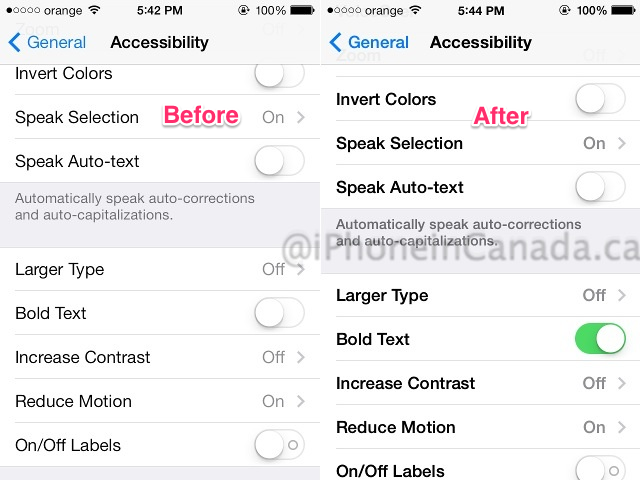
The reboot will take much less time than usual, and as the lockscreen lights up, you will immediately spot the new, bold font on the “Slide to unlock” slider. And as you tap into the Settings app, you’ll see how much easier you can read the menus. Enjoy!



settings-GENERAL-accessibility. just in case you can’t find it.
Unfortunately the bold is too bold and the light is too light, in my opinion. Why couldn’t they have an option for a Regular weight? I really don’t understand a lot of Apple’s design decisions in iOS7.
I used to love the iPhone 5. Not anymore
The one time I tried his it made the text look slightly fuzzy!
Whoops! Clicked too soon. Was going to add that I should try it again!