Just in time for iOS 9’s release (available now!), Rogers and Fido have released their 21.1 carrier update, to bring support for Wi-Fi calling for iPhone users.
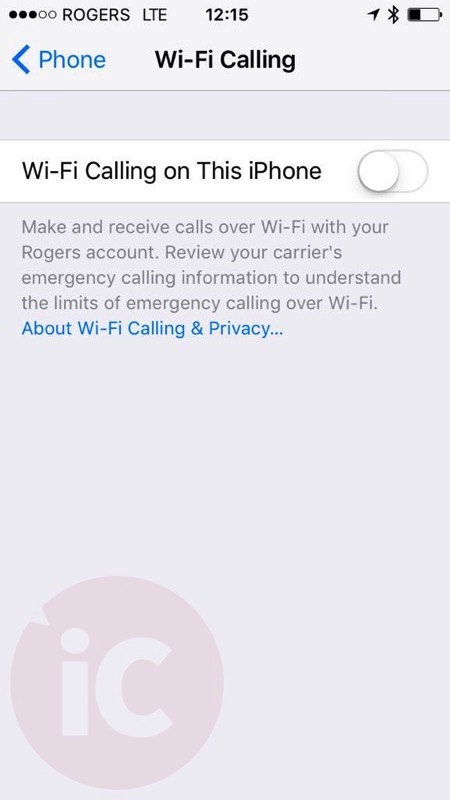
As promised, the update brings Wi-Fi calling support iPhone 5c/5s users or newer. Once the carrier update is installed (it should pop up when you go to Settings > General > About), just enable Wi-Fi Calling by going to Settings > Phone > Wi-Fi Calling > ON.
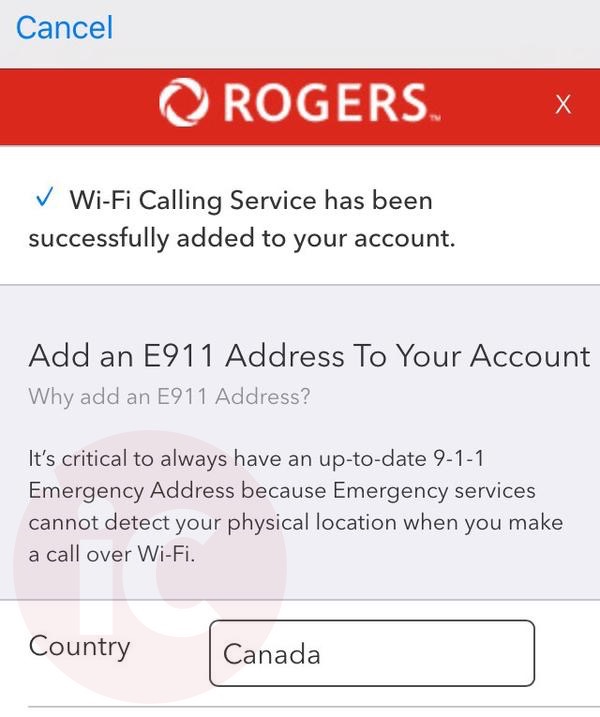
Once you enable the feature, you’re taken to a page to agree to terms and conditions and also an E911 Address page (thanks @Alan_3000):

The feature allows iPhone users with no cellular signal to continue to receive and make voice calls and send/receive text messages when connected to Wi-Fi. This is helpful if you’re in a basement or area with no cell coverage.
Wi-Fi Calling on iPhone requires carrier support to enable it, and Rogers is the first of the Big 3 to support it in Canada. TELUS already confirmed it will not support the feature at this time.
UPDATE: We should have clarified the following from the Rogers Wi-Fi Calling FAQ–One Number needs to be disabled plus the following other features, for Wi-Fi Calling to work:
Are there any services that will not work with Wi-Fi Calling?
Customers with select features and services, including any of the following, will not have access to Wi-Fi Calling:
-
Data blocking
-
Ringback tunes
-
Advanced Call Manager
-
Teletypewriter
-
Rogers One NumberTM
UPDATE 2: If you’re on iOS 9 or iOS 9.1 beta, you need to downgrade to get the carrier settings update. Restore your device in iTunes via DFU mode.
UPDATE 3: Fido has not enabled Wi-Fi Calling yet. Doesn’t work, we’ve tried.
Let us know how Wi-Fi Calling works on your iPhone in the comments below (that is if you can download iOS 9 right now as Apple’s servers are being slammed).
Update 4, Sept. 17, 10AM PDT: Fido Wi-Fi Calling was successfully activated! I disabled Wi-Fi, then tried it and it worked.
 Update Sept. 18:
 Rogers emailed us to say “the issue some customers were having enabling the Wi-Fi Calling feature is fixed.”
In addition, the company said “We’re offering Wi-Fi Calling on a number of devices which really allows a large segment of customers to take advantage of this exciting new feature,” which alludes to the difference in how Bell will only support iPhone 6s models with WiFi Calling.
Update Nov. 16: Are you traveling while using Rogers or Fido Wi-Fi Calling? You will not be charged for the following while you are roaming, according to Fido’s FAQ:
- (1) All text messages and calls you get from anywhere in the world
- (2) All text messages and calls you make or send to a Canadian number
But if you make calls or texts to a U.S. number, you will be charged accordingly.



The is the sole reason I will update to iOS 9, on behalf of all basement dwellers, THANK YOU!
It’s a pretty cool feature, good on Rogers for bringing support for it.
Fine print says in Canada if phone sees both wifi and cell, it will connect on cell. Outside of Canada, it will connect on wifi.
Do manual network selection to “Rogers EXT”. Problem solved 🙂
What does this do?
Will it says it prefers cellular over wifi when in Canada.. If your phone has “No Service” because it’s trying to connect to the extended network then it will use wifi. For example, at my mother’s house I get service but it’s pretty crappy and will cut in and out. This method would ensure I get reliable wifi 😛
When I try to enable, I get the terms, which I agree, then I enter an E911 address, which it accepts, then it says that wifi calling is enabled for my account, but the slider stays off.
I get the same thing! And I don’t have rogers one number or any of those other things enabled.
Carrier’s update does not pop up… I am currently on iOS 9.1 beta with Rogers 21.5… and nothing about Wi-Fi calling in the phone settings.
I’m wondering if I should downgrade to 9…
same story … don’t see the update!
any update on this?
Still nothing for me.. not able to do the carrier update, so no wifi calling.
How is that possible?
It’s possible by restoring your phone with iOS 9. Only downfall is any backups on 9.1 won’t be able to restore on 9.0
Which phone do you have? It’s not available on the iPhone 5 or earlier.
iPhone 6
That’s odd. I’m not sure then because I’m running iOS 9.1 Beta on an iPhone 5 (also carrier 21.5) so I know I won’t have it for sure. Maybe you’re looking in the wrong spot?
Same here with Fido (21.5, 9.1 beta)
iPhone 6plus
No carrier pop up either on Fido…Im still on IOS8….
you need iOS 9
I thought I read somewhere the carrier settings need to be updated first…maybe I’m wrong, anyway downloading iOS9 now….thanks!!!
your carrier is already updated. The latest one is 21.5 which is what you have.
Also, I thought the whole point of this is that it would seamlessly transfer from wifi to cellular, but if you read the Rogers terms page that comes up, it says that calls will drop.
Never was. It’s about getting coverage where no coverage existed or was spotty while on wifi.
I think the handoff simply requires VoLTE
When I try to do this, a dialog says to me “To allow WiFi calling on this account, contact your carrier”. Is there a switch Rogers needs to flip on their end for this to work?
Is there any charge from Rogers to use WiFi calling? Thanks.
Rogers One Number need to be turned off, call Rogers
I got the same thing and I think it is because I am on a corporate account. My employer manages my plan, data and all that.
That’s too bad. I don’t belong to a company but I have a discount through the ontario college of teachers. I’m hardly a business.
Got the same message. Online Chat agent removed my Rogers One Number option. Still didn’t work. I’m now on the phone with Tech support, he is looking to see if my Corp 350 plan is the problem.
Just called Rogers to disable my one number as well and wifi calling still not enabling. I’ll wait a bit to see if it’s a timing issue. Let us know if u are successful
rebooting your phone wont hurt either
Thanks tried without success. On phone with Rogers again they are investigating
i had to call twice about one number
Yep. got a similar response. Escalated my issue. Said someone will contact me within 72 hours…. greaaaaat.
If I had a dollar for every issue Rogers “escalated” then never called me back I’d be a millionaire.
Got it to work. I disable my wifi connection before enabling wifi calling.
Then I entered my 911 info, got the waiting for activation message and now I see Wifi Rogers as my carrier
That’s terrible news for people who live in areas with poor coverage. Thanks for the info.
Wow! They seem to be doing everything to get me off corporate plan. I pay $75 per month for unlimited North America wide calling. International texts/mms/video messaging. 5GB of data and visual voice mail and caller ID. I really want Wifi calling.. but it’s not worth me paying $150 a month to get the equivalent plan.
Why do you want wifi calling, when you have unlimited northamerican calling?
FYI, Wifi calling will still use your plan’s minutes.
But to answer your question… I have a summer cottage where we don’t have any cell reception at but have satellite internet. I often can’t go because I need cell service to make important calls for work.
Oh yes, bad reception areas. Didn’t really think about that.
This is handy when I’m overseas and I need to call home. No more Skype.
Wifi calling is not for free minutes. It’s for low cell coverage areas.
[Update] After calling tech support and refreshing my network settings (4 times) and then enabling Wifi calling on my account manually… It worked! (It didn’t work last night but it worked this morning.) Looks like corporate plans can access Wifi calling after all. Huge win!
This is great news, although one corp plan may be different than another. I really hope you are right, and the Rogers CSR I spoke to was wrong. Resetting my network settings now…
If it doesn’t work, speak to tech support not customer service. They can manually activate wifi on your account.
Still didn’t work. Called Tech Support. It sounded that they know how to fix this issue, but it involves someone going in individual accounts to manually setting something. I was issued a “ticket”, to be queued for this fix. No ETA as they are swapped. This could be your case, when yours started working overnight.
Called Tech support, told Rogers recognized the problem. I was issued a “ticket” to get queued for someone to fix it for my account. No ETA as they are swamped.
Try turning off wifi first.
Yup, Tech Support just confirmed to me that it’s borked – they are working on resolving it.
Anyone getting an error when trying to enable wifi calling? Updated carrier with no problems. When turning on the wifi calling option I don’t get the Rogers e911 page and a message says to contact my provider.
Possibly because I am still on iOS 9 GM. Anyone else seeing this?
Customers with select features and services, including any of the following, will not have access to Wi-Fi Calling:
Data blocking
Ringback tunes
Advanced Call Manager
Teletypewriter
Rogers One Number
You’ll need to remove these features if you wish to enable Wi-Fi Calling on a compatible phone.
I don’t think I have any of those but it still doesn’t work
My mistake, actually do have one number. Thanks for info.
Ah I have one number. Thanks Karine looks like I might have to disable that!
See my msg below – same issue
Is this features breaking handoff if it is enabled?
Check our update to the post:
“Are there any services that will not work with Wi-Fi Calling?
Customers with select features and services, including any of the following, will not have access to Wi-Fi Calling:
Data blocking
Ringback tunes
Advanced Call Manager
Teletypewriter
Rogers One Number”
Me: Hi, I just updated my iPhone and received the new carrier update. When I enable it, it says to contact my carrier to allow wifi calling on this account.
Fido: I an see you have an issue with your wifi. But we don’t offer wifi services. I think that you should instead contact the wifi provider of your home
best and the brightest.
Oh dear oh dear #smh
problem solved, lol.
OK, well, it’s finally fixed.
Why does it only work with no cell signal, i.e. airplane more with wifi on? T-Mobile doesn’t have that restriction, which is why theirs supports soft handoffs when transitioning between wifi and cell and back.
is it no cell signal or when its 3 bars or lower?
Yeah, maybe it is 3 and below. As of yesterday it works with cellular on anyway.
Installed and confirmed! Wifi Calling is working on Rogers iPhone 6 Plus!
rogers one number is better than this. Don’t cancel it for this feature unless Rogers can integrate the two systems better.
huh?
Isn’t Rogers One Number broken for iOS 9. It no longer rings when a call comes in. The app is gone from the notification page under Settings, at least in my case.
Basically, you won’t know a call is coming in when your phone is asleep. I needed to launch the RON app, to see that a call is ringing.
anyone was able to get this working on iOS 9.1 beta?
I called Rogers several time today but I never get an answer. the Carrier version of 9.1 is higher than 9 but the option won’t show up to activate this!
Same here… carrier version is 21.5
It’s possible that they haven’t enabled it for the beta version of iOS. I’m running 9.1 beta with carrier version 21.5 and it doesn’t work for me either. I’m likely going to downgrade to the legit 9.0 so I’ll see what happens.
Let us know if that works. Thanks.
Must restore to iOS 9 for it to work.
Ugh. I’ll pass then.
Does this work on the 5S running iOS 9.1 Beta?
No.
Can someone explain to me how this is better than Rogers One Number? One Number can use cellular or wi-fi and the minutes don’t count towards your plan allotment. Am I wrong?
The fact that they deduct minutes with RON and do with wifi calling is purely a Rogers decision, so really a technical advantage. And with so many people having unlimited calling now, it’s not really an advantage for them at all.
In terms of technical advantages, the only one I can think of, no separate app required because it’s integrated into the OS. Just make or answer the call and it’s on wifi, without having to open another app. Another advantage is seamless handoff of calls when transitioning between cell and wifi and vise versa, but Rogers managed to screw that up so it don’t work here so we can’t count that.
rogers enabled volte, where did they screw up in the handoff (im just curious)
Handoff between wifi and cellular doesn’t work with Rogers but does on TMobile. Not sure where Rogers screwed it up.
Hi It’s Me, thanks for reaching out. We’re always looking at new ways to improve the experience of our customers and deliver value but we can’t share details on products or services that haven’t been announced 🙂
VoLTE on iPhone devices is currently not enabled. Handoff between WiFi and VoLTE will work in the future.
but volte itself is enabled i thought… ah well
For whatever bizarre reason, VoLTE was only rolled out for one specific Android device that Rogers announced last spring (the LG G3 Vigor, IIRC). It hasn’t come to any other devices yet, and VoLTE is required to handle Wi-Fi Calling handoff. T-Mobile has VoLTE support for the iPhone, which is why handoff works down there.
I just got info from Rogers for people with 9.1, they told me to restore my phone to 9.0 through iTunes then activate wifi calling then update to 9.1
if you update to 9.1, you will lose wifi calling option again. I did that and I enabled it on ios 9. once I upgraded to 9.1 the option disappeared again. also keep in mind you can’t restore your data using the backup from ios 9.1 to ios 9.0!!!
Hey I mainly uses Rogers One Number to call Canadian number while i’m out of Canada. With Rogers one Number; I can login into App while on WiFi and use app to call and it is free. How would wifi-calling work in this scenario? Would I like get call while on WiFi and would i be free or rogers will charge me for it?
According to Rogers’ FAQ, calls and texts to Canadian numbers would be free while roaming, as long as they’re over Wi-Fi Calling and not the cellular network. Calls to non-Canadian numbers will be charged normal rates as if they were being made over the cellular network.
On the day that iOS 9 comes out, Rogers adds a new feature which only works with iOS 8? Fucking brilliant.
Elaborate…
It works on my iPhone 6 with Rogers
can you text over wifi calling?
Fido Wifi calling is working perfectly fine for me.
**I’m on iPhone 6 Plus, Fido 21.1
Even after enabling AirPlane Mode and rebooting etc, it still says for me to contact my carrier.
Hey Gary…did you update the carrier settings first? and how since going into “about” does nothing for me
No I didn’t. Once iOS 9 installed and the phone rebooted, I got a push notification a new carrier settings update was available.
Same kind of crap here.
Hey Gary, see I’m connected to WiFi Fido and I’ve even made a phone call. Works perfect.
can you text over wifi calling?
I got it working for literally 5 minutes this morning, and then it reverted back to “off”, and then I have been getting the same “contact your carrier” message. Very frustrating.
did you update the carrier settings first?
talked to fido and they are aware of the issue and they added to the pile….they are working on a fix….
Did you call Fido? In my case it says that I have to call them for some reason! 🙁
Can you send text messages when wifi calling is active?
Yes you can. I can testify.
Im on 9.1 and carrier update 21.5. I am not restoring to 9.0, way to much hassle. Any idea when 21.5 will be supported by wi-fi calling? It’s a higher number than the recently released 21.1 though…
I’ll stick with my VoIP account.
DoEs Roger’s charge you minutes using WiFi calling?
If your plan has unlimited calling then no
Can anyone of you send text messages when wifi calling is active?
No. I could not send sms either. Receiving sms is ok. Making and receiving phone calls are fine too.
How do I force a carrier update? I’m still on iOS 8, do i need to do this before moving to 9. it’ still showing Rogers 20.0.
On iPhone go to Settings – About
It will ask you to update to new carrier settings
It might, unless you’re a Rogers business customer.
You need to move to iOS 9.
can you text over wifi calling?
iOS9 / fido 21.1, can’t get past the “contact your carrier” popup msg. Since had two encounters with Fido reps 1) phone (french rep) : guy had no clue what I was talking about, neither did his supervisor, and 2) chatline (english rep), guy says they’re working on it.
The call quality is horrendous on wifi
See above with VPN solution. Worked for me.
Rogers offers the wifi calling feature as a add on package for $5/month. Does that need to be added in order to get this feature working in iOS 9, or is this feature free with a unlimited Canada-wide calling plan?
its free if you have unlimited plan
Not for business customers.
im a business customer i have wifi calling for free
How’d you manage that? I saw another post: Business CSR confirmed that the corporation plan was the reason wifi-calling is not available. Unless I switch to one of the “in-market” plans, wifi-calling will not be available.
The csr doesnt know a lot about the feature yet. Just keep trying to activate your wifi calling on your settings until the emergency thing pops up. And make sure your carrier and ios are updated to 21.1 and ios 9
I’m on 9.1 beta with a carrier update of 21.5
8:35PM PST. Phone begins to load the E911 page (it didn’t do that this morning), but then still gives me the contact my carrier message. Anyone having more luck?
I don’t see the usefulness of Wi-Fi calling especially because it’s not compatible with the Rogers One Number service. I travel a lot on business and I use my unlocked iPhone 6 Plus with international local SIMs. Then, I use Rogers One Number on either Wi-Fi or cellular data to keep my Canadian number active and avoid long distance and roaming charges for phoning and texting. I’m sure Wi-Fi calling will not work with a non-Rogers SIM in the phone. So I’m sticking with One Number as it appears that Rogers introduced Wi-Fi calling so that those who travel could not avoid paying roaming charges abroad.
Was finally able to enable wifi calling. However, now that its turned on I’m not able to make any calls. Every number I try to call returns a ‘the number you have called is not assigned” message.
UPDATE 2: If you’re on iOS 9 or iOS 9.1 beta, you need to downgrade to get the carrier settings update. Restore your device in iTunes via DFU mode.
Downgrade to what?
Downgrade to iOS 9 via iTunes
How? I got an error message, could not find the files…
Probably have to put your device in DFU mode first.
If anyone does downgrade from 9.0 beta or 9.1 beta to iOS 9 and gets the proper carrier update let us know if that works.
Yes, just downgrade to iOS 9 and Rogers Wifi calling is now working.
I don’t think it’s possible to do that unless you do a factory restore first.
My fido wifi calling is working. Call them up. Works brillant.
Just did it on the phone for Fido, took about 2 minutes total
The fine print, after reading wifi calling. Be careful if your using a proxy outside of Canada you may be billed for long distance and us txt msg.
What abou a non-local VPN while in Canada?
This implies that if you’re overseas and the network you’re on is connecting through a proxy that’s *inside* Canada, it should be treated as a call/text within Canada.
If it’s not, that’s a blatant money grab. There’s no reason a call/text over wifi, from anywhere in the world, shouldn’t be treated as a “local” call or text.
I can not activate wifi calling on Fido. I am on ios 9.0 and the update carrier worked well. When turn wifi calling on I get 2 pop up messages “.. error… contact the carrier” 🙁 🙁
I have done a network reset, turned off the phone and hard reset (both buttons turn off) help?!
See update 3 Fido has not enabled yet….
Is anyone having issues getting iMessage to activate after updating to iOS 9?
I’m on iOS 9.1 beta. No issues with iMessage.
I was on 9.1 beta and restored down to the official 9.0. Now I’m having problems that didn’t exist on 9.1!!!
What issues? Just iMessage?
For the most part it’s anything related to my apple id. iMessage, Facetime, App Store. I’m going to do another restore tonight.
You logged out of iMessage/iCloud before doing the restore right?
Yes. It’s been fixed. Apple’s Activations team reset my profile. Took almost 40 hours to get it working.
Frustrating. I imagine many others will have trouble with this.
Works for me. Did restore my phone yesterday though
I FOUND THE WAY TO ENABLE FIDO WIFI-CALLING , ALL I DID CONNECT WITH NON LOCAL VPN ( CHOSE TORONTO SERVER BUT LIVING IN MONTREAL. ) AND IT WORKS GREAT . WIFI-CALLING AND TEXTING .
Didn’t work for me. I connected to the Toronto server through my VPN (PIA) and still doesn’t allow the wifi calling.
try to reboot after you get through WiFi Calling setup. It showed off for me as well until next reboot.
worked for me, actually. it attempted to connect to a us vpn, failed, but once it did that it let me turn it on. I probably won’t use it much but its cool to have.
worked for me thanks, I hope wifi-calling is free. no extra charge 🙂
Worked for me. I spent 25 minutes with Fido chat and they were useless asking to restart the phone and things like that.
I connected to Toronto server through PIA VPN (i’m in Alberta). Disabled Wi-Fi signal. Enabled Wi-Fi calling and went through the steps to enter the address. After that, Wi-Fi calling still showed as Off in settings. Restarted the iPhone, disabled VPN, enabled regular Wi-Fi signal and now Wi-Fi Calling shows as being on.
anyone have .ipcc file for Rogers, 21.1
Doesn’t work anymore. Lost WiFi calling ability with the iOS 9.1 update, and can’t get it back even with this trick.
After having the sames issues and trying the VPN solution, I decided to go ahead and call Fido. The guy who helped me was clueless, BUT! He was open about it and consulted his documentation and ended up chatting with someone from tech support. Here are the steps that I used to get it to work on my (non-fido) unlocked iPhone 6:
1. Put in sim card, and make sure you install any carrier updates. I am running 21.1
1.1 (Optional?) Call Fido and ask them to reset your “profile”
2. Go to Settings > General > Reset and Reset Network Settings.
3. Reboot your phone
4. Here’s the tricky part, make sure your Wifi is OFF and your data is ON
5. Go to Settings > Phone > Wifi Calling and enable it. It shouldn’t ask you to contact your carrier anymore and it should let you setup the E911 settings
To test:
Wait a minute or two. Turn airplane mode on and wait for the Wifi Fido signal to show up at the top. It may take a few minutes if you are having difficulties obtaining an IP address from your router.
I just completed the wifi calling setup for Fido and it is on and working!! Thursday morning at 11am eastern time.
anyone knows how to get Rogers 21.1 ipcc file ? is there a way to force ios 9.1 with carrier 21.1 ?
Good question. I would also like to know the answer to this. Have any non business customers successfully got a new baseband on iOS 21.5?
Just downgrade to 9.0. It too me 15 minutes. I didn’t even need to restore. I just put my phone into restore mode.
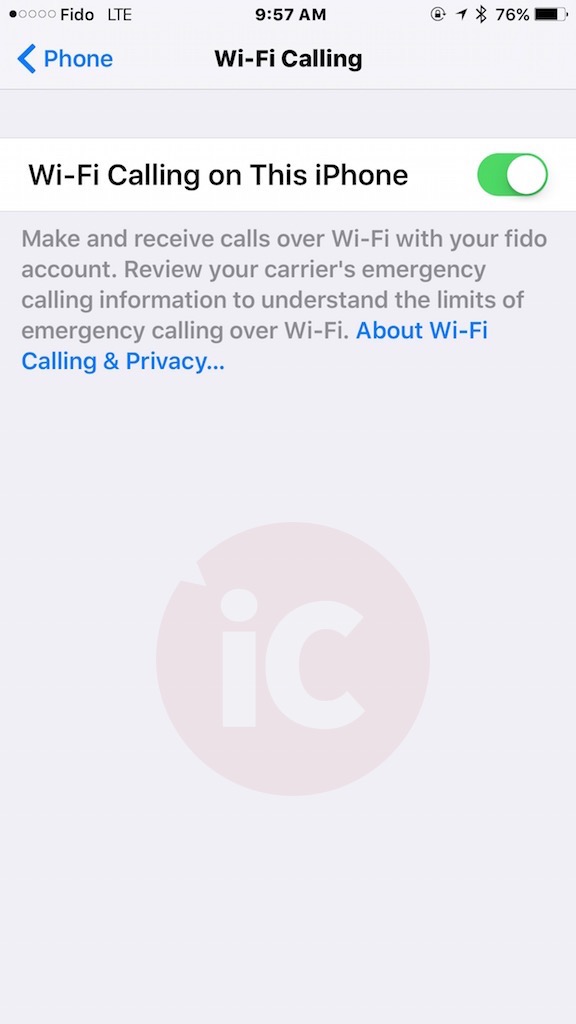
iOS9/ fido 21.1, wifi calling working well. originally i couldn’t get passed the “contact your carrier” so i contacted fido, the rep told me that the the activation process through the phone basically adds a “SOC” don’t quote me but i believe he said “service Operation Code” to your account so that wifi calling will work. Once he added that code i turned my phone off and on, then i went into settings to enable wifi calling, it opened up a new window where i agreed to the terms, added my E911 info and saved, it returned to my screen where wifi calling was enabled! i used it all day yesterday and it works great! the status bar on my phone reads “WiFi Fido”
This is Wifi Calling being activated with Rogers network. The status bar showing “Wifi Rogers”
Did you have to call Rogers to get it working?
No, I never call Rogers
Working on FIDO. After enabling feature and going through setup process I tested by placing phone in Airplane Mode and then switching on Wifi. Network switches to ‘Wifi Fido’.
So I would need to downgrade to iOS 9.0, activate the Wi-Fi Calling, then upgrade to 9.1 again?
Let us know what happens, the carrier update may stay after downgrading then updating to 9.1 beta?
Not sure that I want to go through all the hassle just to get Wi-Fi Calling. I don’t need it all that much.
i would hold off from 9.1 until a few more beta’s come out and you have confirmation that it’ll work
Been using 9.1 since it came out. Haven’t encountered much problem.
except for wifi calling not being supported, which is why you posted 🙂
Oh! I was just curious to see if it was possible. I don’t really care for Wi-Fi calling at the moment. I don’t really mind it.
fair enough, i was tempted to go 9.1 but i need wifi calling so im glad for once i didnt early adopt 😀 (im curious about the new emoji’s)
if you upgrade again, you will lose wifi calling. you need to stay in 9.0
Did you try it? That’s what happened to you?
I just got off the phone with Fido, and it turns out that this feature can only be enabled on certain plans. My plan, $49.50 5gb unlimited canada-wide minutes, is not eligible for this feature. They offered me a plan with 3gb and unlimited canada wide calling for $70, or 6gb unlimited canada-wide for $95 and those plans could enable this feature… I don’t need wifi-calling that badly lol
They’ll take any excuse to bump you off that sweet plan.
Totally agree!
If you have a great plan and you are getting the contact your carrier message. Don’t call. Trust me, it’s not worth drawing attention to you and your plan. A quick review of your plan by a Rogers Rep could discover that you are no longer eligible to remain on that plan.
Cellular companies in Canada are so much like “organized crime”. The actions of cellular companies in Canada have even become an election issue. Simply amazing!
I’m on a FIDO $43 BYOP plan and it works for me.
For everyone having a problem enabling WiFi calling on Rogers:
My phone was giving me the contact your carrier message, but I finally made it go through. I called support, and the person was looking through my account trying to figure out what it was, but I don’t think she actually changed anything. Eventually she put me on hold to talk to a senior person, and while I was waiting I tried activating it again, and success. I don’t think she changed anything on her end, so the fix MIGHT have been to try activating it ‘during’ a phone call. Maybe that’s not the fix, but it’s worth a try if you’re still stuck.
Hmmm.. So after getting it working and showing ‘Rogers Wi-Fi’ in the status bar, it seemed to work only as long as the phone was awake. I made a couple calls no problem, then put the phone down. The next time I picked it up it was back to displaying Rogers in the status bar, even though WiFi calling is still switched on.
Nope, didn’t work for me 🙁 Thanks for the tip though would have been great if that had been it.
For Rogers business or other customers, here’s what I did. I was on iOS 9.1 beta. I put my phone in restore mode, then chose update. After choosing update, it downgraded to iOS 9.0. It then updated my carrier settings to 21.1. I didn’t lose anything on my phone and didn’t need to do a restore. I then enabled wifi calling in the phone settings. I entered an address.
The only odd item is when I call my home 289 number from my iPhone 416 number, it says I’m calling long distance. Weird. Toronto to Mississauga ain’t long distance!
Seems to work ok otherwise.
after talk with rogers technician, he created a ticket and said will get back to me in 72 hours. Only 1 hour after I got a message from him saying the problem fixed. And I noticed the wifi calling is turned on by itself.
tnx for sharing, do you have this for Rogers as well ?
Finally got it working after talking with ROGERS TSR support. They said if you have a new share everything plan and nationwide video calling is not enabled then they need to provision it which requires you to turn off your phone after and wait a few minutes before restarting. After my iPhone 6 was restarted I enabled wifi calling flawlessly without errors.
Try giving them a call and see if this works.