
Apple’s AirPort Utility App is Being Removed From the App Store
Apple warns that "functionality is not guaranteed" when using AirPort Utility on iOS 27 or later.
Earlier this week, we told you Readdle was set to launch their highly anticipated Scanner Pro 7 update for iOS users this week, and it’s now available in the App Store, with a 50% off launch sale for $5.49 CAD. As for existing users, the update is free.
Scanner Pro 7 comes with highly anticipated OCR text recognition for your scans, so now you can copy or search for text within your scanned documents.
Also new is distortion correction, so when you scan the page of a book, for example, the app can straighten out your images and text.
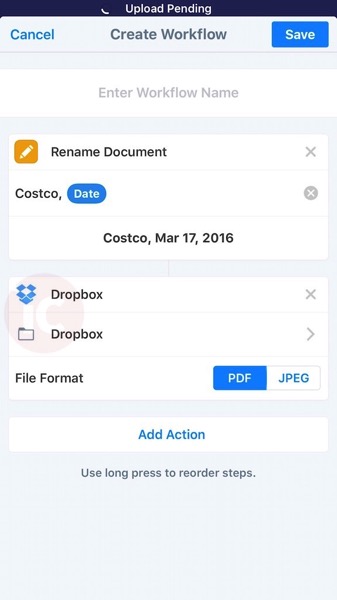
But the most compelling feature, which I’ve enjoying using for this week is the new Workflow feature. It allows you to create a custom list of actions for your scans, so with one-tap, you can have your files renamed and uploaded to a cloud service, for example.
For example, here’s a sample workflow Costco addicts like myself might create, to catalogue your receipts if you’re into that sort of thing. The simple workflow will rename a scan to ‘Costco’, add the date, then upload it to Dropbox.
Workflow actions can easily be dragged and rearranged. It’s really easy to set these up, and will definitely save time if you need to upload your scans or send them somewhere afterwards. You can access your Workflows from the Share sheet on any scan.
The new update also has improved colour processing so images, colour stamps and signatures will look better.
Scanner Pro 7 is our go-to app for scanning from our iPhone and the built-in Workflow feature makes it one of the best scanning apps out there.
Click here to download Scanner Pro 7 for iOS—it’s on sale for $5.49 CAD.
Want to see more of our stories on Google?

P.S. Want to keep this site truly independent? Support us by buying us a beer, treating us to a coffee, or shopping through Amazon here. Links in this post are affiliate links, so we earn a tiny commission at no charge to you. Thanks for supporting independent Canadian media!


Does anyone know if OCR is done in the cloud (on Readdle’s servers) or less likely, locally on a iOS device? There might be some privacy issues for some.
I can find out. Be right back.
Thanks Gary, it looks to me like it’s done on the device
If anyone is interested, it seems that character recognition is done on the device. I have disabled WiFi on my iPad and the app still went through the OCR successfully. That is a big plus!
They just told me it’s done locally on the device.
Thanks again Gary, I appreciate you taking the time to check with Readdle’s people.
Cheers!