
Apple’s AirPort Utility App is Being Removed From the App Store
Apple warns that "functionality is not guaranteed" when using AirPort Utility on iOS 27 or later.
It can be a great journey back to the past or a reason to freak out: it is possible to see everything you have ever posted on Facebook. There is a mirror that shows your digital self and a time machine the leads you back to the moment of your digital “birth.” In other words, there is an electronic trail of everything you’ve ever done on Facebook and I mean everything: all the messages, statuses, pictures and more. The good news: you can see all the data that Facebook has stored of you.
Just a reminder to those privacy-conscious users: Facebook also tries to recognize untagged photographs of you, and has pictures of you for facial recognition purposes.
So, if you have decided that you really want to know what you have done in the past, just follow the steps listed below to save all the data Facebook has stored.
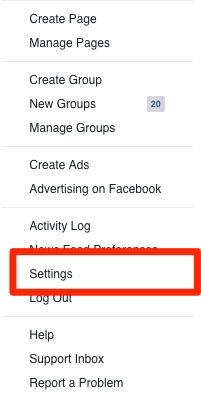
Step 1. After logging in to your Facebook account, navigate to “Settings”
Step 2. Go to “General Settings”
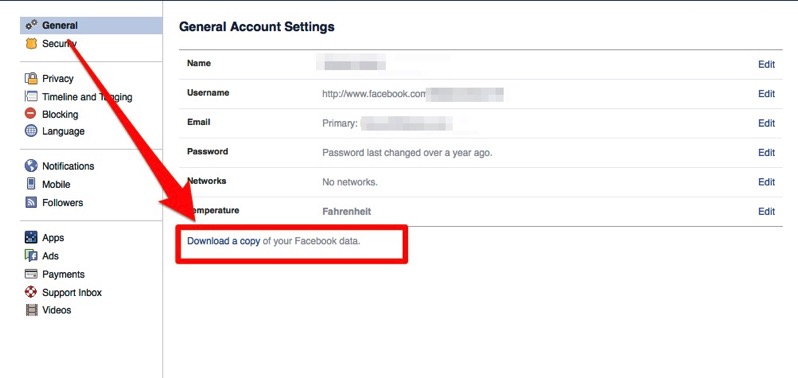
Step 3. Find the “Download a copy of your Facebook data” tab
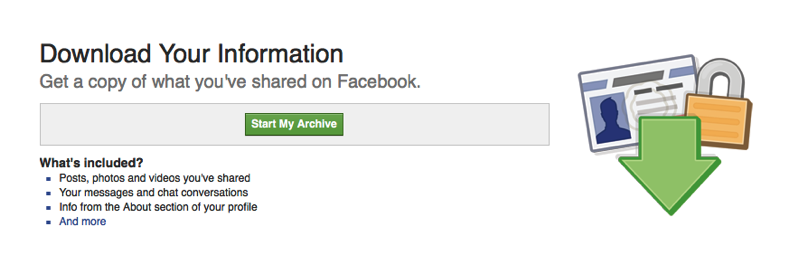
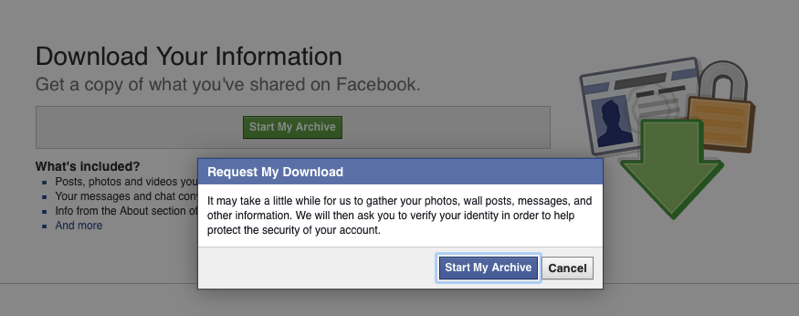
Step 4. Wait for Facebook to gather all the data. Depending on the amount of data you have shared on the popular social media platform, it may take a while.
Step 5. Click on the link Facebook has sent you. Remember, the link will only work for a few days after being sent.
That’s it. Enjoy!
[via The Telegraph]
Want to see more of our stories on Google?

P.S. Want to keep this site truly independent? Support us by buying us a beer, treating us to a coffee, or shopping through Amazon here. Links in this post are affiliate links, so we earn a tiny commission at no charge to you. Thanks for supporting independent Canadian media!


This doesn’t provide all data though. A few times I’ve wanted to see all content shared to certain custom friend lists, but the posts don’t include the privacy settings. Kind of annoying. There is no way that I’ve seen to see what content has been shared to specific lists. That would be REALLY useful for some purposes.