
Apple Giving Away Photo Editing App ‘infltr’ as Latest Free Download

The Apple Store iOS app has a new freebie, as photo editing app infltr is the latest offer available via promo code.

Normally priced at $1.99 USD, what makes infltr different is its endless number of filters. The developers describe themselves as “a new type of photo app with an infinite number of filters. Just touch the screen and see the filter instantly change. There’s nothing simpler, or more beautiful to use.”

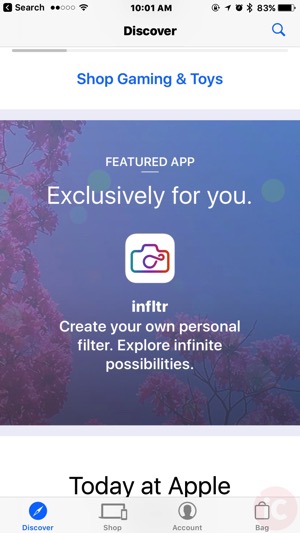
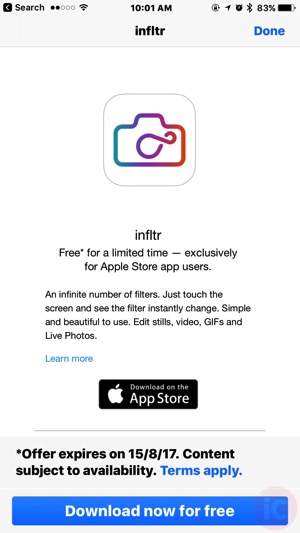
How to download infltr for free? Open the Apple Store iOS app, scroll down until you see the ‘Featured App’ section, tap it, then at the next screen, tap ‘Download now for free’, which will then provide you with a promo code to redeem.

IMG 4148 IMG 4149

If you need yet another photo editing app, check out infltr, as it’s available until August 15, 2017.

Want to see more of our stories on Google?

Add iPhone in Canada as a Preferred Source on Google

P.S. Want to keep this site truly independent? Support us by buying us a beer, treating us to a coffee, or shopping through Amazon here. Links in this post are affiliate links, so we earn a tiny commission at no charge to you. Thanks for supporting independent Canadian media!

Subscribe
Notify of
guest
7 Comments
Oldest
Newest Most Voted
Inline Feedbacks
View all comments
Ace
Ace
8 years ago

Doesn’t work on iOS 11 public beta;( redeem button is grayed out so there’s no way to continue and Apple doesn’t give a code to manually enter.

Mario Gaucher
Mario Gaucher
Reply to  Ace
8 years ago

yep… exactly my case also (iPhone and iPad).
last month, I had to use my wife’s iPhone to download it… and after that, download the app she just “purchased”.

Ace
Ace
Reply to  Mario Gaucher
8 years ago

Figured, I may have to do the same;)

Karine
Karine
Reply to  Ace
8 years ago

Same for me.. 🙁

sukisszoze
sukisszoze
8 years ago

Thanks! I will just add this to my other photo apps that I don’t use..ha.ha

Gary
Reply to  sukisszoze
8 years ago

Lol so true

Riddlemethis
Riddlemethis
8 years ago

It would be helpful for others if you provided screen pics how exactly to get to the featured app. When you finish downloading the app,you are sent to your account page.

Even if you go to the Discover section you are overwhelmed with options but no Featured App.

I think the same app developers who designed the Apple Store app are the same one who designed Apple Maps.

7
0
Would love your thoughts, please comment.x
()
x