With the launch of Apple Watch Series 3, cellular connectivity arrives for the first time. In Canada, Bell is Apple’s first launch partner (Telus will come later this year), charging customers $5 per month to use their smart watch on a data plan (most plans in the USA are $10/month).
Fellow Canadian Jesse Hollington over at iLounge has a great walkthrough of setting up Apple Watch Series 3 LTE models with Bell.
Apple Watch Series 3 uses an integrated eSIM, which will share the same number as your iPhone. Bell calls this feature NumberShare. Here’s Jesse’s take on the entire setup process, which starts within the Apple Watch iOS app—there’s no need to speak with a human to set this up:
In our case, activating on Bell Mobility in Canada, we were presented with a series of four screens, first showing us the “Smartwatch” plan fees involved, then prompting us to sign in with our “MyBell” account credentials, asking us to confirm our emergency address, and then showing a final confirmation screen before returning us to a final confirmation in the Watch app. The entire process took under a minute.
Once complete, Bell also sends customers a confirmation text message to say “Activation complete. You now have access to wireless service on your watch.”
Bell will also assign a “device identification number”, which is another phone number on your bill, to differentiate from your iPhone number for billing purposes. This is not a real number but only to identify your Apple Watch cellular data plan, but it may confuse some customers that it could be their watch phone number, reports Jesse.
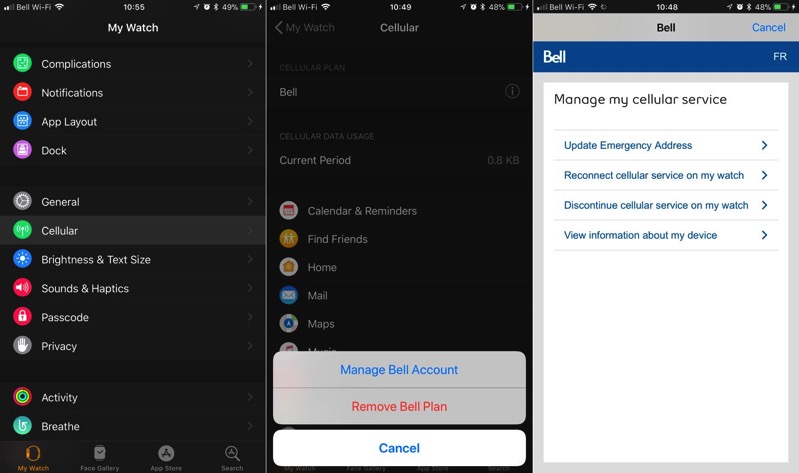
How to check cellular data usage? The Apple Watch iOS app gets a new section called Cellular Data Usage, under My Watch > Cellular > Cellular Data Usage. It will also show your cellular plan and carrier number in this section. To remove your Bell plan, just tap the “i” icon next to the carrier’s name, while this option also allows users to mange their cellular service as well, such as updating an emergency address.
How did your Apple Watch Series 3 setup go with Bell?



I have a corporate plan with Bell and NumberShare is “not available,” at least for now … grrrr!
That’s what I have also been told.
Waiting to see if Telus will allow the Apple Watch 3 LTE on their corp plan.
I just got a message from Bell: “there are a couple of requirement but they’re compatible if you have unlimited Canada-wide or Can/US calling plus data share provisioning on top of being enrolled into WiFi calling. Thanks! ^MA” So I need to have unlimited plus wifi calling? This seems excessive.
Unlimited nationwide is a requirement for wifi calling anyways
Have all that, but customer service said they don’t have it (on corporate plans at all) … unless that *just* changed?
Are you serious Rogers/Fido? No support for watch Cellular? Going to seriously consider switching. This is ridiculous.
Did it earlier, what a painless process. Literally just need to enter your bell account login and accept the agreement.
Would be nice if adding any devices to a cellular account was this easy.
Can someone answer these questions for me:
– If I go for a run and leave my iPhone at home and someone calls, will it ring on both devices?
– If my wife makes a call on the iPhone while I am still running, will I be able to make a call or will it say that it is being used?
– If I make a phone call on the Watch, can you transfer the call to the iPhone?
The short answer is that despite sharing the same number, both devices work as if they were separate phones.
1. Incoming calls will always ring on both devices, provided they both have a connection to the cellular network.
2. You can place and receive calls on both devices simultaneously. If an incoming call comes in while you’re on a call on one device, it will show a call waiting notification on the device you’re using, and a normal incoming call notification on the other one.
3. Unfortunately, there doesn’t appear to be any way to hand off calls between devices.
“To remove your Bell plan, just tap the “i” icon next to the carrier’s name” – I’d love to see proof if it’s actually that easy to cancel something from Bell.
Heh, don’t want to risk trying it, as knowing Bell I might have to jump through hoops to get it back… ????