With the release of iOS 12, Apple has added a bunch of new features and technologies to its Safari browser including icons in tabs, automatic strong passwords, security code autofill, 3D models and AR viewing as well as improved intelligent tracking prevention to permanently partition cookie access in third-party contexts.
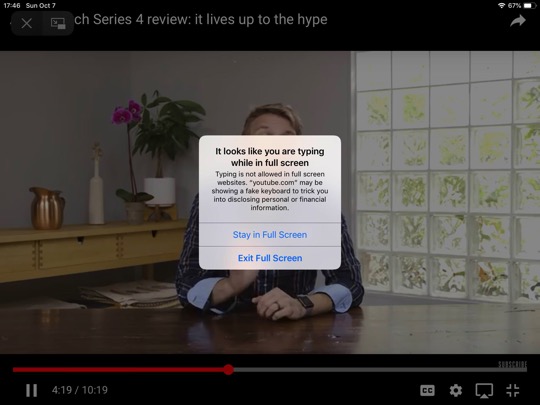
Focusing on improving security and privacy in the latest iOS version, Apple has included built-in protection against fake software keyboard in Safari on iOS 12.
As highlighted by a Reddit user, Safari now has a security mechanism in place to make sure malicious websites aren’t displaying a software keyboard that mimics the iOS one in order to act as a key-logger.
“To trigger the warning: open a webpage in full-screen mode, for example, a full-screen video on YouTube’s mobile website. Then tap several times at the bottom of the screen, as if you were typing on an invisible keyboard.
I wasn’t aware of this malicious trick before, so I would guess it’s not common, but it’s neat Apple has a protection against it.”
As you can see above, a warning popup will appear telling you the website may be showing you a fake keyboard to trick you into disclosing personal or financial information.
Let us know about your Safari experience in iOS 12 in the comments section.



