
Samsung Galaxy Tab S12 Ultra Hands-On: Familiar Hardware, Smarter AI
The Galaxy Tab S12 Ultra feels more like Samsung refining its best tablet than reinventing it with improvded audio and AI capabilities.
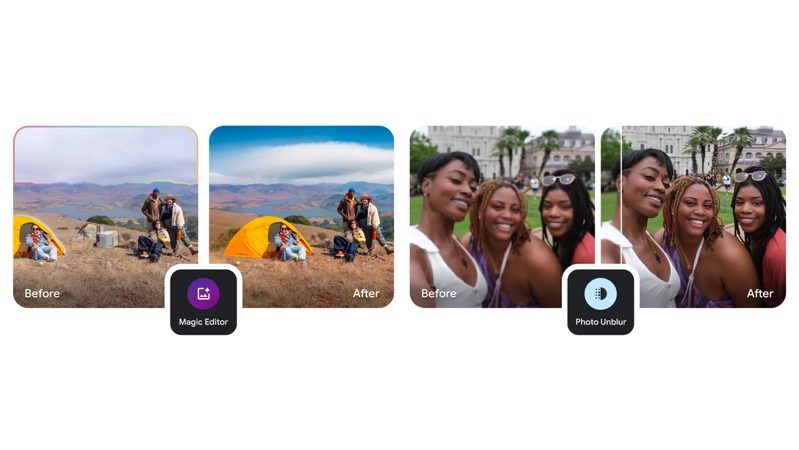
Google announced today that Google Photos will soon get free AI-powered editing tools, starting on May 15.
Previously, AI editing tools were only available for Pixel smartphones, but now they will be free for everyone, no subscription needed. The following features will also be available on more devices including Pixel tablets.
Photo Unblur will clear up blurry shots with just one tap. Magic Eraser easily removes distractions or photobombers from pictures with a few taps. Meanwhile, Portrait Light lets users adjust lighting in portrait photos for a more flattering result.
Also, Magic Editor, which debuted last year on Pixel 8 devices, will now be accessible on all Pixel models. Magic Editor uses generative AI to “reimagine your photos”, such as by moving key objects and fixing up backgrounds.
Non-Pixel users on Android and iOS platforms will get free 10 Magic Editor saves per month, with the option to unlock more through a Pixel device or a Premium Google One plan.
“These tools will gradually roll out starting May 15 and over the following weeks to all devices that meet minimum requirements. Look out for them in Google Photos to help make your shots picture-perfect,” explained Dina Berrada, Director of Product Management, Google Photos, on Wednesday.
For those that use Google Photos, these are some awesome features coming your way. Now if only Apple can bring forth similar one-tap AI-powered editing features too, right? Hopefully, we will see something new at WWDC in June.
Want to see more of our stories on Google?

P.S. Want to keep this site truly independent? Support us by buying us a beer, treating us to a coffee, or shopping through Amazon here. Links in this post are affiliate links, so we earn a tiny commission at no charge to you. Thanks for supporting independent Canadian media!

Still no duplicate photo detection. At best, Google Photos has “stack similar photos” feature which doesn’t work.