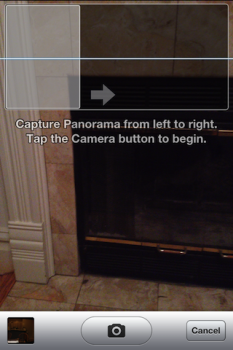
Recently it has been discovered that iOS 5 has a hidden built in panorama mode for the native Camera app. Enabling the option allows users to tap and move the camera from left to right along a blue line after hitting the shutter button to capture a panoramic image. Even though @chpwn has released a Cydia package installing which instantly enables this feature, it requires the device to be jailbroken in order to have access to it. Luckily, a simple guide has been posted at FSM using which you can enable panorama mode on any iPhone, including iPhone 4S, running iOS 5 without any jailbreak.
Here are the steps you need to follow:
1. Download iBackupBot from the official website. ( Mac and Windows )
2. Plugin your iPhone and back it up via iTunes
3. Open iBackupBot and find the backup that you just made via iTunes. Select and load it.
4. Find Library/Preferences/com.apple.mobileslideshow.plist

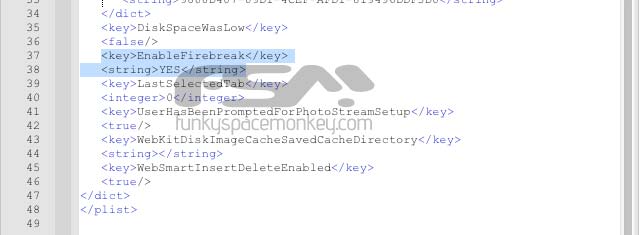
5. Now you need to add a key to this .plist file. Open the file ( on mac, it just works *wink, wink* ) and near the bottom, add a key ( EnableFirebreak ) and a string ( YES )

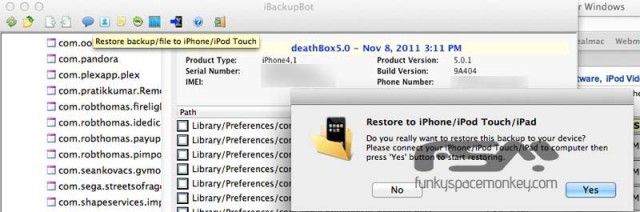
6. Save your modifications, and right from iBackupBot restore your iPhone with the modified iTunes backup

7. That’s it. Open your camera app, tap on options and there it is.




Why the iBackupBot sounds like hack or another type of JB to me? Does or will Apple allow such modification to its system files and native apps?
Good question
just dont tell Apple about this!
Apple has probably reserved it for later updates to compete with Android and WP7 when it’s out everywhere. They will say “the next update adds panoramic…”, you get the point. Here is your chance to have it enabled before that update comes out. It is your choice, I’m doing it.
I did it with iFile just ad the line of code in the right spot and respring.
Seems like a nice tweak, but a lot of effort for users who aren’t jailbroke. I think I’ll pass on this as it’s not really going to be needed for the amount of effort required. 🙂
How come it crashes every time I use it?
I would recommend the app Photosynth. Lets you shoot full 360 degrees not just panorama’s, and its FREE!
Ummm..my 4S doesn’t have this file?
Nevermind. Amazing what the sort by name will do. 🙂
I just did it with iFile as well. Super Easy if you’re already jailbroken.
I have problem restoring the phone with iBackupBot after making the changes. Error code:-19? Any advice??
nice. please state that iPhone should not be synced as the iBackupbot Software is working because the result on my pc was to create a faulty backup so the iBackupbot and iTunes could not read my iPhone 4S. The solution to this as that I deleted the corrupted backup from iTunes (edit>preferences>devices) and I had to backup again. good job btw 🙂