The following tutorial will help you jailbreak your iPhone, iPad (not iPad 2), and iPod touch. The steps are pretty much the same for each device since they all run iOS.
Warning: do not proceed if you’re unsure about what you’re doing. There are risks involved.
Should I use PwnageTool or redsn0w to jailbreak?
If you need the ultrasn0w unlock–>PwnageTool. Why? PwnageTool will enable you to update to iOS 4.3.3, but retain your old baseband. Click here on how to unlock your iPhone on iOS 4.3.1.
Everyone else, redsn0w will work fine on Mac/Windows (if you don’t care about an unlock).
This guide will help you jailbreak your iPhone 4 on a Mac (although the process for an iPod touch and iPad 1 is the same)
Before we begin: sync your iOS device in iTunes. This will create a backup.
Step 1: Download redsn0w 0.9.6rc16 and iOS 4.3.3 for iPhone 4 (or find your firmware here). Save everything to a folder on your desktop, to make things easy.
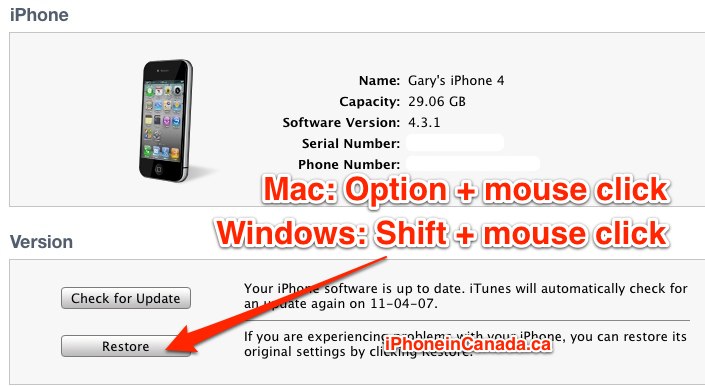
Step 2: Launch iTunes (make sure it’s updated). For Mac users, hold Option on your keyboard then click restore (Windows users, hold Shift). A window will pop up, allowing you to browse to the iOS 4.3.2 firmware file on your computer. Select it and your iPhone will restore.
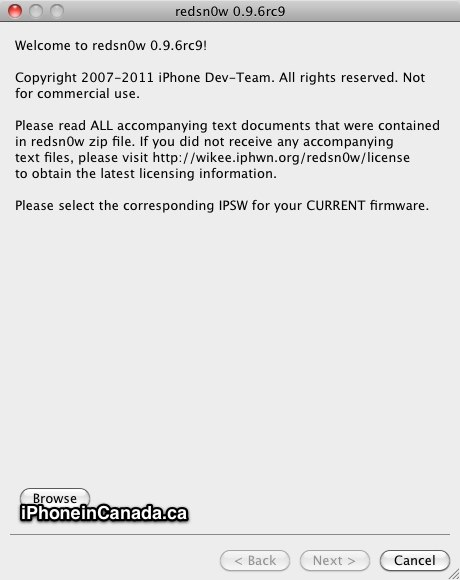
Step 3: Launch redsn0w. Click ‘Browse’ and find your iOS 4.3.3 firmware file. Once it’s identified, click Next.

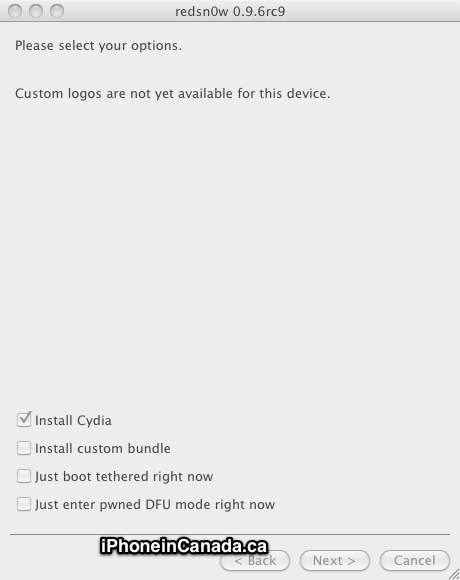
Step 4: Ensure ‘Install Cydia’ is ticked off. Click Next.
Step 5: Turn off your iPhone, but ensure it’s still plugged into your computer. You’ll be entering DFU mode next. Click Next.
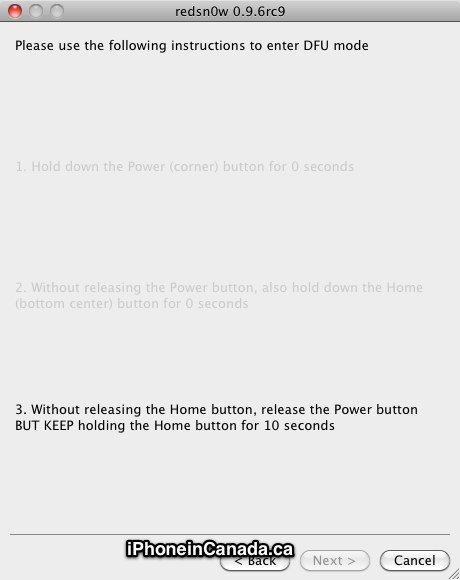
Step 6: Follow the instructions for DFU mode, as it counts down the seconds for you.
Hold down the Power button…for a few seconds
Keep down Power, hold the Home button…
Hold down Home, release the Power button…
If you fail, start the process again.
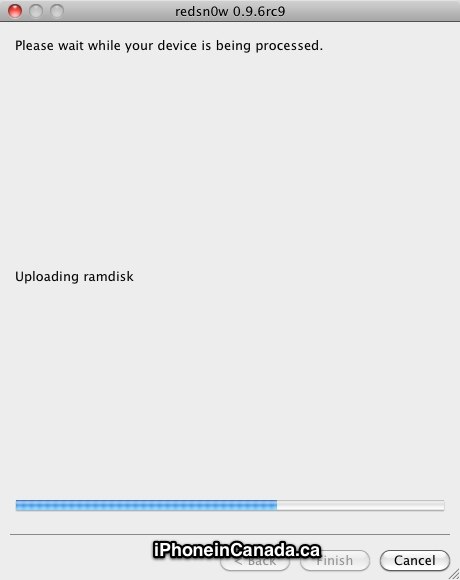
Step 7: If DFU is successful, redsn0w will work its magic and jailbreak your iPhone. You’ll see a black screen with lots of tiny white text. Just let it complete.
Step 8. You should see Cydia on your Homescreen. Voila! Now, sync from your backup in iTunes and Bob’s your uncle.
Let me know how this tutorial works for you!



There seems to be an issue with Installous search function after jailbreaking with this redsn0w for 4.3.1…the apple loading screen shows up and the screen flickers…anyone else seeing this?
Amazing everything perfect!!
Is it still necessary to restore from the firmware file if we are already running 4.3.1?
No, just run redsn0w.
This is fully untethered, right?
Yes
Worked Great for me !!
Upgrading from 4.2.1, and restoring to 4.3.1 via iTunes (file from Apple’s servers) and always get 1013 error on restore. Tiny Umbrella isn’t correcting. Help!! I had the same issue when I was going from clean 4.3 down to 4.2.1 -> had to use Greenpoison to get me out in that case. Don’t think that’ll work on 4.3.1.
Does SBsettings, winterbord, MyWi (not sure if one still need it now), work with the jaiblreak 4.3.1?
Worked great for me too.
Anyone try this over top of the Snowbreeze tethered jailbreak?
Tiny Umbrella has an option to “Set Hosts to Cydia on Exit” under its “Advanced” tab. Un-ckeck that option, “Apply Changes”, quit the app and retry the firmware upgrade again. It might fix your problem.
Also, if you have Wi-Fi Sync app running on your Mac, it will prevent you form upgrading the firmware. Uninstall that and try again.
Hi,I am on 4.1 on the Iphone 4. Do I need to upgrade to 4.3.1 first via Itunes then try the above jailbreak? Thanks
Hi, I am using JB 4.2.1 on ipod touch 3g. Can I update to 4.3.1 through itunes’ update button or do i have to use the restore button?
Which ever you want. Clicking update will be much easier
Yes if you want te latest firmware…
Yes if you want te latest firmware…
Thanks!!! Would I then just choose the ISPW file from above for Iphone 4GSM ?
Alright, thanks! updating now…
What is the difference between the following:
– Upgrading to the new FW, syncing with iTunes device backup, applying the jailbreak.
– Upgrading to the new FW, applying the jailbreak, syncing with iTunes device backup.
I’ve always went with the former, but the article suggests the latter. I’m wondering if there is any advantage with the latter. There is no way to preserve cydia apps in either case (without using third party cydia apps), right?
I also have that question – but add to that BiteSMS and iBlacklist.. I use those all the time
Yes.
Jailbreak went perfect but when i try and install winterboard it does not work…
Help anyone?
I have an iPhone 3GS running 3.1.3. Do I need to connect to iTunes and update to 4.3.1 first and then run redsn0w? Or will I have to restore the phone first. I don’t want to loose my current jb if I can’t get a new one as I totally depend on MiWi.
Updated and the white text was telling my that it had an unsucessful firmware dl after 6000ms (???) and I now have a white cydia icon. Going on jb try #4 guys, any suggestions?
Are you sure you have the right firmware file for your iPhone model?
Try PwnageTool/SB as an alternative.
I’ve got a 3GS so I downloaded the “4.3.1 (3GS): iPhone2,1_4.3.1_8G4_Restore.ipsw”. Selected the “newer model” option and followed the instructions. I’m on windows (if if matters). Should I still try the Pwnage Tool option?
PwnageTool is for Mac only. The Windows equivalent is sn0wbreeze. Give that
a try.
I got fed up after I posted my reply and just decided to wipe my iphone and try again. After I hit the restore button and rebooted, I saw Cydia! So I did my itunes restore and now cydia is gone. /facepalm. I’m restoring one more time and if I don’t see Cydia, i’ll use Sn0wbreeze.
Thanks, Gary!
yes it works great! thanks.
I like the fun graphics on this jailbreak!
Is your reception bar messed up after the jailbreak?
also mine does not show carrier name anymore…..why is that?
so after the jailbreak, i don’t even have connection to rogers anymore….
Got stuck at “Installing Activation Bundles”. Upgrade from iPhone 4 OS4.1. After “Restore” to 4.3.1 at iTune, it stuck at Recovery Mode. Still try to go into DFU mode anyway, got succeed but stuck at “Installing Activation Bundles”. What can I do now??? Please help.
Start the process again. It might take a couple tries. Or, try a different
computer.
thanks for showing me so love gary and helping me with my post.
You’re welcome 🙂
Yes. Use redsnow if you don’t need the unlock.
Jailbroke my Telus iPhone 4, but now I have no carrier connection! What do I do?
if my phone was unlocked from the apple store (as in, it was unlocked to begin with, i bought the phone outright) will using the redsn0w jailbreak change that?
I apply the jailbreak first, if there are any cracked apps, they wont install without appsync (installed after jailbreak)
No
It looks like the iPhone 4 update has come out… Is that right? I want to make sure it’s working before I update
im having some serious issue trying to do this..i have downloaded the 4.3.2. update which you need to use for jailbreak but it keeps saying that the file is not able to be processed. any ideas on this guys?
I have issues doing this to my ipad1. I keep getting this itunes error “the ipad could not be restored. an unknown error occurred 3194”. worked on my iphone though.
Try the device in recovery or DFU mode
Still no luck, Says verifying ipad restore with apple. and then fails with that error still.
are you on a mac or pc? with my iphone i had issues and had to remove the apple line from my hosts file. you may want to try that out.
Success with Ipad 1 and Iphone 3Gs. Big thanks to Dev Team and instructions were cristal clear !
THANKS FOR THE TUTORIAL..