
Microsoft 365 Support to End on Older Macs and iPhones Starting in July
Microsoft is ending core support of Microsoft 365, Office 2019, and Office 2021 on older Macs and iPhones, starting July 13th.
The long-awaited moment is here: iOS 7 has landed. For those who have managed to download it, here are the top 10 features you should try now.
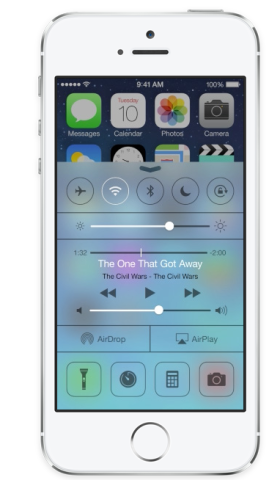
Some of us have jailbroken their device to have quick access to features. With Control Center, you have quick access to the controls and apps you always seem to need. And they are all there, just swipe up from any screen (Lock screen included) and you can turn off or on Airplane mode, Wi-Fi, adjust brightness, etc.
While multitasking was decent on iOS 6, with iOS 7 it’s smarter than ever. Just press the Home button twice and see it in action.
We all love to use the iPhone’s camera. But starting today, you’ll find all the shooting formats front and center and you can swipe to capture the way you want. Try it now!
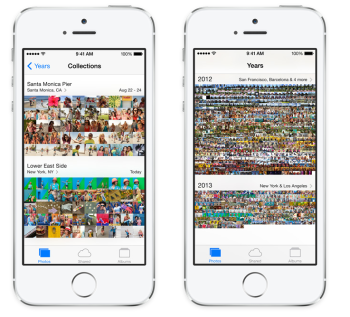
With iOS, 7 Apple introduced Years, Collections, and Moments, which are smart groupings of your photos and videos based on your time and place. If you want your photos to fill the screen, just tap years. Each year holds Collections, like your trip to Niagara Falls .
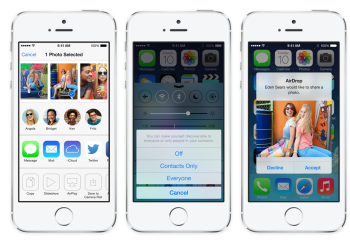
If someone right next to you with an iOS device (iPad 4, iPhone 5, 5th generation iPod Touch, iPad mini) you easily can send a photo with a Share button. Tap “share” and then select the person you want to share with and the device will do the rest via Wi-Fi and Bluetooth. No setup required.
With iOS 7, you will have all your new mail, missed calls, to-dos, and much more in Notification Center. And there is a new feature called Today, which gives you a summary of “today,” and then there is a heads-up for tomorrow as well. To access Notification Center, just swipe down from any screen.
Alongside the icon redesign, here comes an enhanced Safari as well. Now you can enjoy the content-full screen as the buttons and bars — and the unified search field — disappear until you scroll to reveal them. Safari also includes a new tab view, shared links, and reading list as well.

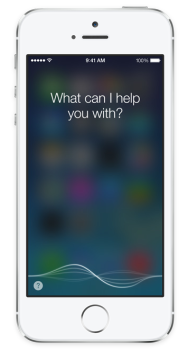
With iOS 7, Siri finally gets out of beta. And it isn’t the Siri you learned to know under iOS 6: it features a great new look, new sound, and new capabilities, a redesigned interface, a clearer, more natural sounding female or male voice, which makes it easier to understand. Siri also is able to take on extra tasks such as returning call, playing voicemail, controlling iTunes Radio, and much more.
The App Store app now includes two new features: Apps Near Me and Wishlist. Whatever you find yourself tap, Near Me and you’ll see a list of apps you might find useful.
The rising numbers of iDevice theft has prompted Apple to improve its Find My iPhone app and adding another layer or security to iOS 7. Now if you want to turn off Find My iPhone or erase the device, you need to input your Apple ID and Password.
And these are just 10 of the most useful changes. Dig in and let us know what you think.
Want to see more of our stories on Google?

P.S. Want to keep this site truly independent? Support us by buying us a beer, treating us to a coffee, or shopping through Amazon here. Links in this post are affiliate links, so we earn a tiny commission at no charge to you. Thanks for supporting independent Canadian media!


I just updated on my iphone 5. I tried the dynamic panoramic photo thing but it doesn’t move along when I move my phone. Anybody else trying this with the same result?
Ok I just read that this feature is not making it to the final build. Too bad… it looked neat. Probably a battery waster.
i used it when it was on beta for like, 2 minutes
its neat, but meh
you arent missing out on much
Yeah, you’re probably right. Thanks!
Did you guy notice that the clock app icon is actually showing you the real time?
This may just make me put the clock app back on my home screen instead of in a folder
Love this feature.
I always have wondered why it was not like that all along?
I like that you can now put as many icons into a folder you like
I don’t like th efact that the folders are now on two pages for the same number of icons as in IOS6…
I like the call block feature in the phone app
Lol wow these so called new features sounds so elementary. The crappest android phones out there for under $100 have this for years! Iphone sheep’s makes me lmao! Hahaha
how do you delet songs off of the device
wang chow mofo