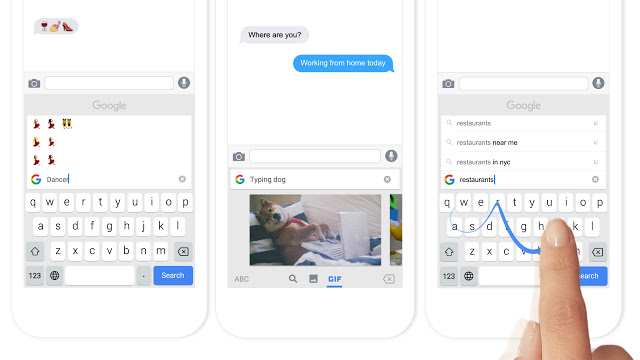
After waiting just over a month, Canadians finally have access to Google’s third-party keyboard for iOS called Gboard from the Canadian App Store (thanks to @arturlatsko for pointing this out).
Gboard brings built-in search, GIFs, emojis and Glide Typing, right into the keyboard screen. I’ve been using Gboard as my primary keyboard on iOS since it launched in the U.S. App Store just over a month ago, and it is pretty awesome.
Here’s what you can do:
Search and send anything from Google:
• Nearby stores and restaurants
• Videos and images
• Weather forecasts
• News and articles
• Sports scores
• And anything else you’d search on Google
The built-in search is very convenient and easy to use, giving users easy access to paste results into messages. A single tap on a result or GIF will copy it to your clipboard, allowing for quick pasting of results. The Glide Typing feature is very accurate, probably one of the best we’ve used to date.
Overall, Gboard packs some pretty powerful features into a very clean layout that complements the iOS user interface. Gboard is available as a free download from the App Store. The app requires any device running iOS 9.0 or later.
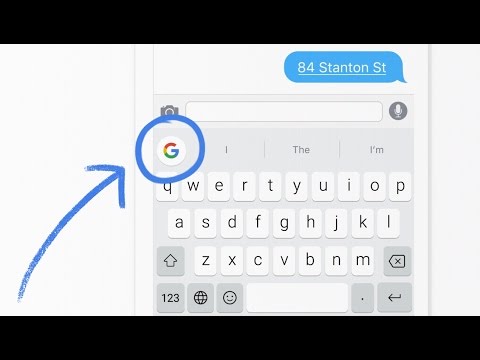
ALSO: if you want to stop the ‘Globe’ on your keyboard from defaulting back to the iOS English keyboard (so Gboard remains 24/7), here’s how to do it.
Update: it appears it’s not available in the App Store yet, it could be still propagating or Google announced this too early. Let’s wait a bit and see.
Update 2: Google Canada let us know the app went live earlier this morning:
[via Twitter]



It’s not in the Canadian App Store. Says it’s unavailable.
It’s up now! Grab it!
Yup, live, Google replied on Twitter it went live an hour ago
What the heck are you doing up so early out There on the left Coast?
I never sleep for you guys, obviously 🙂
Real answer: we have a toddler o_0
YUP….done that 🙂
hahah
Yep -_-
Not available yet.
Does anyone bother fact checking before reporting anything nowadays? /rolleyes
This makes no sense. It was on the Canadian AppStore last weekend. I dowloaded it. Installed it. And I’m still using it (See Picture) And about 30 mins later. It was gone. Same thing happened this evening. It was on the Canadian AppStore. Told my sister to download. She did! And now it’s gone again!
I downloaded it a couple of weeks ago from the US store and used it for over a week before deleting it. Yes, it has some cool Google-related features, but the glide typing is clunky and unreliable. Since that’s the main purpose of a keyboard, using it was frustrating and pointless.
The version I was using also didn’t have a return key, and the punctuation key wasn’t on the main keyboard. Perhaps they’ve since fixed that. It’ll probably ALL be fixed eventually, but I’m sticking with SwiftKey for now.
Mine has both the punctuation key and return key on the main keyboard.
Just downloaded it now. The swype is nice but almost immediately I realized that the lack of 3D Touch to select words and move the cursor around is frustrating to not have.
Slide along the space bar to move the cursor
Good tip!
Terrific keyboard. Just needs bilingual support. Is it only in English?
Yeah, just installed it. Don’t look like it has multi-language support, and seems to be English-only for prediction/autocorrect/etc. I guess I’ll stay with SwiftKey for now.
I’d like to remove the globe icon on the assumption that this will be the only keyboard I use going forward. Anyone know of a way to do that?
Yes, this: https://www.iphoneincanada.ca/news/how-to-stop-your-keyboard-from-switching-back-to-apples-default-from-third-party-keyboard/
Thanks for the reminder i’ll update our post!
Thanks, Gary. I deleted the other keyboards (only Gboard shows up), but the globe icon remains.
Pft. Keyboard has poor predictions. There is no auto rotate (Google doesn’t like this feature). You should be able to glide to delete a word. The color of predictive words should not be the awful light grey which is hard to see.