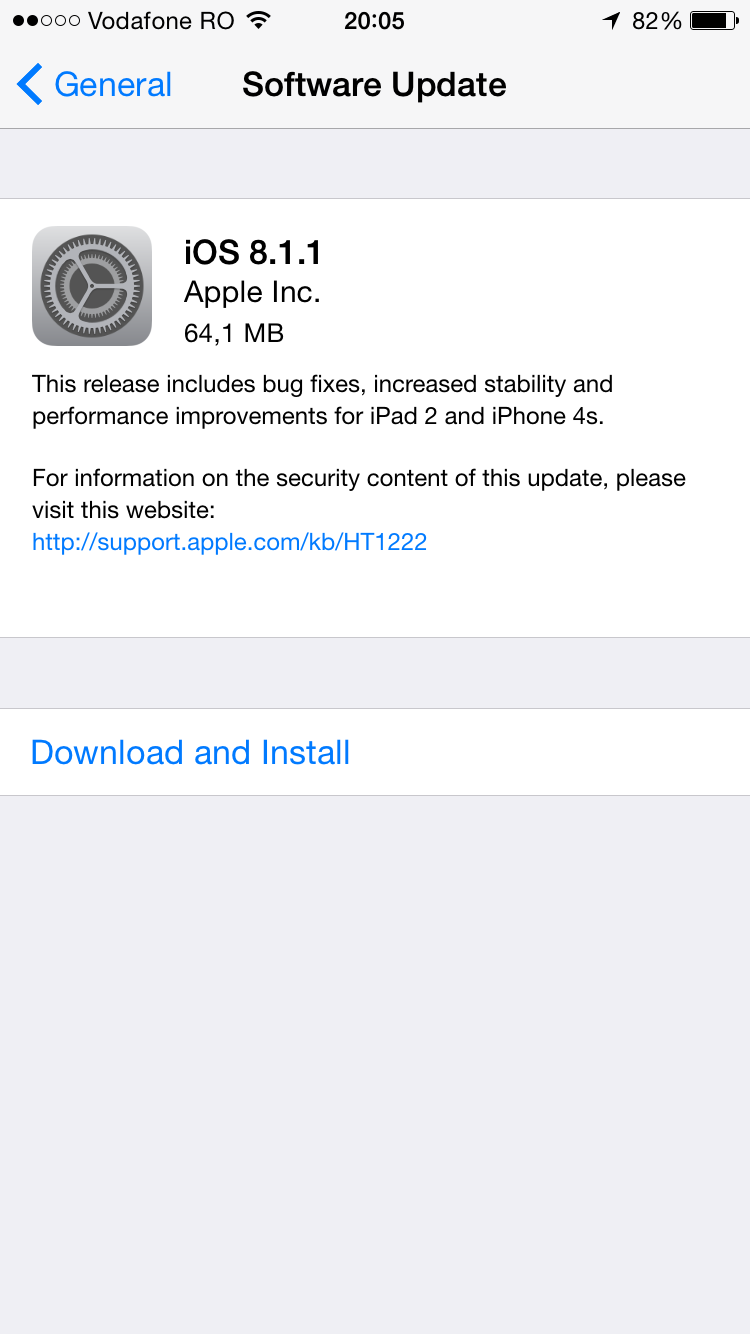
Apple has released iOS 8.1.1 for download, after releasing the beta for developers exactly two weeks ago, which noted some performance increases for the iPhone 4S and iPad 2. The download is 64MB for the iPhone 6, as seen below:
Below are the direct download links:
- Apple TV 3 (AppleTV3,1) version 7.0.2 (Build 12B435), Download
- Apple TV 3 (2013) (AppleTV3,2) version 7.0.2 (Build 12B435), Download
- iPad 2 (Wi-Fi) (iPad2,1) version 8.1.1 (Build 12B435), Download
- iPad 2 (GSM) (iPad2,2) version 8.1.1 (Build 12B435), Download
- iPad 2 (CDMA) (iPad2,3) version 8.1.1 (Build 12B435), Download
- iPad 2 (Mid 2012) (iPad2,4) version 8.1.1 (Build 12B435), Download
- iPad mini (Wi-Fi) (iPad2,5) version 8.1.1 (Build 12B435), Download
- iPad mini (GSM) (iPad2,6) version 8.1.1 (Build 12B435), Download
- iPad mini (CDMA) (iPad2,7) version 8.1.1 (Build 12B435), Download
- iPad 3 (Wi-Fi) (iPad3,1) version 8.1.1 (Build 12B435), Download
- iPad 3 (GSM) (iPad3,2) version 8.1.1 (Build 12B435), Download
- iPad 3 (CDMA) (iPad3,3) version 8.1.1 (Build 12B435), Download
- iPad 4 (Wi-Fi) (iPad3,4) version 8.1.1 (Build 12B435), Download
- iPad 4 (GSM) (iPad3,5) version 8.1.1 (Build 12B435), Download
- iPad 4 (CDMA) (iPad3,6) version 8.1.1 (Build 12B435), Download
- iPad Air (Wi-Fi) (iPad4,1) version 8.1.1 (Build 12B435), Download
- iPad Air (GSM) (iPad4,2) version 8.1.1 (Build 12B435), Download
- iPad Air (CDMA) (iPad4,3) version 8.1.1 (Build 12B435), Download
- iPad mini Retina (Wi-Fi) (iPad4,4) version 8.1.1 (Build 12B435), Download
- iPad mini Retina (GSM) (iPad4,5) version 8.1.1 (Build 12B435), Download
- iPad mini Retina (CDMA) (iPad4,6) version 8.1.1 (Build 12B435), Download
- iPad mini 3 (Wi-Fi) (iPad4,7) version 8.1.1 (Build 12B436), Download
- iPad mini 3 (Cellular) (iPad4,8) version 8.1.1 (Build 12B436), Download
- iPad mini 3 (China) (iPad4,9) version 8.1.1 (Build 12B436), Download
- iPad Air 2 (Wi-Fi) (iPad5,3) version 8.1.1 (Build 12B436), Download
- iPad Air 2 (Cellular) (iPad5,4) version 8.1.1 (Build 12B436), Download
- iPhone 4s (iPhone4,1) version 8.1.1 (Build 12B435), Download
- iPhone 5 (GSM) (iPhone5,1) version 8.1.1 (Build 12B435), Download
- iPhone 5 (CDMA) (iPhone5,2) version 8.1.1 (Build 12B435), Download
- iPhone 5c (GSM) (iPhone5,3) version 8.1.1 (Build 12B435), Download
- iPhone 5c (CDMA) (iPhone5,4) version 8.1.1 (Build 12B435), Download
- iPhone 5s (GSM) (iPhone6,1) version 8.1.1 (Build 12B435), Download
- iPhone 5s (CDMA) (iPhone6,2) version 8.1.1 (Build 12B435), Download
- iPhone 6 Plus (iPhone7,1) version 8.1.1 (Build 12B436), Download
- iPhone 6 (iPhone7,2) version 8.1.1 (Build 12B436), Download
- iPod touch 5G (iPod5,1) version 8.1.1 (Build 12B435), Download
Update: Here are the full iOS 8.1.1 release notes:
Support doc to be updated shortly.
…more to follow




Now I’m curious to hear what this actually does for the experience on a 4S, if anything meaningful at all. Left mine at v7.1.2 for good reason, it would seem, so I’m wondering if those who did update to v8 are any happier after installing this one.
edit – I’m also hopeful that this resolves the wifi issues I’ve been having at work on the 6 since the v8.1 update.
Personally, for a 4S I would leave it there.
Yeah, I don’t really have any plans to update it past there, unless I not only hear reports that v8.1.1 is better, but also get some personal experience with one that’s been updated. I lucked out in the latter department, since my boss also has an old 4S and did update to v8. He has reported performance-related regrets, so I’m looking forward to seeing if anything changes for him with today’s update. Not that the 4S of mine really gets much use beyond an iPod now, but whatever, hehe.
Yeah, my 4S is still running iOS 7. Hoping that this update gets some positive reviews from 4S users, and if so I might make the leap. 🙂
I’m still on 6.1.3 on my 4s. I missed the update window to 7 as I got bogged down with other things. I’ve got anther work 4s that needs to go in for repair/replacement so I’m going to wipe and install the new 8.1.1 and see how it runs.
That’s a big nope on the Wi-Fi issues being fixed for me.
I don’t work until tomorrow, so I won’t know until then. Not sure what the router is at work, but the one at home gets along fine with the phone, at least.
Lucky. My ASUS router won’t work any of my iOS devices consistently. I’ve changed nothing on the router end of things for months. This started with iOS 8.1. All other devices are solid on Wi-Fi. I have an iPhone 5, 6 and an iPad 2. Hope your good luck continues.
Are you sure that write up is for 8.1.1? It sounds like the write up from 8.1
The support doc should be updated shortly.
Performed the update on an iPhone 6 and I’m still experiencing Wi-Fi connectivity issues. Works when I first connect then eventually browsing in Safari and attempting to use Internet connected apps fails. Apps report no connection and Safari displays “Page Not Found”. Anyone want to buy an iPhone 6…?
367 MB download for an Air 2 registered on a U.S. iTunes account
This update made my iPad 2 useable again. Still not sure I’d go from iOS 7 to 8 on an older device though if you haven’t already done it.