**Did you enter my InvisibleShield Contest Giveaway? Find out if you won by clicking here!**
*edit* March 15: added a few steps to clarify this tutorial…thanks!
Happy Saturday everyone! When you think about it, the state of cellphone ringtones has evolved significantly over the years. The so called “ring ring” is out and now you have Joe Blow and his grandpa sporting mp3 clips and other miscellaneous sounds. Today this iPhone ringtone tutorial will show you how to add ringtones to your 1.1.4 iPhone in a matter of minutes!
How to Add Ringtones to your 1.1.4 iPhone with iTunes 7.6
- Launch iTunes. Go to the library. Click on Music.
- Go to Edit—>Preference—Advanced—Importing–make sure AAC Encoder is selected. Click OK.
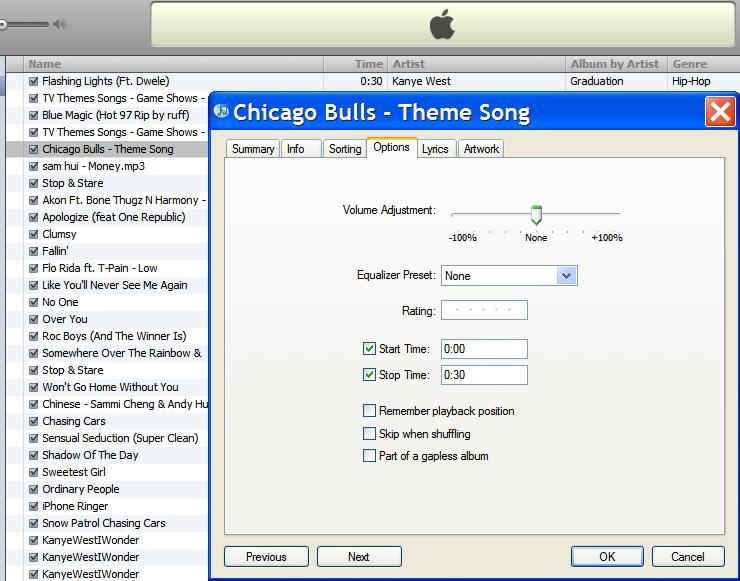
- Right click any mp3/song. Click on “Get info”
- Under the “Options” tab, tick both boxes (Start time and Stop time) and change the time to the section of the clip you want made as a ringtone. It MUST be 30 seconds or less. For example, here I am making a 30 second clip of the Chicago Bulls theme song. Click OK

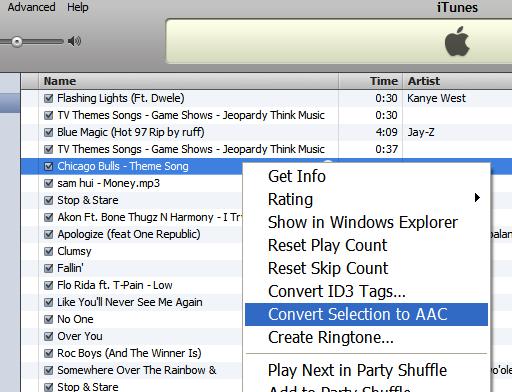
- Right click the song and go to “Convert selection to AAC”. It will convert and you will see a new clip appear in your music library.
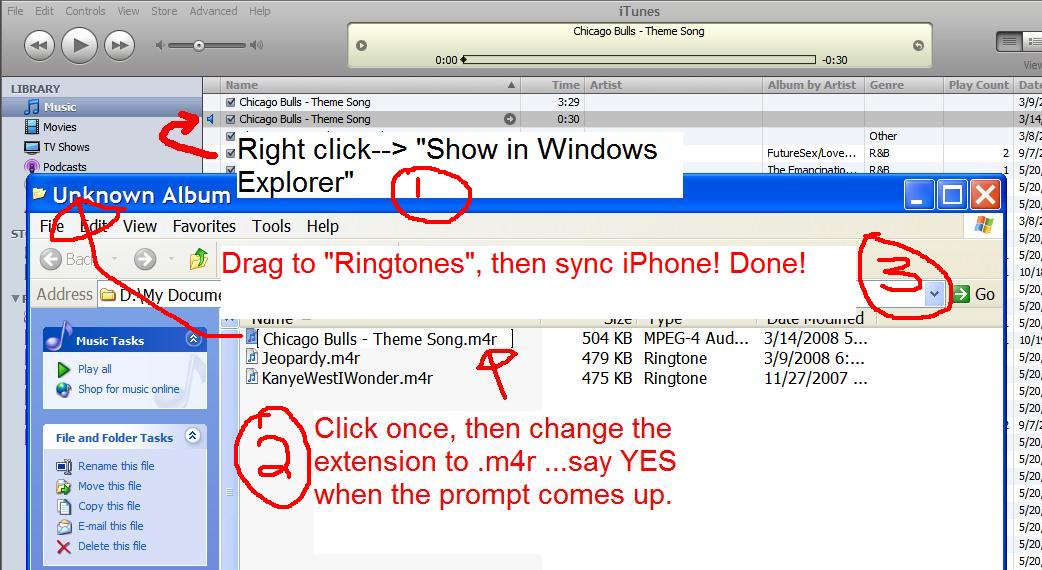
- Right click this new file and go to “Show in Windows Explorer”
- Tools—Folder Options—View tab—uncheck the box next to Hide extensions for known file types. Click OK.
- One click on the file, and rename the extension to .m4r (say YES when the prompt appears)
- Now, drag this “.m4r” file into the Ringtones folder on iTunes.
- Under the Ringtones folder on your iPhone (plug in your iPhone if you haven’t), tick off the ringtones you want to sync with. Sync the iPhone–tada! You now have customized ringtones on your iPhone, for free!
If you enjoyed this post, please subscribe to my RSS feed, so you won’t miss any updates!



It doesn’t seem to work for me..Ringtones doesn’t highlight when I try to drap and drop ..nothing is in my folder?
How about us Vista users? It doesn’t rename the extension, just the name so it still recognizes it as an m4a not an m4r. How can we change that?
I got my own question answered. Refer to this to allow the changing of file extensions: http://www.tech-recipes.com/rx/1269/vista_show_unhide_file_extensions
this is the link to show you how to change extension. XP and Vista is same http://www.mediacollege.com/microsoft/windows/extension-change.html
This still works under 7.6 eh! Well that is good news.
I have been doing it with 7.5 and it is a great way to get ringtunes
Coooooool.
Thanks for the how to guide. 🙂
for earlier firmware it might not work properly and only show one custom ringtone at a time. i got around that by accessing my phone using SSH and just putting them in the ringtones directory from /, library, ringtones.
Same with me Rui, I seem to do everything correctly but the tone does not show up in the iTunes RingTones playlist.
its because when you type in .m4r at the end it just adds it to the name, it doesn’t change the file extension, did it say .mp3 or .m4a at the end of the title in windows explorer before you typed it in? if it didnt then you have the same problem as me, you computher automatically hides the .mp3, so you have to find a way to view it where you can see the .mp3 or .m4a. im looking for a way, ill post back as soon as i find one.
Peace
For those that are using a Mac I just figured it out. Once you have the file .m4r, right click on it and copy it. On the left side of the finder window you will see a folder MUSIC, click that, then click on iTunes, then iTunes MUSIC then scroll down till you see a folder named RINGTONES, click on that folder, paste your ringtone in that folder. It wont be added to the iTunes Ringtone folder till you double click it to play it, iTunes will open, and it will be automatically added to the RINGTONE folder.
Let me know if it works.
Hey Alex,
Thanks for posting it for mac users, I am stuck though…when I my itunes folder i don’t have a RINGTONES folder. What am I doing wrong?
I just edited the instructions a bit guys…try again. 🙂
damn, you beat me to it, i wass writing my way when you did it, but your way is probably easier, oh well, lol.
Peace man, great site.
actually, i have vista, and your way doesnt work, because vista doesnt have those things at the top of windows explorer, so if you have vist people, my way will work, but iphone fan might know a way to make those options at the top of the windows explorer.
Peace
Look at the second post and click the link. I already asked and answered this question lol.
ok guys i just found our solution, listen up Rui and 1XZero! and all others that have a problem after part 7!
1. what you need to do is steps 1-7,
2. BUT instead of renaming the file, you need to right click in windows explorer, and click “add to SONG TITLE.rar” (song title in caps lock fills in for the real song in case you didnt figure that out lol).
3. Ok, then once you make the .rar and open it up, at the end it should say “.mp3” or “.m4a” so then all you need to do is change that to “.m4r”. A little over to the right it should now say ringtone, if it does, then you did it right!
4. then your gonna want to click “extract to” and pick a place to extract it to.
5. Once you extracted it, you need to double click it and it should automatically go to ringtones.
6. Now complete steps 11, (dont worry about steps 8-10 if you followed my method.)
If this worked for you guys, then tell me, cuz i wanna know if this only works for me, go ahead, give it a try!
Peace
WICKED THANKS!! It worked perfectly! I can’t wait to upload them (phone’s charging boo)
It’s even easier for those on a Mac. Just open Garage Band, and drag any sound file into the window (mp3, wav, acc etc). Move the sliders to select the portion of the file you wish to have as a ringtone. On the SHARE menu, select “export ringtune to itunes”. Next time you sync your iphone the ringtune will copy over.
You can also create our own ringtones with Garage band using the built in instuments, or a microphone, line in etc. The possibilities are endless.
Thanks guys for your helpful hints! How many people does it take to post about making ringtones?! LOL 🙂
i guess alot man lol, ive already made like 8 ringtones lmao.
Peace
I’m trying this with version1.1.3 & having the following issue: when copying ringtones to phone, only 1 shows up – even if I copy them all, in the phone it simply duplicates that only one!!!! Any thoughts on this? I don’t necessarily wanna mess with SSH as I’m not experienced enough & will have a complete meltdown if I do something irreversible to my “precious” lol. Anyways, any help would be much appreciated!!!
BTW, this site is an ABSOLUTE goldmine & I love it to death!
Cheers & Go Habs Go 🙂
is there a program that allows them to be LOUDER!!!? you could hear a mouse farting in the room before you hear the iphone’s ringtones
I am able to make them, but if I try and load say 3 of them, i get 3 of the same ringtone and the other two do not show up…. Any fixes on this?
the m4r file only would show up in my ipod so i ssh’d it on to the iphone and it works now. Using Metallica – One!
its not syncing to my phone, i keep trying, but i only have the ones i bought
I have the same problem. It shows up in my ringtone folder for iTunes but not in my sync list for iPhone ringtines. I have de version 1.1.4 and I believe apple caught onto it and made in impossible from the newest firmware.
Hey!
I don’t have the folder ”Ringtones”!
What do I do?
Thanks
DVD
i did everything i was able to sync but after that i am not able to find the ringtone so i cant set it as my ringtone
I have a similar problem with only one ringtone showing up. Even if I load 10 different ringtones, only one shows up, 10 times! Anyone know how to fix this problem. I’m running 1.1.4, and had no problems making the ringtones. I just one them all available on my iPhone, not just one randomly chosen out of the ten. iTunes even shows that I have all 10 loaded in my iPhone, but again, only one actually shows.
Is there anyway to change the sound of text messages?
You’re awesome, thanks so much!! That was super easy! I’ve been annoyed as hell with having to stick with only my factory ringtones!!
I’m having the exact same problem ie: only one ringtone will actually load at a time.. I’m a little familiar with SSH, but I don’t have wi-fi in range at my house so I have to go to a buddy’s house and use his computer everytime I want to use SSH… I guess no one found a solution without going through SSH? Either way, one ringtone is better than none…
I have windows xp and it worked for me. Thanks a lot, your instructions were so easy!
Is it possible to have more then one custom ringtone at a time? I tried awhile ago and it came up on the phone but was my other ringtone i already had on the phone.
i had to drag it from my ringtone folder in itunes to my ringtone folder in my iphone.
Been trying it all day with a 40 sec ringtone and couldnt get it to work. worked fine with 30 sec.
I can’t seem to locate the RINGTONE folder in iTunes. Hence, I can’t proceed to step 11 onwards.
I’m using Windows XP & iTunes 7.6.2.9. Can somebody please help? 🙁
this method dosent works
IT WORKS!!!! THANK YOU SO MUCH! IT WORKS!!!! 1.1.4 FIRMWARE, WINDOWS VISTA, IPHONE 8GB! IT WORKS!!!
Hi there, I really appreciate you posting the instructions here.. its soo easy to follow.. the only problem is I can’t seem to copy the .mp4 files to my itunes.. I tried dragging or importing.. none seemed to work.. please Help! Thanks.
… continuation of my previous post.. I forgot to mention that I have iphone3g will this work?
Hey I did it for the first one and it worked…then i did it for the second one but it wouldn’t add ot my phone?? only the 1st one will stay on there? any idea of how to get more than one?
Awesome, thank you very much. Worked like a charm, and I didn’t have to download any other programs or mod my iphone. Much appreciated. Anyone know where I can get an NES emulator with roms without having to use any other programs?
Wowie!!! Awesome, thank u very very much! Worked perfectly
I need help! I’ve been trying forever to get a ringtone. I already have a couple of aac files (m4r) and a little ringtone icon under radio in my itunes. I’ve already synced my phone. The problem is when I go to settings, sounds, ringtones, my ringtones don’t show up!
Also, my ringtones won’t drop into the ringtone folder under playlists. For some reason it made a new ringtone folder under radio under library with the bell icon. what the hell?
I did it!! Somehow…..you can ignore my question. THANK YOU!!!
Ok, well I deleted the one I previously made because i wanted a better one, and now it’s still not working. I don’t get it and I’ve spent hours on this. It’s a freaken m4r file, it’s in my ringtones folder with the bell icon, I’ve synched my phone. When I go to add it, it won’t show up under sounds. very frustrating
Thanks a Ton. I have been trying to get ringtunes ( for free ofcourse) since the day one i got my phone. But nothing worked. Finally your blog helped. Now i am going to go Crazy with this Now. thanks. mac users has it easy but for us windows users you made it a piece of cake too. MWAH.
Thanks, Great……….It works
have you solved this problem yet
help! song shows up on my itunes but not on “sounds” is that were im suppose to select it as the ringtone?
unfortunately this worked right up until i tried to drag and drop into ringtones. unable to move file with os 3.1
CANNOT BE DONE IN CANADA…THAT IS WHY EVERY IPHONE USER IN CANADA HAS THE SAME STUPID DEFAULT RINGTONES!
BUY A BLACKBERRY
Hehe. What blackberry should I buy then? I want one that has the
amazing trackball, or better yet a Blackberry Storm first generation,
with its awesome touch interface.
CANNOT BE DONE IN CANADA…THAT IS WHY EVERY IPHONE USER IN CANADA HAS THE SAME STUPID DEFAULT RINGTONES!
BUY A BLACKBERRY
Hehe. What blackberry should I buy then? I want one that has the
amazing trackball, or better yet a Blackberry Storm first generation,
with its awesome touch interface.
It doesn’t seem to work for me..Ringtones doesn’t highlight when I try to drap and drop ..nothing is in my folder?
It doesn’t seem to work for me..Ringtones doesn’t highlight when I try to drap and drop ..nothing is in my folder?
How about us Vista users? It doesn’t rename the extension, just the name so it still recognizes it as an m4a not an m4r. How can we change that?