
YouTube Canada Unveils Nine New Creator Shows Include a New Matty Matheson Production
YouTube unveiled the lineup Wednesday during YouTube Features in Toronto, hosted by SubwayTakes creator Kareem Rahma.
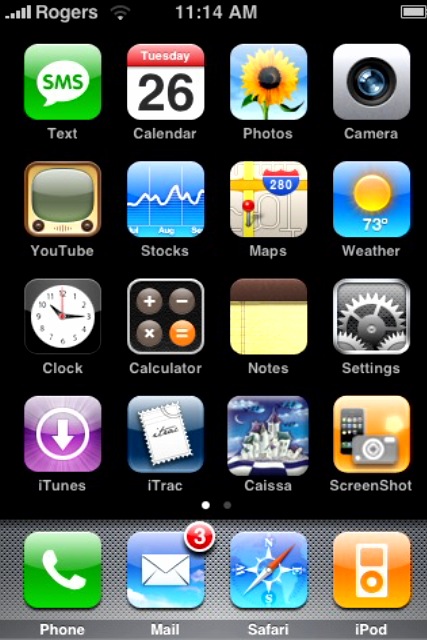
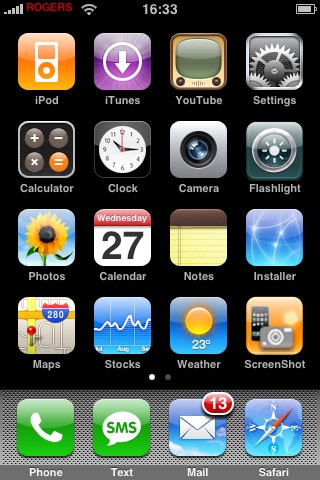
There are more and more Canadians out there owning iPhones, it’s only going to increase! The other day I asked you, my loyal readers out there to email me your homescreen screenshots (sorry to the 1.1.3 people out there! let’s hope for an update to ScreenShot!).
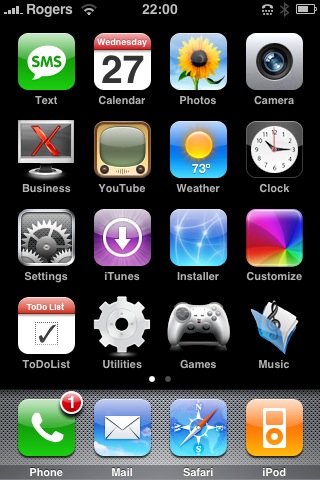
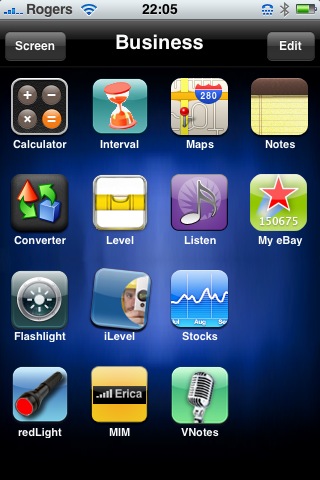
Well, in about a day and half I have received lots of emails from those who managed to email me. Here is a gallery of the screenshots in no particular order–this ought to show all your soon-to-be iPhone owners what’s capable when you install 3rd party apps like SummerBoard and Customize!
Bruce K. sent me two screenshots:
From left to right: Gabe N., Jordan M. (representing T-DOT!), and Lars H…

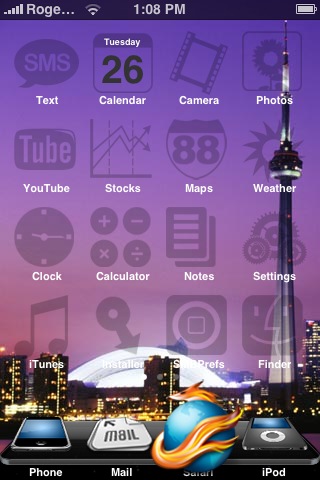
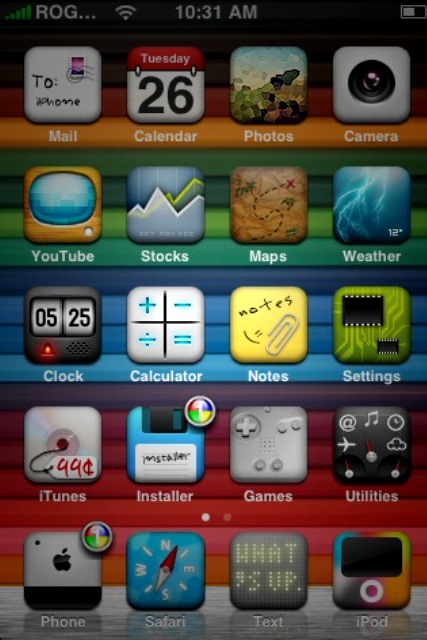
…here we have screenshots from Tim A., Veasna, and Simcoe PC Repair:

Thanks to everyone who took the time to email me your screenshots. There are some pretty funky homescreens out there. Looks like I’m not alone when it comes to keeping it plain and simple! 🙂
If you enjoyed this post, please subscribe to my RSS feed, so you won’t miss any updates!
Want to see more of our stories on Google?

P.S. Want to keep this site truly independent? Support us by buying us a beer, treating us to a coffee, or shopping through Amazon here. Links in this post are affiliate links, so we earn a tiny commission at no charge to you. Thanks for supporting independent Canadian media!

Cool homescreens!
Wow, I’m actually fist!
Awesome homescreens! 😉
Hey iPhone fan, is it possible to add some more screenshots yet? Like I posted in the other topic, I don’t have an email account hooked up because of hotmail…. So i’m gonna try to SSH the picture from my phone then send it to ur email?
Hey Dusty! Sure, send it in and I will update the post!
Ok coool! I’m just at work for the day, ill hopefully get it to ya later tonight.
Thanks iPhone Fan 🙂
Hold up. What’s this iSkype app I see? Is Skype finally available on iPhones now?
cool
Looking good guys. But I was hoping more people would submit cool ones!
Anyone figure out how or if this works on 1.1.3??
Its 1.1.2 only for now..
I am sure an update will soon be out…
cool. my phone made the gallery!
Thanks for sending it in! 🙂
I sent one in hopefully it makes it up there. Mine was even done on 1.1.3 using the ZiPhone unlock.
thanks colin, guess that might give me incentive to use ZiPhone now
anyone know if I can just do it from where Im at or do I have to restore to 1.1.2 or even 1.1.1?
To those who sent in their homescreens late, I will include them in a future post! Keep them coming!
OK I’m on 1.1.3 with ZiPhones now and everything is much smotther, I also got Screenshots working so I just sent my shots to you 🙂
oops meant **smoother 😛
Please help fix unlocked iphone than has been updated to 1.14 from 1.13 and now all is erased, I need my apps back aswell as the installer, please help.
hey Moe check out the newest post on here, perfect instructions thanks to iphonefan and Zibri!!
Thanks for the reply, ziPhone was helpful, it has to run from Desktop though, instructions here:
https://www.iphoneincanada.ca/3rd-party-applications/ziphone-25-how-to-unlock-your-114-iphone/
Thanks for the help.
Cool homescreens!
Wow, I’m actually fist!
Awesome homescreens! 😉
Hey iPhone fan, is it possible to add some more screenshots yet? Like I posted in the other topic, I don’t have an email account hooked up because of hotmail…. So i’m gonna try to SSH the picture from my phone then send it to ur email?
Hold up. What’s this iSkype app I see? Is Skype finally available on iPhones now?
cool
Looking good guys. But I was hoping more people would submit cool ones!
Hey Dusty! Sure, send it in and I will update the post!
Anyone figure out how or if this works on 1.1.3??
cool. my phone made the gallery!
Ok coool! I’m just at work for the day, ill hopefully get it to ya later tonight.
Thanks iPhone Fan 🙂
Its 1.1.2 only for now..
I sent one in hopefully it makes it up there. Mine was even done on 1.1.3 using the ZiPhone unlock.
thanks colin, guess that might give me incentive to use ZiPhone now
anyone know if I can just do it from where Im at or do I have to restore to 1.1.2 or even 1.1.1?
Thanks for sending it in! 🙂
I am sure an update will soon be out…
To those who sent in their homescreens late, I will include them in a future post! Keep them coming!
OK I’m on 1.1.3 with ZiPhones now and everything is much smotther, I also got Screenshots working so I just sent my shots to you 🙂
oops meant **smoother 😛
Please help fix unlocked iphone than has been updated to 1.14 from 1.13 and now all is erased, I need my apps back aswell as the installer, please help.
hey Moe check out the newest post on here, perfect instructions thanks to iphonefan and Zibri!!
Thanks for the reply, ziPhone was helpful, it has to run from Desktop though, instructions here:
https://www.iphoneincanada.ca/3rd-party-applications/ziphone-25-how-to-unlock-your-114-iphone/
Thanks for the help.