
You Can Now Jailbreak iOS 16.4.1 with Palera1n 2.0.0 Beta 6
Codenamed Bakepale, the latest v2.0.0 beta 6 update to jailbreak tool Palera1n has just been released, which fully supports iOS 16.4 - iOS 16.4.1 jailbreak.
As with all 1.0 jailbreak releases there are always initial bugs, which happens to be the case with the new evasi0n tool. Earlier we covered a few of the issues which involved the “patching kernel” freeze, Cydia downtime and the weather app crashing on launch. Another issue that has become quite common is the time zone and incorrect time error immediately after jailbreaking.
How to fix this? Easy. Users have told us to toggling the “Set Automatically” option to ON/OFF should fix the time. If that doesn’t work, just keep ‘Set Automatically’ to OFF to fix your time issue.
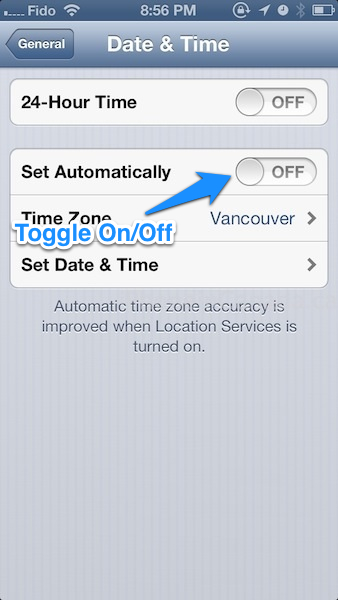
Earlier this evening we revealed how the evasi0n untethered jailbreak was achieved, which involved a vulnerability to do with the time zone in iOS. Let us know if this fix works for you.
Thanks Farid
Update: According to commenter G, here are steps to fix this issue:
1. Go to Settings > General > Date and Time > Set Automatically > ON
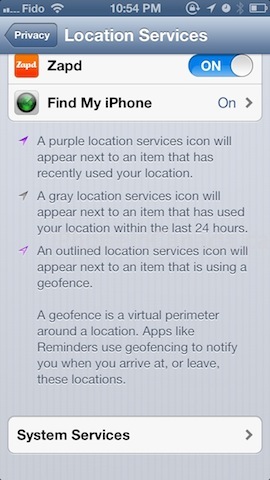
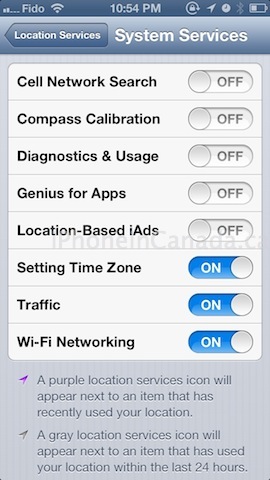
2. Go back to Settings > Privacy > Location Services (make sure it’s on) > scroll to the bottom, System Services > Setting Time Zone > ON
Want to see more of our stories on Google?

P.S. Want to keep this site truly independent? Support us by buying us a beer, treating us to a coffee, or shopping through Amazon here. Links in this post are affiliate links, so we earn a tiny commission at no charge to you. Thanks for supporting independent Canadian media!


Between this problem, the weather problem, and who knows what else is out there, it seems like it makes sense to wait a couple days for them to update the jailbreak and fix the bugs.. Unless you feel like being a beta tester.. I can’t wait to install the jailbreak, but I don’t want to spend hours figuring out bugs and frustration.. I’m looking forward to an update if there is one, or bug fixes for anything that goes wrong.
I did everything at 9am this morning, and I’ve been lucky and ran into no problems all day.
IMO, none of these are that big of an issue that would take “hours figuring out bugs and frustration”
You need to do 2 things to fix this issue:
1. go to settings > than general > date and time > set it to automatically on
2. Go back to settings > than Privacy > than location services (make sure it’s on) > than scroll to bottom and choose system services > turn On “setting time zone”
Awesome thanks for the extra tip. Updated and added to the post.
Hey Gary, just wanted to say awesome site and keep up the great work. I check this site 2 or 3 times a day, my go to site for iOS news. Been following for 3 years, since the iPhone 4 launch. Thanks to this site I was able to get the iPhone 4 on launch day at oak ridge mall.
I followed all the steps and still nothing! HELP 🙁 I already restored TWICE and restarted the phone multiple times…
Was the default setting ON for “Setting Time Zone?”
I think I might of turned it off before to save battery life back in like September.
No weather issue. Cydia back up. Didn’t have time zone issue. Settings crashes when first open. Then ok on next try. I think that’s an intelliscreenX issue though. So so good
No issues with the time but for those having issues with the weather app, do not apply the untethered update in cydia. I applied it the first time and the weather app wouldn’t open. I did a full restore, re jb’d and didn’t apply the update and no issues.
nvm…now the app doesn’t open…
When my alarm goes off and I hit the volume button to snooze, it no long works like it used to. I have SBSettings, Springflash and Activator. Does anybody else have this problem like I do?
I found if you didn’t have location services on & just turned it on the time issue resolved itself without having to go through all those steps.
1. Set time manually
2. Do the hard reset of iPhone (Home+power)
3. Go back to day and time turn on and off “Set automatically”
4. Bam you have your time zone