
You Can Now Jailbreak iOS 16.4.1 with Palera1n 2.0.0 Beta 6
Codenamed Bakepale, the latest v2.0.0 beta 6 update to jailbreak tool Palera1n has just been released, which fully supports iOS 16.4 - iOS 16.4.1 jailbreak.
While Pod2g says there is a lack of innovation on Apple’s side when it comes to the new features introduced with iOS 6, the jailbreak community seems to be far more responsive to user demand and jailbreak tweaks, and ideas are growing alongside iOS itself. So, in case you have spent 15 minutes of your day drinking coffee and jailbreaking your iDevice using evasi0n (maybe with the help of our tutorials) here are the top ten tweaks you’ll enjoy.
Stride ($2.99)
In case you envy Android users who can unlock their device with a gesture, there is an app for that called Stride. And yes, it is available in the Cydia store. Update: Still waiting for iOS 6.1 support.
Dashboard
For those who have missed live widgets, here is a jailbreak app you’ll enjoy: Dashboard. Once installed, you can start adding custom widgets that float next to app icons on your iDevice’s Home screen.
Battsaver ($2.99)
Yes, battery life isn’t just your main issue, it’s everybody’s. Fortunately, there is an app for that one as well: BattSaver regulates the way you use your iDevice. It uses several different strategies to preserve battery life by following your usage pattern and turning parts of you iPhone off when you don’t need them, and on again when you do.
MapsOpener (free)
With Apple Maps rivaling Google Maps, MapsOpener comes into the picture to help you make GMaps your default iOS maps app.
iFile ($4.00)
This app is one of the key apps for every power user. It’s like bringing the Mac OS X Finder to iOS or Explorer for Windows.
Messages+ ($7.99) (or BiteSMS)
If you want to compose an SMS to anyone from any app, or reply to a message without closing the app you are using, Messages+ is the app for you.
Auxo ($1.99)
With your iDevice capable of multitasking, switching between apps is easy, but iOS displays a row of icons. Auxo re-imagines the switcher in the way that Apple should do with iOS 7.
Emblem ($1.99)
This jailbreak tweak is iPad-only and allows you to interact more intuitively with notifications. Notifications will appear as banners on the right side of the screen like they do in Mountain Lion.
Winterboard (free)
If you want to customize the overall look of the lock screen and home screen, there is no better way to do it than with Winterboard. There are tons of awesome pre-made themes available through Cydia, so take your time and pick up one that suits you if you don’t feel like preparing one yourself.
SBSettings (free)
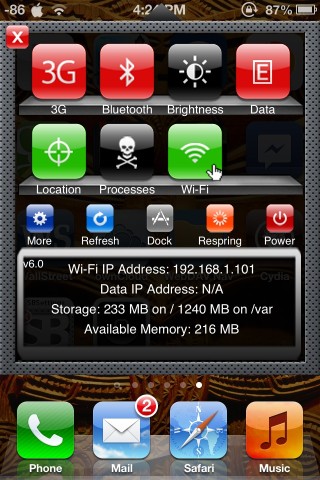
If Auxo isn’t your thing, then you can always go back to one of the most popular jailbreak tweaks of all time–SBSettings. This tweak allows you to quickly toggle various iOS system settings such as Bluetooth, WiFi, brightness, 3G, EDGE, Airplane Mode, etc. Just swipe the top bar of your screen or see toggles within Notification Center.
Want to see more of our stories on Google?

P.S. Want to keep this site truly independent? Support us by buying us a beer, treating us to a coffee, or shopping through Amazon here. Links in this post are affiliate links, so we earn a tiny commission at no charge to you. Thanks for supporting independent Canadian media!


Auxo is a much nicer app switcher IMO than Swithcy
merge doesn’t even work with ios 6
Right. I’ll update the list accordingly. Thanks!
SBSettings is not part of the list, is it because it’s not compatible yet with 6.1 – even though you have it as the image above?
Sbsettings working fine on 6.1
Installed SBSettings this morning on 6.1 when I jailbroke my iPhone 5, seems to work fine.
SBSettings works now. Thanks
It would be nice to have screenshots to go along with the titles.
Downloaded SBSetting but airplane toggle is missing. Is any one experiencing the same problem?
Airplane toggle is available, you can download it if not already there by default. Make sure you turn the toggle on under “More”
Yes
Anyway to turn on Edge Network via SBSetting on the iPhone 5. Reason is to conserve more battery since I don’t need 3G 90% of the time. 3G standby drains a lot more battery then Edge network.
Downloaded the Edge Toggle for SBSetting but it keeps crashing. Any other solution?
Thanks.
are you sure you’re on Rogers/Fido?
They’re the only carriers that support 2G (EDGE) over GSM.
That might be your issue
Yes. I’m with Fido. So I would like to use the 2G (Edge) network on my iPhone to conserve battery.
personally went with androidlock XT not stride (dont think it’s even supported on iphone 5?)
stride is not compatible with iphone 5 evasi0n jb
ya it is…
has been since the first day
Switchy says the product is not currently certified to be compatible with your device. Did the author bother to check any of these tweaks to see what will & won’t work on evasion or iOS 6.1? Sure doesn’t appear to be the case (Stride=FAIL).
You could try Auxo instead.
Yes I could……& you could also verify things are compatible with the current iOS or Evasion jb before you post. Very bush league on your part.
Hey guys, I’m a noob lol, I used the AndroidlockXT tweak, but is there something available to get rid of the “slide to unlock” thing? Any recommendations are appreciated!
Thanks
In androidlockxt you have to change apearance –> minimize –> No
thank you!!!
Gary I have to agree, you should be more strict with your authors. This post is very sloppy. Multiple tweaks aren’t compatible, iphone had built in tethering (in Canada anyways), and dashboard is some shitty tweak for iPad. I think he means Dashboard X which is the best widgets app IMO.
This is just riddled with errors. Please fix. Also, add the price for apps which you usually do for all other post like this.
The lack of biteSMS on the list is disheartening to say the least.