
Microsoft 365 Support to End on Older Macs and iPhones Starting in July
Microsoft is ending core support of Microsoft 365, Office 2019, and Office 2021 on older Macs and iPhones, starting July 13th.
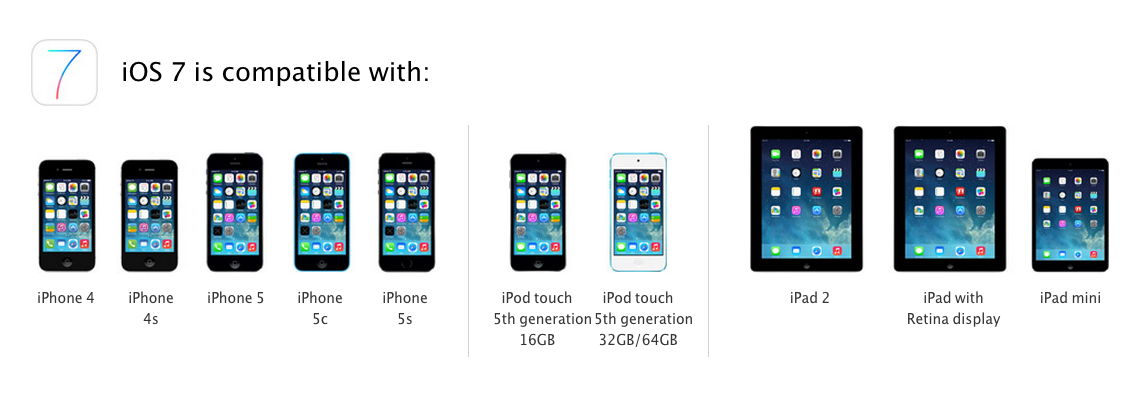
Apple has released iOS 7 for download as an over the air update on the following iOS devices:
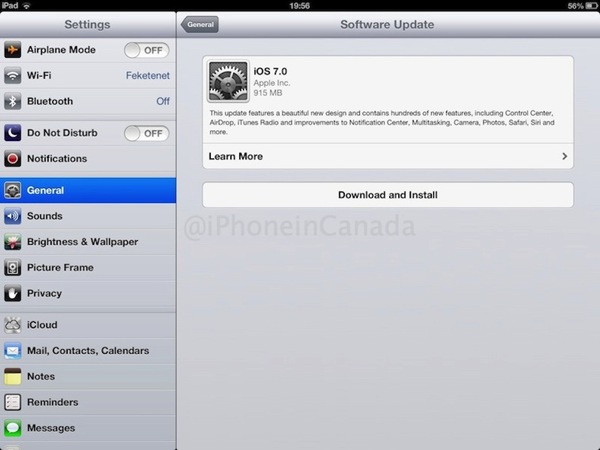
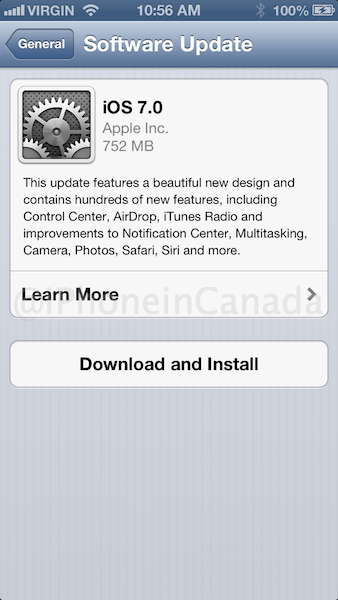 Image via @bradhams
Our advice is to do an iCloud backup or iTunes backup before you hit update.
How to update to iOS 7? Go to Settings > General > Software Update and it will appear. You will be required to plugged into power and also on Wi-Fi. Let us know how your update goes!
Update: Get direct download links for iTunes right here.
…more to follow
Want to see more of our stories on Google?

P.S. Want to keep this site truly independent? Support us by buying us a beer, treating us to a coffee, or shopping through Amazon here. Links in this post are affiliate links, so we earn a tiny commission at no charge to you. Thanks for supporting independent Canadian media!


its kind stuck not downloading at all.. ; -(
Yup … I even started mine at 12.55EST and its barely moved!
About 21 hours remaining ….lol
Ouch! Mine just dropped to six minutes … Of course the six minutes might end up being sixty minutes!
Software Update Failed – An Error occurred downloading IOS 7.0
Will just keep trying
Also – you 3.1 gig of space to do the update
I have the same issue……
can this be avoided if iTunes is used? The free space requirement that is…
Anyone know if its possible to update to ios7 GM from a beta version? It says my “software is up to date”
You gotta update to the GM from beta via iTunes
When in iTunes, if I click on “Check for Update” it reports 6.1.3 is current version. If I check on my devices (as noted above) it does show the update.
Did you update to itunes 11?
Yes, I updated to the newest iTunes before trying the iOS 7 update. Turns out for the first hour or so you couldn’t update via iTunes but now you can.
Does anyone know how if it’s possible to update with iOS 7 beta 6? All I see is “software is up to date.”
Thanks!
YOU have to restore via iTunes to the final build.
its not working for me aftyer downloading the newer itunes
dafuq? I had 8 minutes left in my download and all of the sudden an error occurred. Anybody else have this problem?
Mine went super-fast (17 minutes) Wow!! very impressed so far!
Apple’s servers are getting so hammered. I can’t even get to the download, “an error has occurred”.
This is probably going to be the largest, most downloaded mobile OS update ever rolled out.
Keep trying, I just got mine to work second try.
After checking for updates on iTunes over and over, it finally shows that 7.0 is available for download!
I’ve tried 2 times and the “error has occurred” message popped up both times at around 13 min remaining….. On my 3rd try now….
Tried about 7 times, most of the time it would kick me out with the error message of a failed upload. Tried powering off the phone twice with no luck. Currently seems to be getting the update (20min loading as of now) and the only thing different I did was open up the “Learn More” tab immediately after accepting the agreement…probably nothing to do with it, but hey, just passing on what I did (am doing!)
It’s the servers getting hammered.
I have an iPhone 4 which I know is compatible but iTunes is saying the latest version is the 6.1.3… i’m not seeing iOS 7 update at all :/
Make sure iTunes is up to date.
updated 30 minutes ago, loving it
Initial impression of iOS 7? Horrid. Too bright and too washed out at the same time. I hate all the white and grey – hard on my eyes.
Also – folders are VERY ugly. That grey background is awful.
You seem surprised by the update … It’s the same thing we’ve already seen since the announcement six months ago … The folder background is actually a Gaussian blur so the colour will differ depending on your background.
I’ve seen the screenshots – but not tinkered with the actual iOS until today. The use of white and light grey is everywhere. It is horrid. An example – using the camera – take a photo, then preview/select the photo you’ve taken .. photo thumbnails display against a white background at the top of the screen, with airdrop and sharing options displayed below. The white is so overwhelming that it washes everything out .. makes it tough to focus on the photo thumbnails. This paradigm is used everywhere – its awful and hard on my eyes.
There is a lot of white and in some case it can be a bit intrusive … Perhaps the next update will address this … Plus I still hate the safari icon ….
I also hate the Safari icon in iOS7. Only one worse is the “stocks” icon. To top it all off – the battery life is noticeably degraded. I’ve spent the evening turning off various functions (location services, etc) to try to recoup battery longevity. On the surface this new OS is pretty – but under the covers – it’s an ugly duckling. Jonny Ives should stick with hardware design.
I’m surprised you are actually updating, considering the amount of changes and Jailbreak tweaks implemented. If I recall, you were completely opposed to any change. Looks like Apple actually listens to the Jailbreak community – not so insignificant after all, eh?
There are some great enhancements in this iOS. I was never opposed to change, I am opposed to the notion that Apple must change for the sake of change. The jailbreak community has lots of great tweaks, but at the same time they have a lot of bad ones too so that’s a moot point.
There was absolutely no reason for Apple to change over to a light pastel colored theme. Also no reason to implement any Jailbreak tweaks. 99% of iOS users as you had mentioned in a previous comment, could care less. Yet here we are today, with a cosmetic makeover, and major JB tweaks implemented. Change, for the sake of change is what we have.
And my stance hasn’t changed. I don’t like change for the sake of change. Be that as it may, I’m not going to hold back from new enhancements for the sake of a stance. If you want to call me a hypocrite by all means you’re entitled to do so, I’m not sure what that accomplishes but I can ensure you it doesn’t bother me in the slightest.
You are right! Awful….white white white
Email… Blue letters on white…near unreadable
Calculator …skinny white numerals on black background
Keyboard….white on white practically
Folders….washed out grey
Who designed this? Nothing wrong with my vision…..haven’t these apple folks heard of CONTRAST in the visual field?
Wish I had never downloaded Ios7.
I sure like a lot of the new features on iOS 7.
I sure hate the look of iOS 7
They need to offer the old look. This is far too primary school meets cartoon for me.
Yeah I would be awesome if they offered some different themes. Even better would be if they allowed third party themes through the App Store.
Will you not need the 3 GB of free space if done through iTunes on PC?
I’d like to because I like the sound of a lot of the new features, but every time I see it, I get turned off of it. It’s just so non-Apple like. I think the new design is really unbalanced and unpolished. It just seems ugly to me.
If your not to happy about it, Fragil1ty64 must be crapping his pants right fearing the upgrade.
Tried multiple times via software update on the device (both iPhone 5 and iPad Mini), couldn’t get it to work. Software Update Unavailable error message. Thought I’d give it a shot via iTunes, worked first time for the iPhone, trying the iPad mini now. Just an FYI to try if you are still having issues.
my brothers 4S installed but the phone wont activate
I had the ios 7 GM installed (without developer account). I tried doing a restore and hit the activation error. Now I cannot downgrade to ios 6.1.4 for some reason (I get a wrong ios version error through iTunes 11.1).. I’m stuck, can anyone help? I also went to one of those websites to register my udid and waiting for that but any other solutions, please let me know!!!
ditto I have been waiting 5 hours to activate after update, spoke to apple and they said they were not aware of any problems with activation – is this possible I am the only person unable to activate my previously activate iphone 5?
Too bright! Needs a darker theme!
I’ve been using iOS 7 since the beginning and there have been major overhauls and revamping since the inception. It does take a lot to get use to it but once you do, it’s awesome. The look, the feel and the stability. Keep in mind that it was Jonny Ive who created the skeuomorphism look and feel on all the apps prior. He’s no longer there so they had to re-create everything.
You meant Scott Forstall right?
Am updating to iOS 7 with my iPad 3 (With retina display of course) and it says I have 75 minutes remaining. Download appears to be going well, will post back here if everything is successful (Had to stop a torrent download to allocate more bandwidth).
It would be nice if the frigin’ thing would just download! Multiple error messages with every download attempt, I guess I have to give on this one for a while arrghhhh
Why don’t you try updating through iTunes? Note, your iTunes must be updated to 11.1 in order to download the iOS 7 update… if you’re looking on how to do this (Considering your iTunes update may not be downloading natively then there’s a certain direction I can point you too) Check out this forum; https://discussions.apple.com/message/23014882#23014882 to find the link to the update (I assume you’re running this on a Mac, if not, I can’t help you there).
Download was successful! Install as well! Everything looks extremely modern and very well organized, I especially like smooth it feels, as opposed to iOS 6. Keep up the good work Apple! I can only hope OS X Mavericks will feel just as smooth and modern.
Updated with no problem, but now my iphone 5 is randomly frozen and rebooting. Cannot even shutdown unless using hard reset when it is frozen.
Wonder why iOS doesn’t have more customization that it has. On the wrong background image, text is not readable. Can’t change background colors. Can’t resize icons in folders,
Can’t have a dynamic hoem screen like the S brand…
I’m still getting an mini though 😉
The new iconography aside (which is starting to grow on me), the problem is connecting to visual voicemail on Fido.
Fido has been no help; first tech tried to tell me iOS7 was an Android issue (lol), second tech said there was nothing wrong with them (Fido) and I might consider upgrading my phone, and the third tech finally admitted yes there is a problem and that an update is expected in the next day or so.
I started the newest upload this morning at its now frozen……..
upload should be SOFTWARD UPDATE
i GOT 2ND IPOD TOUCH AND IT SAID I NEED TO DOWNLOAD BUT I NOT SEE IT ANY