Gemini Notebook Now Has Hundreds of Free Textbooks for Students
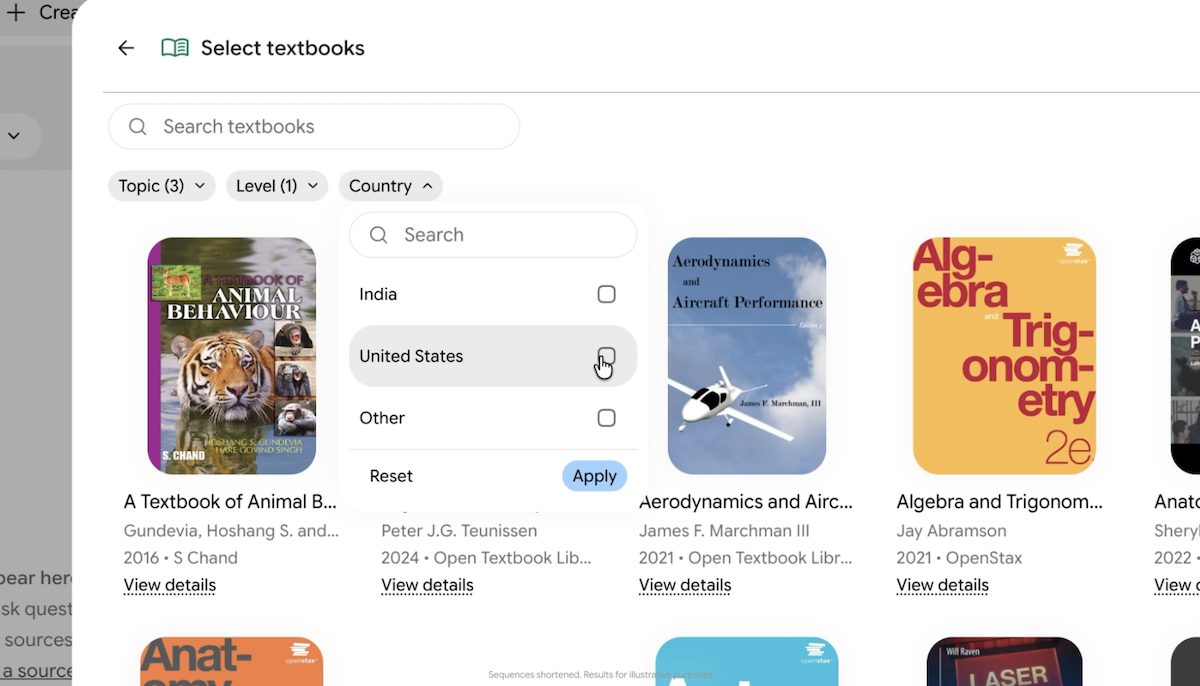
Google is adding hundreds of free textbooks from major publishers directly into Gemini Notebook to help students get verified answers.
Google is rolling out a major update to the Gemini app that allows users to generate, preview, and edit documents, spreadsheets, and PDFs directly in chat. Users are no longer required to copy and paste text back and forth between a chat window and an external document.

The new capability lets users handle a wide range of file formats right inside their chat sessions. Whether you are working with Google Docs, Google Sheets, slide presentations, Markdown files, plain text documents, or computer code, Gemini now supports direct file management.
For those working with PDFs, the feature works seamlessly across both web browsers and mobile devices, while other formats are currently supported on the web version.
One of the standout features of this update is the ability to expand documents into a full-screen view. This lets users type edits manually just like they would in a traditional word processor. If you want the AI to make changes instead, you can simply highlight specific sections of text to ask targeted questions, or ask Gemini to refine visuals and content on the fly.
To demonstrate how it works, Google pointed to practical everyday tasks, such as uploading handwritten lecture notes and asking Gemini to turn them into a clean PDF study guide. Once generated, users can immediately review the file, highlight tricky paragraphs to ask for clarification, or manually tweak the wording without ever leaving the app.
This update follows a string of recent enhancements aimed at making Gemini a more practical productivity hub for everyday tasks, small business owners, and students.
The new file generation, preview, and editing tools are rolling out globally to all users, supporting every language where the Gemini app is currently available.
Want to see more of our stories on Google?

P.S. Want to keep this site truly independent? Support us by buying us a beer, treating us to a coffee, or shopping through Amazon here. Links in this post are affiliate links, so we earn a tiny commission at no charge to you. Thanks for supporting independent Canadian media!